Line chart in a table
A line chart shows how a measure changes over time. This template draws one in every row of a table. For example, for each product, it shows the number of orders per month.
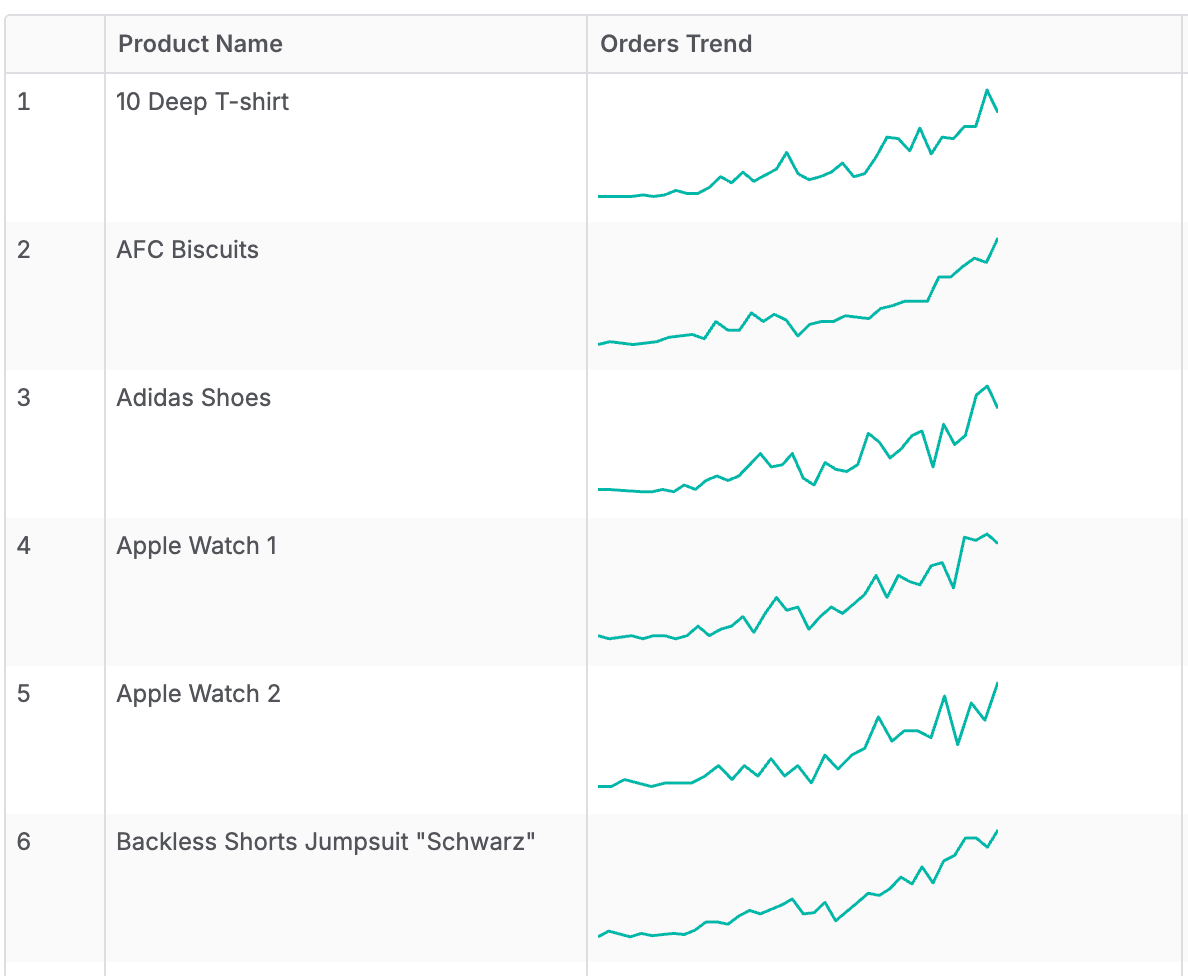
Add the function library and import it into your dataset first. See SVG charts in tables.
Add the metric
Call SVG.Viz.Line from a metric of type text, and wrap it in SVG.Html.Box to fix the size in the cell.
metric orders_trend {
  label: 'Orders Trend'
  type: 'text'
  definition: @aql
    SVG.Html.Box(
      200, 60,
      SVG.Viz.Line(
        orders,
        orders.created_at | month(),
        count(orders.id),
        null,
        200,
        60
      )
    )
  ;;
}
Parameters
SVG.Viz.Line
SVG.Viz.Line takes these parameters in order.
| Parameter | Type | What it is |
|---|---|---|
pAxisModel | model | The model the time dimension belongs to, such as orders. |
pAxisRef | dimension | A date or datetime dimension, one point per value, such as orders.created_at | month(). |
pMeasureRef | number | The measure to plot, such as count(orders.id). |
pColor | text | Line color. null uses #01B8AA. |
pWidth | number | Width of the chart's drawing grid. Sets the proportions, not the display size. null uses 120. |
pHeight | number | Height of the chart's drawing grid. Sets the proportions, not the display size. null uses 48. |
SVG.Html.Box
SVG.Html.Box sets how big the chart looks in the table cell. Without it, the chart stretches to the full width of the cell.
| Parameter | Type | What it is |
|---|---|---|
pWidth | number | Display width in pixels. |
pHeight | number | Display height in pixels. |
pContents | text | The chart to show, such as the result of SVG.Viz.Line. |
The chart scales to fit this box and keeps its proportions. Use the same width-to-height ratio as the chart's pWidth and pHeight, or the chart leaves empty space around it.
Use it in a table
Put the metric next to the dimension you want a row for. Don't add the time dimension to the table: the chart draws the periods inside each cell.
explore {
  dimensions {
    product_name: products.name
  }
  measures {
    orders_trend: orders_trend
  }
}
How to read it
- Each point is one period of
pAxisRef, from left to right in time order. Points are spaced by date, so a gap in the data shows as a longer segment. - Periods with no value are skipped.
- The vertical scale starts at 0, or at the lowest value if it is negative, and ends at the highest value of the row.
- Each row has its own scale, so compare the shape of the lines, not their height.
- A row with only one period shows a single dot.