AI billing
Holistics AI features run on Holistics-managed AI models by default. That usage is billed through AI credits, a prepaid balance your account draws from as your team uses AI.
You have two ways to pay for AI:
- Use Holistics-managed models: usage is deducted from your AI credits. Many plans include free monthly credits, and you can buy more whenever you need them.
- Bring your own key (BYOK): connect your own OpenAI, Anthropic, or Gemini account through Bring Your Own LLM. Your provider bills you directly for that usage. See how the options compare.
How AI credits work
AI credits work like a prepaid dollar balance: 1 credit equals US$1, and each AI request draws down your balance based on the tokens it uses.
AI credits are always priced and billed in USD, regardless of which data center your account is on. This includes APAC and EU accounts, whose subscriptions are billed in SGD or EUR. Your account holds two kinds of credits:
- Free monthly credits: included with eligible plans. They're used first, reset on your billing date each month, and unused credits don't roll over.
- Paid credits: credits you buy in advance. They're used once your free monthly credits run out, and each top-up expires 12 months after the date you buy it.
Holistics may also add one-time credits to your account, for example as part of a promotion. These show up in your transaction history.
How usage is charged
Each AI request is charged based on the model it runs on and the number of tokens it processes. Longer conversations, larger datasets, and more complex questions use more tokens, so they cost more.
Admins can see the current rate for each model under Billing & Usage → AI Billing, shown in USD per 1 million tokens.
Holistics-managed models vs. BYOK vs. MCP
Your setup decides who bills you for AI usage and at what price.
-
Holistics-managed models: Holistics bills you from your AI credits, at Holistics-managed model pricing: the per-model rate on the AI Billing page, with free monthly credits on eligible plans.
-
BYOK: your AI provider bills you directly, at its own rate.
-
MCP: your own AI agent (such as Claude) connects to Holistics through the MCP server and does most of the reasoning, which offloads usage from Holistics AI. Your agent's provider bills you for the agent's work. Some tasks still run on Holistics AI, such as searching Holistics docs, writing AQL (
generate_aql), and writing visualizations (generate_viz). How those are billed depends on the models you've set up in AI models: Holistics-managed models, billed from your AI credits, or BYOK, billed by your provider. If you use the Holistics skills plugins, you can also have your agent write AQL and visualizations itself. See Choose who writes AQL and visualizations.
View your AI billing details
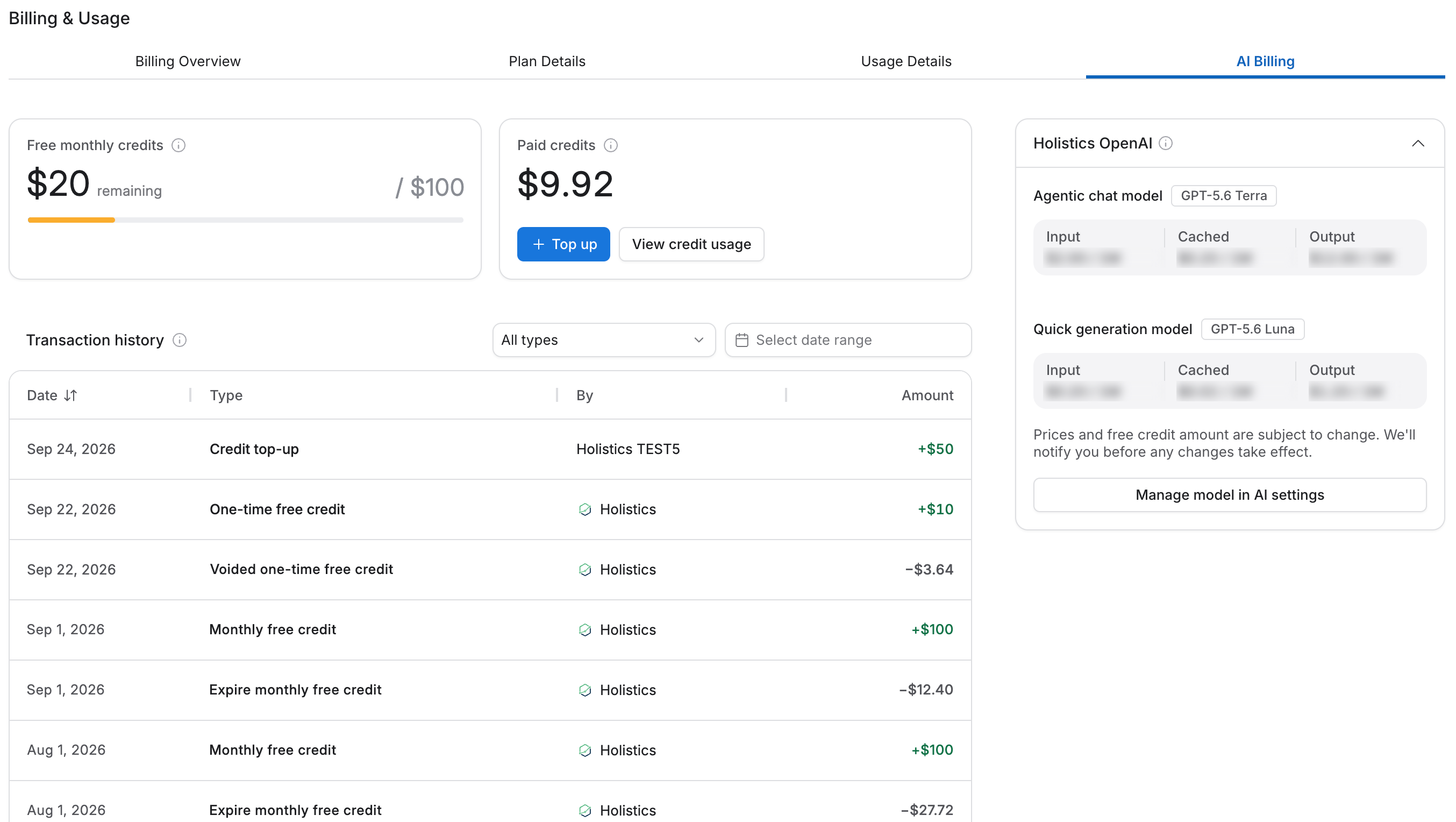
The Billing & Usage → AI Billing page is available to admins. It shows:
- Price list: the current rate for each Holistics-managed model, in USD per 1 million tokens.
- Free monthly credits: this cycle's allowance and how much remains.
- Paid credits: your current paid balance.
- Transaction history: every change to your balances, such as top-ups, monthly free credit grants, and one-time credits from Holistics. Individual AI requests aren't listed here.
For a breakdown of what your AI credits are being spent on, see Cost analytics below.
Cost analytics
The Billing page above tracks your balance and transactions; Cost analytics shows what's actually driving that spend. Go to AI Monitoring → Cost analytics to see chat counts, average cost per chat, and total cost over time.
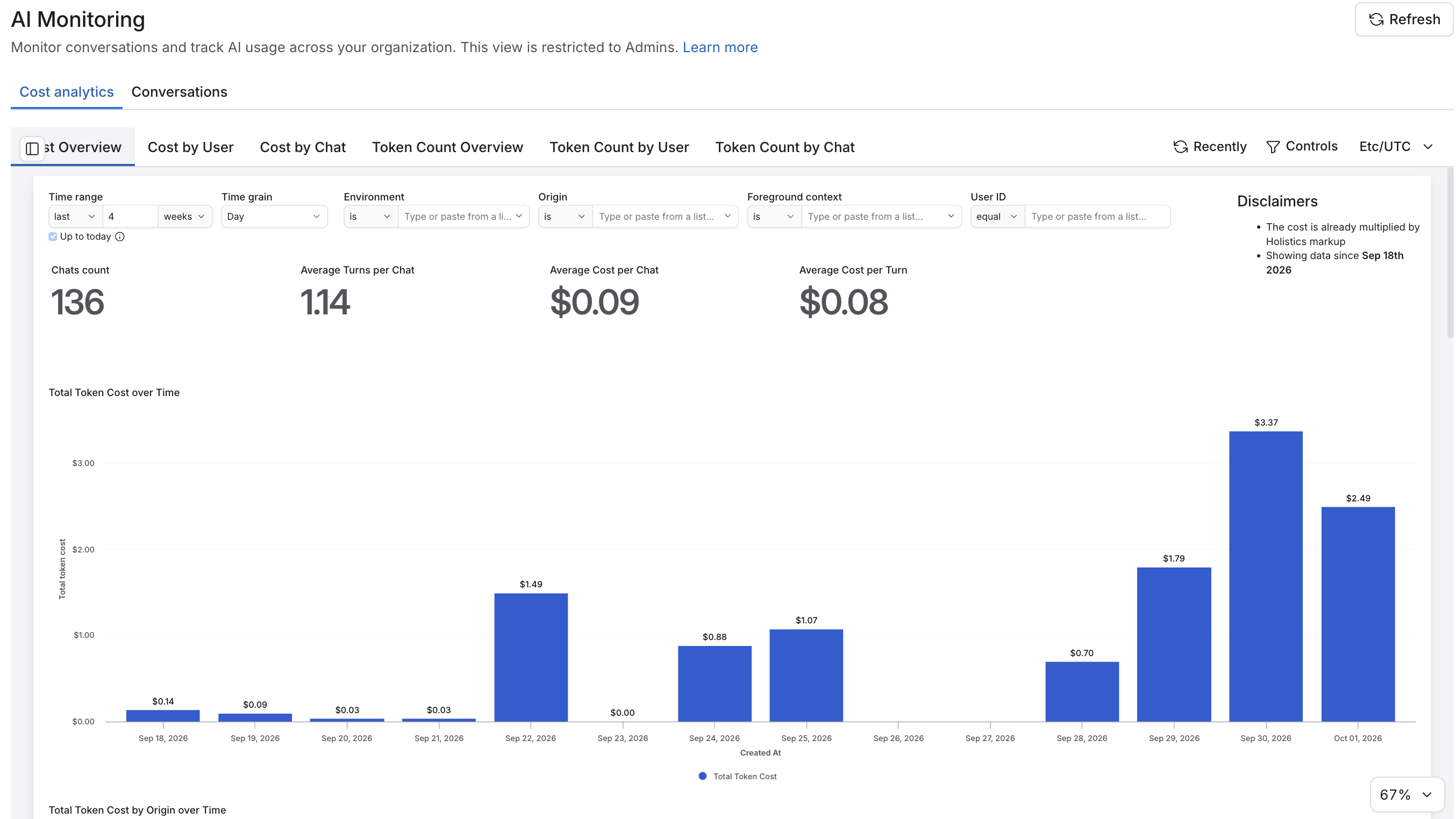
It has six views, split into two groups:
- Cost: Cost Overview, Cost by User, Cost by Chat
- Token Count: Token Count Overview, Token Count by User, Token Count by Chat
Token count includes usage from both Holistics-managed models and BYOK. Cost only covers usage on Holistics-managed models, since BYOK usage is billed by your provider directly.
Pricing and tokenization differ slightly between providers, so if you switch providers, treat these numbers as a close approximation rather than an exact forecast. Cost analytics data is available from September 18, 2026 onward.
In each view, you can see a further breakdown by:
- Time: The time period of the usage.
- Environment: Development or Reporting.
- Origin: which AI feature triggered the cost, for example Chat page (Ask AI in Reporting or Copilot in Development), AI Tasks, AI Block, AI accessed through the MCP server.
- Foreground context: what the user was doing when they used AI, such as viewing a dashboard, editing a dashboard, or exploring a dataset.
- User ID: who used the AI. Only the user ID is shown for now; names and emails are coming soon. To look up who a user ID belongs to, check the Users page.
Control your AI cost
Beyond monitoring spend, you can limit it directly:
- Restrict who can use AI: grant AI access only to specific users or groups. See Who Can Use AI.
- Turn off specific features: disable individual AI features org-wide instead of AI entirely. See Enable AI.
- Move usage off AI credits: switch specific teams or use cases to Bring Your Own LLM, so that usage is billed by your own provider instead of drawing down AI credits.
- Choose who writes AQL and visualizations over MCP: decide whether your agent calls Holistics AI for these tasks or writes them itself. See Choose who writes AQL and visualizations.
Top up AI credits
Admins can buy paid credits anytime from the AI Billing page. Click + Top up, enter an amount in USD, and confirm.
Top-ups are charged to the primary card on your Holistics billing account, and applicable taxes are added on top. If you don't have a card on file, contact [email protected] to top up.
Low-credit notifications
Holistics alerts you in-app and by email when your AI credits are running low and when they run out, so you have time to top up before AI features pause.
When you run out of credits
Holistics AI billing is prepaid, so you'll never receive an open-ended AI bill. When your free and paid credits are used up, AI features running on Holistics-managed models pause until you top up.
To keep using AI without topping up, you can switch to your own provider key at any time. Each request is billed according to the setup that was active when it ran.