How it works: MCP Server
What is MCP Server?
Holistics connects to external tools via its MCP (Model Context Protocol) Server. MCP is an open standard that defines how your tool discovers what Holistics can do, calls those capabilities, and receives results. When your tool connects to Holistics via MCP, it can query datasets, list dashboards, export data, and more.
Why MCP Server?
The MCP Server lets you combine the best of both worlds:
- Holistics brings your governed data — datasets, dashboards, metrics, and AI-powered exploration
- Your AI agent brings its reasoning ability, other connected tools, and the interface your team already uses
The result: your AI tool can answer data questions, build dashboards, and run analytics — all through natural conversation, without switching apps.
Connection details
The Holistics MCP Server uses Streamable HTTP transport. You'll need a connection URL and an authentication method to connect.
Connection URL
Select options to build your connection URL:
App domain
Environment
Connection URL
https://mcp-apac.holistics.io/reporting/mcp
Connection URL
https://mcp-apac.holistics.io/development/mcp
Environment
Connection URL
https://mcp-us.holistics.io/reporting/mcp
Connection URL
https://mcp-us.holistics.io/development/mcp
Environment
Connection URL
https://mcp-eu.holistics.io/reporting/mcp
Connection URL
https://mcp-eu.holistics.io/development/mcp
Connection URL
Please contact [email protected] for your MCP server address.
URL format
https://mcp-<REGION>.holistics.io/<ENV>/mcp
<REGION>: Choose based on your data center:apac,eu, orus<ENV>:reporting(default): Let your AI work with published Holistics objects (i.e. objects on your Holistics Reporting tab)development: Let your AI work with unpublished Holistics objects in your current AMQL project branch (i.e. objects on your Holistics Development tab)
Authentication
Holistics MCP supports two authentication methods.
OAuth (recommended when available)
Your tool redirects you through a standard login flow. You authenticate with your Holistics account, approve access, and your tool handles token refresh automatically — no credential management on your end.
Best when:
- Multiple users connect under their own Holistics identities
- You want per-user access control and audit trails
API Key
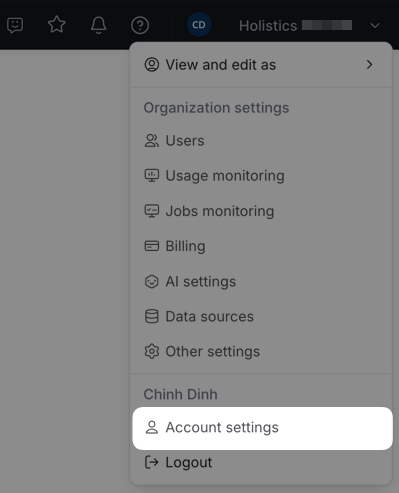
Pass a Holistics API key via the X-Holistics-Key HTTP header. It's long-lived and requires no login flow.
Find your API key under Account Settings in Holistics.
Best when:
- You're running a server-side or automated integration with no user present (e.g. a Slack bot, a custom agent)
- Your tool doesn't support OAuth
Notes: API key requests are attributed to the key owner's account — all users of a shared deployment act as the same Holistics identity. Use OAuth when individual identity matters.
Test your connection
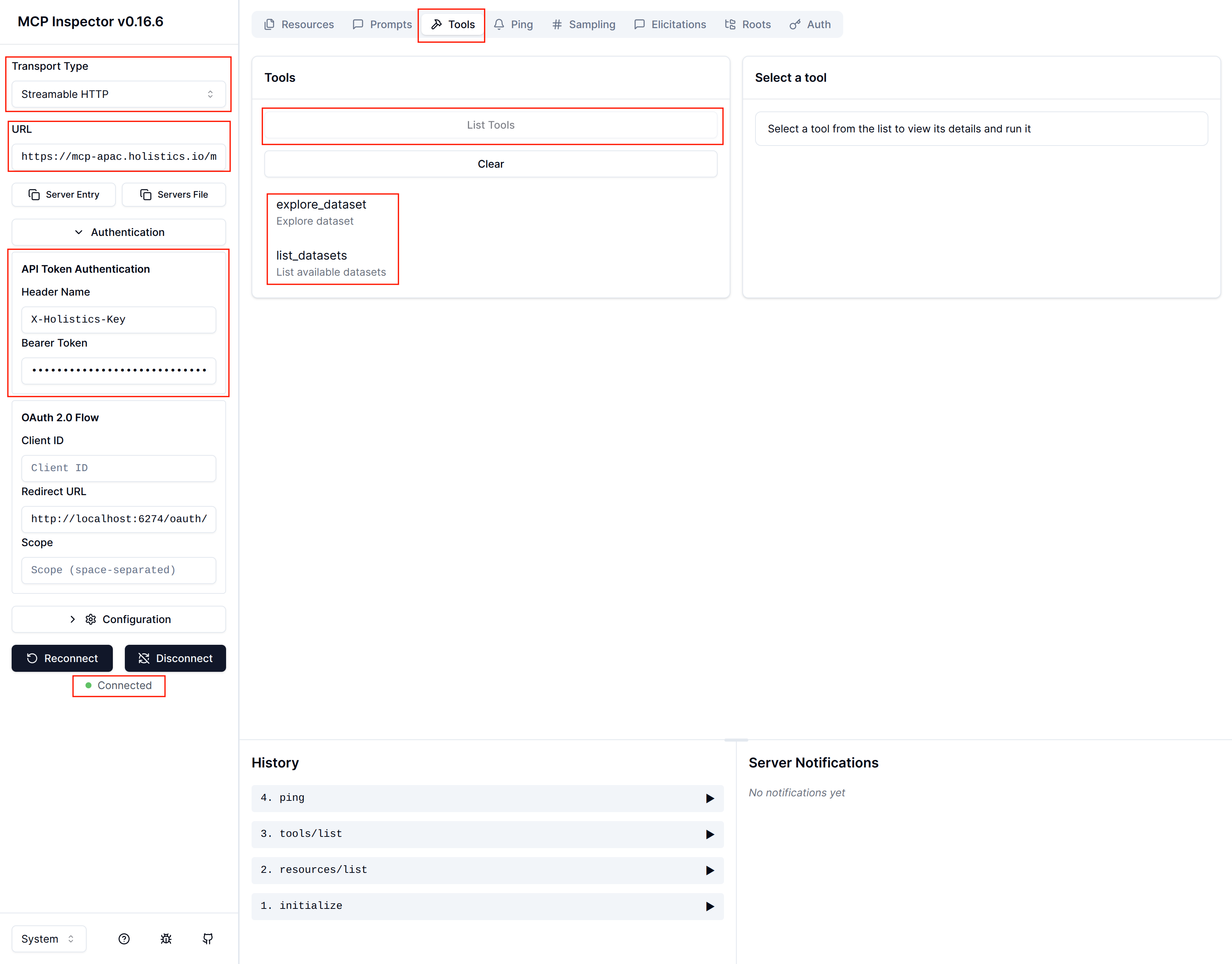
If your AI tool can't connect, use MCP Inspector to test the server directly.
-
Run MCP Inspector in your terminal:
npx @modelcontextprotocol/inspectorIt opens automatically in your browser.
-
Configure the connection:
- Transport Type:
Streamable HTTP - URL: your connection URL from above
- Authentication — choose one:
- OAuth: click Connect and follow the OAuth flow
- API Key: select API Token Authentication, set Header Name to
X-Holistics-Key, enter your API key as the Bearer Token
- Transport Type:
-
Click Connect — you should see "Connected" status.
-
Go to the Tools tab and click List Tools — you should see the available Holistics tools.
If you still can't connect, verify that Holistics AI and MCP Server are enabled in your AI Settings and that your API key is valid (in case you use API).