Claude Code
For coding agents, the recommended setup is the Holistics CLI + Skills workflow rather than a standalone MCP connection. It sets up local AML development, CLI sync, and MCP access together in one step — the full local development experience, not just data Q&A.
Overview
Here's what you'll do to connect Claude Code to Holistics:
- Turn on MCP Server - a one-time step in your Holistics workspace, done by an admin. If it's already on, skip ahead.
- Get your connection URL: choose the environment you want to work with
- Reporting: published Holistics objects - those on the Reporting tab.
- Development: unpublished Holistics objects in your current AMQL project branch - those on the Development tab.
- Choose your connection method:
- CLI command is the quickest way to register the server from your terminal.
- JSON config is useful if you're already managing other MCP servers in a config file.
- Choose your authentication method:
- OAuth logs in with your Holistics account - no key to create or manage.
- API key uses a static key instead, useful for headless or scripted setups.
- Learn more: OAuth vs. API key - which should I use?
Step 1: Turn on MCP Server
This is a one-time setup done by a workspace admin. Go to AI Settings and enable both Holistics AI and the MCP Server.

Step 2: Get your connection URL
Your connection URL depends on your data center region and the Holistics environment you want your AI to work with.
Select your data region
Select your working environment
Let your AI work with published Holistics objects — those on the Reporting tab.
Get your connection url
https://mcp-apac.holistics.io/reporting/mcp
Let your AI work with unpublished Holistics objects in your current AMQL project branch — those on the Development tab.
Get your connection url
https://mcp-apac.holistics.io/development/mcp
Select your working environment
Let your AI work with published Holistics objects — those on the Reporting tab.
Get your connection url
https://mcp-us.holistics.io/reporting/mcp
Let your AI work with unpublished Holistics objects in your current AMQL project branch — those on the Development tab.
Get your connection url
https://mcp-us.holistics.io/development/mcp
Select your working environment
Let your AI work with published Holistics objects — those on the Reporting tab.
Get your connection url
https://mcp-eu.holistics.io/reporting/mcp
Let your AI work with unpublished Holistics objects in your current AMQL project branch — those on the Development tab.
Get your connection url
https://mcp-eu.holistics.io/development/mcp
Get your connection url
Please contact [email protected] for your MCP server address.
URL format
https://mcp-<REGION>.holistics.io/<ENV>/mcp
<REGION>: Choose based on your data center:apac,eu, orus<ENV>:reporting(default): Let your AI work with published Holistics objects (i.e. objects on your Holistics Reporting tab)development: Let your AI work with unpublished Holistics objects in your current AMQL project branch (i.e. objects on your Holistics Development tab)
Step 3: Connect
Claude Code supports two ways to register the Holistics MCP server: CLI command and JSON config. Both support OAuth and API key.
CLI command
OAuth
- Use your connection URL from Step 2 and replace
<MCP_SERVER_ADDRESS>.
claude mcp add holistics-<ENV> <MCP_SERVER_ADDRESS> --transport http
API key
- Use your connection URL from Step 2 and replace
<MCP_SERVER_ADDRESS>. - Obtain your API key:
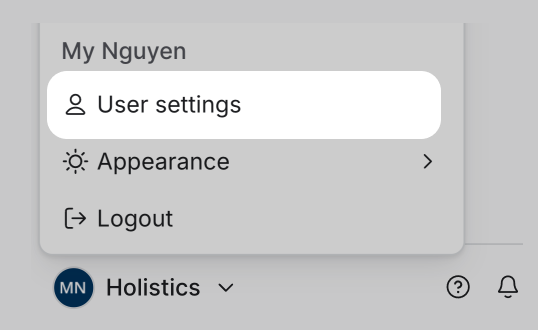
Find your key under profile menu > User settings in Holistics.
- Replace
<YOUR_HOLISTICS_API_KEY>below with it.
claude mcp add holistics-<ENV> <MCP_SERVER_ADDRESS> --transport http --header "X-Holistics-Key:<YOUR_HOLISTICS_API_KEY>"
Note: No spaces between X-Holistics-Key: and your API key.
JSON config
Add to your Claude Code MCP config.
OAuth
- Use your connection URL from Step 2 and replace
<MCP_SERVER_ADDRESS>. Omit theheadersfield — the client handles authentication automatically.
{
  "mcpServers": {
    "holistics": {
      "url": "<MCP_SERVER_ADDRESS>"
    }
  }
}
API key
- Use your connection URL from Step 2 and replace
<MCP_SERVER_ADDRESS> - Use the same API key as obtained above, and replace
<YOUR_HOLISTICS_API_KEY>below with it.
{
  "mcpServers": {
    "holistics": {
      "url": "<MCP_SERVER_ADDRESS>",
      "headers": {
        "X-Holistics-Key": "<YOUR_HOLISTICS_API_KEY>"
      }
    }
  }
}
Need more help?
See the MCP FAQ for questions about permissions, data access, and security.