Custom AI app
If you're building an AI application with the OpenAI API, you can add Holistics as an MCP tool so your app can query data and run analytics as part of its workflow.
Overview
Here's what you'll do to connect your custom AI app to Holistics:
- Turn on MCP Server: A one-time step in your Holistics workspace, done by an admin. If it's already on, skip ahead.
- Get your connection URL: Choose the environment you want to work with:
- Reporting: Published Holistics objects (those on the Reporting tab).
- Development: Unpublished Holistics objects in your current AMQL project branch (those on the Development tab).
- Get your API key: A backend service can't complete an interactive OAuth login, so this uses API key authentication.
- Connect in your app: Include the Holistics MCP server in your tool list when calling the OpenAI Responses API.
Step 1: Turn on MCP Server
This is a one-time setup done by a workspace admin. Go to AI Settings and enable both Holistics AI and the MCP Server.

Step 2: Get your connection URL
Your connection URL depends on your data center region and the Holistics environment you want your AI to work with.
Select your data region
Select your working environment
Let your AI work with published Holistics objects — those on the Reporting tab.
Get your connection url
https://mcp-apac.holistics.io/reporting/mcp
Let your AI work with unpublished Holistics objects in your current AMQL project branch — those on the Development tab.
Get your connection url
https://mcp-apac.holistics.io/development/mcp
Select your working environment
Let your AI work with published Holistics objects — those on the Reporting tab.
Get your connection url
https://mcp-us.holistics.io/reporting/mcp
Let your AI work with unpublished Holistics objects in your current AMQL project branch — those on the Development tab.
Get your connection url
https://mcp-us.holistics.io/development/mcp
Select your working environment
Let your AI work with published Holistics objects — those on the Reporting tab.
Get your connection url
https://mcp-eu.holistics.io/reporting/mcp
Let your AI work with unpublished Holistics objects in your current AMQL project branch — those on the Development tab.
Get your connection url
https://mcp-eu.holistics.io/development/mcp
Get your connection url
Please contact [email protected] for your MCP server address.
URL format
https://mcp-<REGION>.holistics.io/<ENV>/mcp
<REGION>: Choose based on your data center:apac,eu, orus<ENV>:reporting(default): Let your AI work with published Holistics objects (i.e. objects on your Holistics Reporting tab)development: Let your AI work with unpublished Holistics objects in your current AMQL project branch (i.e. objects on your Holistics Development tab)
Step 3: Obtain API key
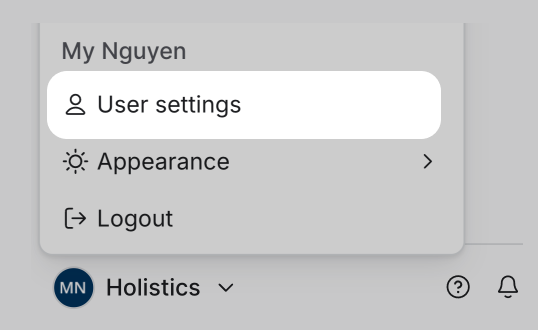
Find your key under profile menu > User settings in Holistics.
Step 4: Connect in your app
Include the Holistics MCP server in your tool list when calling the OpenAI Responses API:
import OpenAI from "openai";
import type { ResponseInput } from 'openai/resources/responses/responses';

const client = new OpenAI({
  apiKey: "<YOUR_OPENAI_KEY>",
});

async function chat(input: ResponseInput) {
  const completion = await client.responses.create({
    model: "gpt-4.1",
    input: input,
    tools: [
      {
        type: "web_search",
      },
      {
        type: "mcp",
        server_label: "holistics_mcp",
        server_url: "<MCP_SERVER_ADDRESS>",
        server_description: "Holistics MCP to access my BI and business data",
        headers: {
          "X-Holistics-Key": "<YOUR_HOLISTICS_API_KEY>",
        },
        require_approval: "never",
      },
    ],
    tool_choice: "auto",
    parallel_tool_calls: true,
  });

  console.log(completion.output_text);
}
Replace <MCP_SERVER_ADDRESS> with your connection URL from Step 2 and <YOUR_HOLISTICS_API_KEY> with your API key from Step 3.
Need more help?
See the MCP FAQ for questions about permissions, data access, and security.