FAQ
Before diving in, one general clarification: MCP is an interface to Holistics features, not a separate system. It must be authenticated by a Holistics user account, and all of Holistics' data policies and access controls apply — whether you're using the UI, the API, or MCP.
Authentication
OAuth vs. API key: which should I use?
Holistics MCP supports two authentication methods. Choose the one that best fits your needs:
| OAuth (recommended) | API key | |
|---|---|---|
| Best for | Individual users connecting under their own Holistics identity | Admins managing keys centrally, or automated workflows |
| Setup complexity | Low (browser login flow) | Medium (manual configuration) |
| Key management | Automatic | Manual |
| User permissions | Uses your Holistics account permissions | Uses the API key owner's permissions |
Permissions
What permissions does MCP have in Holistics?
MCP inherits the permissions of the authenticated Holistics user — no more, no less. This includes data access, row-level permissions, and feature access. It behaves the same as using Holistics through the UI or API.
See how queries are executed for details.
What is the recommended least-privilege setup?
Use OAuth authentication so each user connects under their own Holistics identity. This ensures everyone can only access the data their Holistics account permits — no shared credentials, no elevated access.
Data
What data does MCP return to the AI tool?
MCP can return real query results or metadata depending on your settings. You can control this — sample data and result data can each be turned off independently. Query results are currently capped at 1,000 rows.
Learn more in Data access and policy.
Does MCP store or retain data?
MCP is a protocol, not a storage layer — it doesn't retain data on its own. Your AI tool or agent may retain data locally, but that's outside Holistics. Any data queried through MCP is handled the same way as queries made through the Holistics UI — retrieved and cached within your account's data center.
Which data center does MCP use?
Each Holistics region has its own MCP server. Data is transferred through your account's regional MCP gateway, the same data center your Holistics account uses.
Monitoring
Is there audit logging for MCP queries?
Not yet exposed to users. Holistics currently has internal logging but it isn't directly accessible. If audit logging is important for your use case, reach out at [email protected].
Test and troubleshoot
My AI tool can't connect. How do I test the connection directly?
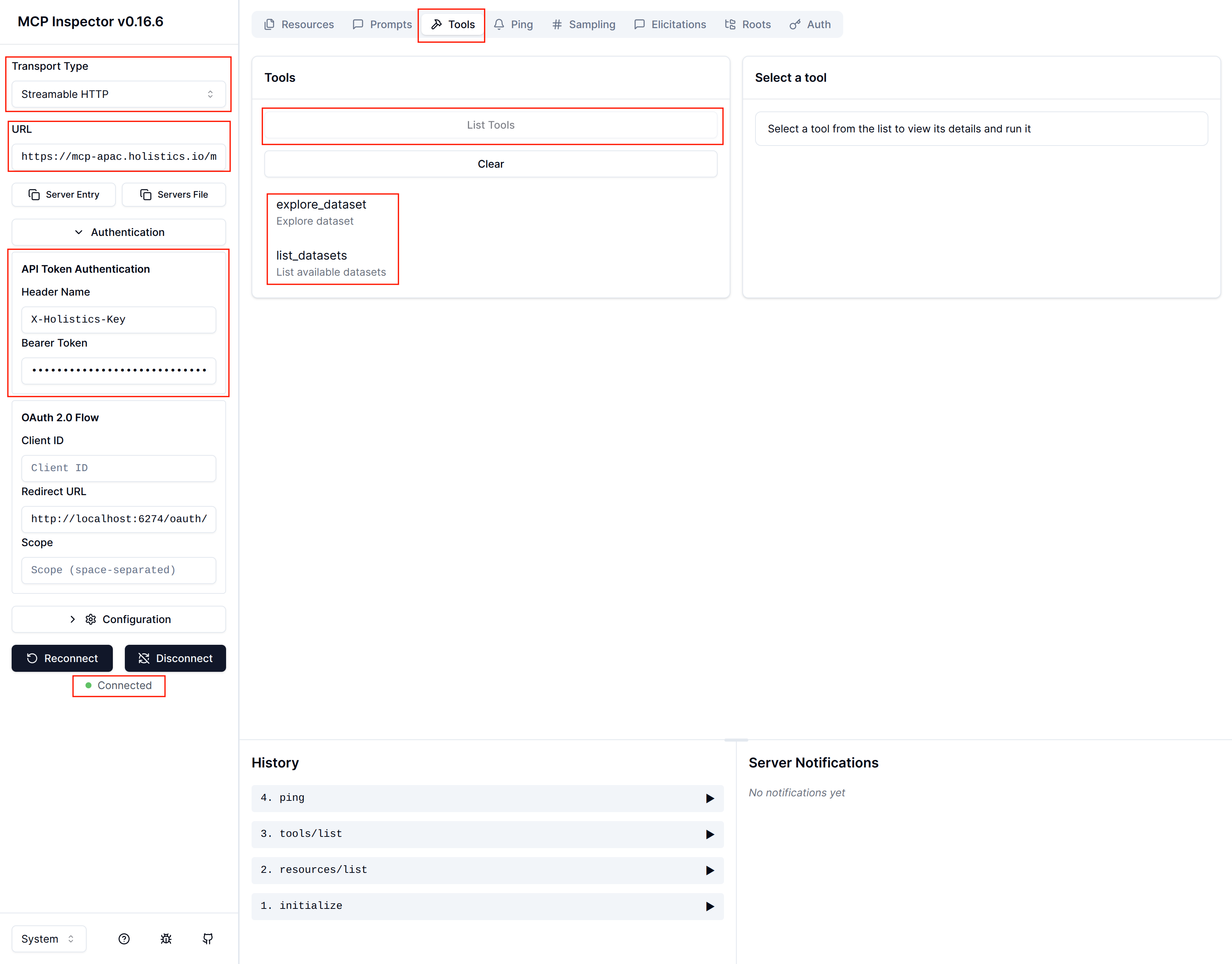
Use MCP Inspector to test the server directly, outside of your AI tool.
-
Run MCP Inspector in your terminal:
npx @modelcontextprotocol/inspectorIt opens automatically in your browser.
-
Configure the connection:
- Transport Type:
Streamable HTTP - URL: your connection URL
- Authentication — choose one:
- OAuth: click Connect and follow the OAuth flow
- API Key: select API Token Authentication, set Header Name to
X-Holistics-Key, enter your API key as the Bearer Token
- Transport Type:
-
Click Connect. You should see "Connected" status.
-
Go to the Tools tab and click List Tools. You should see the available Holistics tools.
If you still can't connect, verify that Holistics AI and MCP Server are enabled in your AI Settings and that your API key is valid (in case you use API).