Redact data for AI
Sometimes you want AI to help with a report without seeing the sensitive parts of it. A support lead can look at customer emails on their dashboard, but you'd rather those emails never leave your warehouse for an AI provider.
Holistics gives your semantic layer a way to tell the two apart. The H.current_user.h_is_ai system user attribute is true only while AI is running a query, so any control that reads user attributes (column-level permission, row-level permission, dynamic data sources) can branch on it and return something different to AI.
When you need this
Holistics AI runs every query as the user who asked, so your existing permission controls already apply, and the default AI provider operates under Zero Data Retention, with training and API logging disabled.
Thus, you only need to use this feature when:
- Your policy won't allow certain values to leave your warehouse at all. Regulated PII, payment details, or data covered by customer contracts, where a retention guarantee isn't the same as never sending it.
- You bring your own AI provider. With your own LLM, retention, logging, and training controls are yours to configure, and a self-hosted or third-party model may not match the defaults above.
Branching on h_is_ai means AI and the user run different queries, which costs extra warehouse time and can make AI's answer disagree with what's on screen. See Caveats before you roll this out widely.
Step 1: Enable the AI user attribute
The attribute is not provided by default. Until you turn it on, AI queries carry exactly the same user attributes as the user who asked.
Go to your tenant name -> Organization settings -> AI settings -> AI user attribute, and turn on Let your semantic layer know when AI is asking.

Step 2: Branch on it in your semantic layer
Now use the attribute wherever you'd normally use a custom user attribute. The example below is column-level permission: the email dimension's SQL definition branches on who's asking, resolving to either the real column or a redacted placeholder.
Model users {
  type: 'table'
  label: 'Users'
  data_source_name: 'demodb'

  dimension id {
    label: 'Id'
    type: 'number'
    definition: @sql {{ #SOURCE.id }};;
  }

  dimension email {
    label: 'Email'
    type: 'text'
    definition:
      if (H.current_user.h_is_ai) {
        @sql 'Redacted for AI';;
      } else {
        @sql {{ #SOURCE.email }};;
      }
  }

  // Other dimensions...

  table_name: 'ecommerce.users'
}
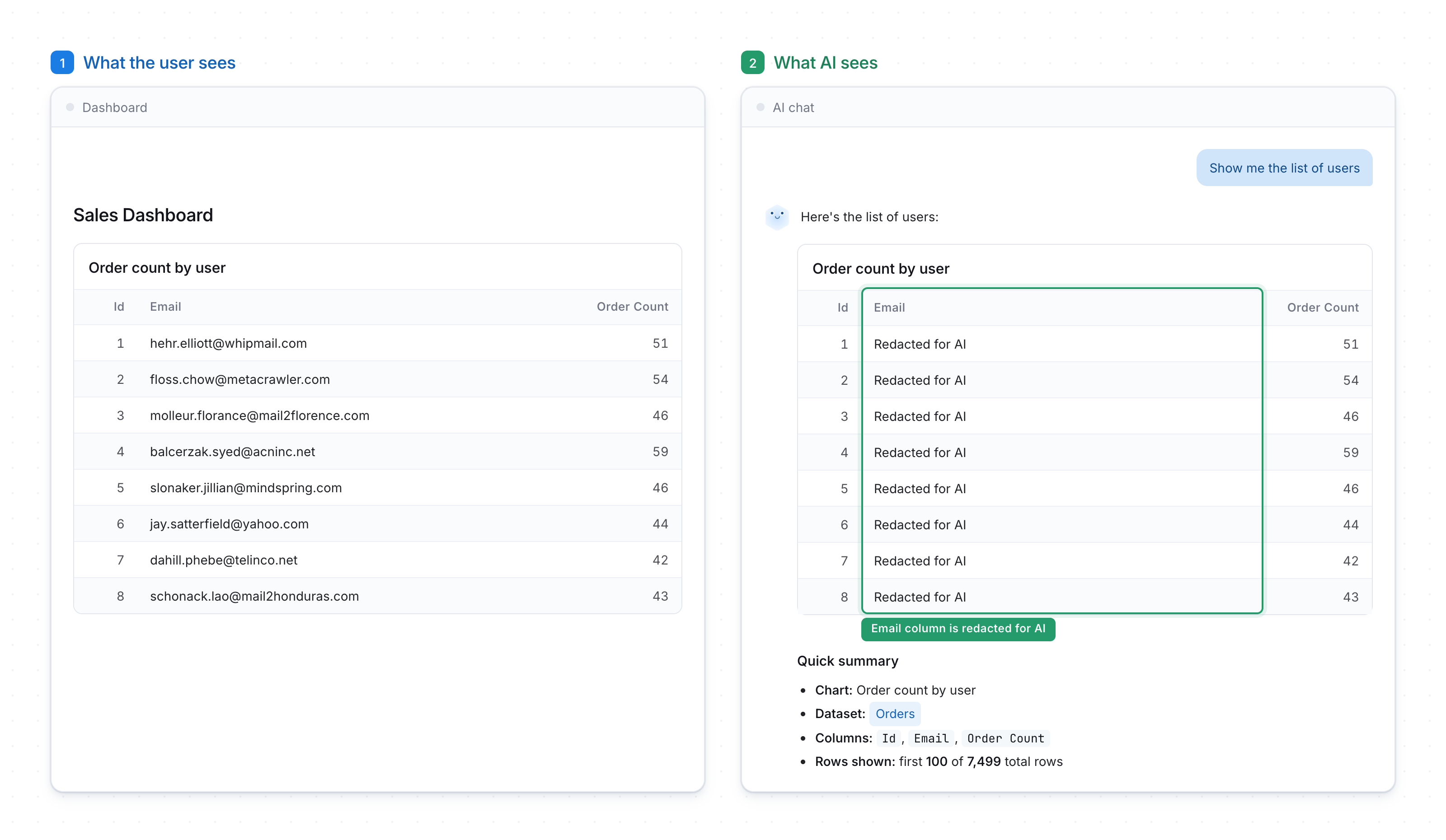
The user still sees real emails in the chart. When AI reads the same chart, the email column comes back as Redacted for AI, so it can still count orders per user (ID) and describe the shape of the data without ever receiving an email address.
Controls you can use it with
Anything that already reads user attributes accepts h_is_ai, so pick the control that matches how much you want to hold back:
- Column-level permission: mask individual sensitive columns while AI keeps working with the rest of the row. This is usually the right starting point.
- Row-level permission and as-code: drop entire rows for AI, for example excluding unreleased products or a restricted region. Use with care around measures: filtering rows out for AI means its totals can disagree with what the user sees. See Caveats.
- Conditional field logic in AQL: define a custom field whose
case()expression returns a masked or bucketed value when AI is asking. - Dynamic data sources: point AI at a sanitized replica of your database instead of production.
- Custom AI context: pair the data-level control with an instruction telling AI which fields are redacted, so it doesn't try to reason about the placeholder values.
Caveats
Serving AI a different result than the user has real costs. Keep the branching narrow and deliberate.
AI can't reuse the user's cache. When a query involves h_is_ai conditional logic, Holistics can't serve AI from the result the user already loaded. AI needs its own warehouse run, which adds cost and wait time to every question about that field.
AI's answer can disagree with the screen. AI is looking at masked or filtered data, so a summary or insight it produces may not match the numbers the user is reading. While this is typically fine for redacted columns, it is riskier for redacted rows. E.g. If you filter rows out for AI, its totals will be wrong from the user's point of view.
FAQs
What happens if my semantic layer uses h_is_ai while the setting is off?
The query raises an error (that the attribute or variable doesn't exist) instead of falling back to a default value. This is intentional. A silent fallback would let a redaction rule stop redacting without anyone noticing, so the error tells your analysts before AI receives the real values.