Box Plot
A box plot summarizes the distribution of quantitative values by visualizing the median, first, and third quartiles in a single chart. Each box shows the interquartile range, the line inside marks the median, and the whiskers reach out to the rest of the spread.
- Good for: comparing distributions across categories, spotting spread and skew, surfacing outliers in a metric.
- Not great for: showing a single total or count per category (use a bar chart), trends over time (use a line chart), or part-to-whole composition (use a pie or treemap chart).
Syntax
Two variants are available, both taking the same two fields and the same show_outliers option:
- Vertical Box Plot: boxes laid out top to bottom (the default orientation).
- Horizontal Box Plot: boxes laid out left to right.
Vertical Box Plot
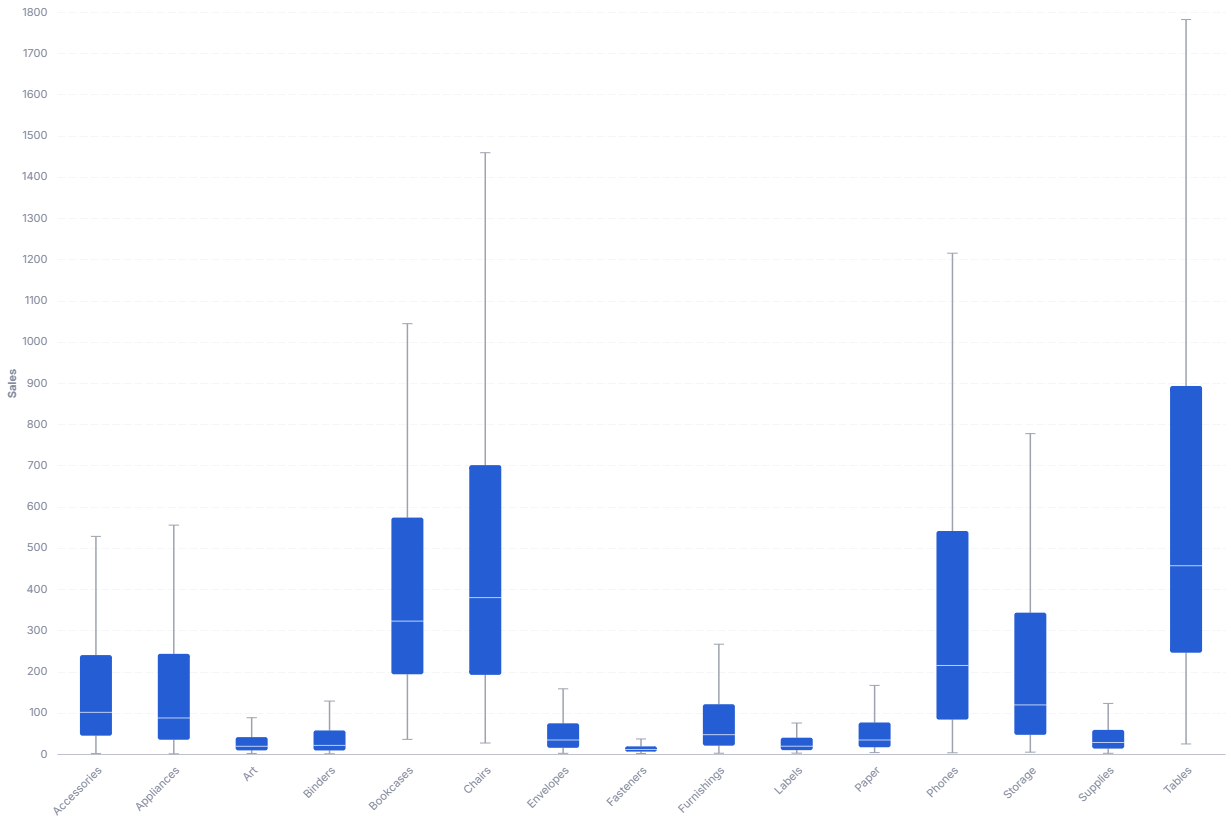
CustomChartDef box_plot {
  label: 'Box Plot'
  icon: 'hicon:chart-boxplot'
  description: 'To summarize the distribution of a quantitative value across categories by showing the median, quartiles, and range.'
  fields {
    field dimension {
      label: 'Dimension'
      type: 'dimension'
      sort {
        apply_order: 1
        direction: 'asc'
      }
    }
    field value {
      label: 'Value'
      type: 'dimension'
      data_type: 'number'
      sort {
        apply_order: 2
        direction: 'asc'
      }
    }
  }

  options {
    option show_outliers {
      type: 'toggle'
      label: 'Show outliers'
      default_value: false
    }
  }

  template: @vgl {
    "data": {
      "values": @{values}
    },
    "encoding": {
      "x": {
        "field": @{fields.dimension.name},
        "type": "nominal"
      }
    },
    "layer": [
      {
        "mark": {
          "type": "boxplot",
          "extent": 1.5,
          "size": 32,
          "outliers": @{options.show_outliers.value},
          "box": {"cornerRadius": 2},
          "median": {"strokeWidth": 2},
          "rule": {"size": 1.5},
          "ticks": {"color": "#9CA3AF", "size": 10},
          "tooltip": true
        },
        "encoding": {
          "y": {
            "field": @{fields.value.name},
            "type": "quantitative",
            "scale": {"zero": false},
            "axis": {"format": @{fields.value.format}, "formatType": "holisticsFormat"}
          },
          "opacity": {
            "condition": [
              {"test": "!length(data('box_hover_store'))", "value": 1},
              {"param": "box_hover", "empty": false, "value": 1}
            ],
            "value": 0.15
          }
        }
      },
      {
        "transform": [
          {
            "aggregate": [
              {"op": "min", "field": @{fields.value.name}, "as": "box_min"},
              {"op": "q1", "field": @{fields.value.name}, "as": "box_q1"},
              {"op": "median", "field": @{fields.value.name}, "as": "box_median"},
              {"op": "q3", "field": @{fields.value.name}, "as": "box_q3"},
              {"op": "max", "field": @{fields.value.name}, "as": "box_max"}
            ],
            "groupby": [@{fields.dimension.name}]
          }
        ],
        "params": [
          {"name": "box_hover", "select": {"type": "point", "fields": [@{fields.dimension.name}], "on": "mouseover", "clear": "mouseout"}},
          {"name": "normalPointSelection", "select": {"type": "point", "fields": [@{fields.dimension.name}], "toggle": "true", "clear": "mouseup"}},
          {"name": "hoverPointSelection", "select": {"type": "point", "fields": [@{fields.dimension.name}], "on": "mouseover", "clear": "mouseout"}}
        ],
        "mark": {"type": "rule", "size": 32, "opacity": 0, "tooltip": true},
        "encoding": {
          "tooltip": [
            {"field": @{fields.dimension.name}, "type": "nominal", "title": "Category"},
            {"field": "box_max", "type": "quantitative", "title": "Max", "format": @{fields.value.format}, "formatType": "holisticsFormat"},
            {"field": "box_q3", "type": "quantitative", "title": "Q3", "format": @{fields.value.format}, "formatType": "holisticsFormat"},
            {"field": "box_median", "type": "quantitative", "title": "Median", "format": @{fields.value.format}, "formatType": "holisticsFormat"},
            {"field": "box_q1", "type": "quantitative", "title": "Q1", "format": @{fields.value.format}, "formatType": "holisticsFormat"},
            {"field": "box_min", "type": "quantitative", "title": "Min", "format": @{fields.value.format}, "formatType": "holisticsFormat"}
          ]
        }
      }
    ],
    "holisticsConfig": {
      "crossFilterSignals": ["normalPointSelection"],
      "contextMenuSignals": ["hoverPointSelection"]
    }
  };;
}
 View on GitHub
Legacy syntax
CustomChart {
  fields {
    field a {
      type: "dimension"
      label: "Categorical field"
    }
    field b {
      type: "dimension"
      label: "Quantitative field"
    }
  }

  options {
    option tooltip {
      type: 'toggle'
      label: 'Show tooltip'
      default_value: true
    }
  }

  template: @vgl {
    "data": {
      "values": @{values}
    },

    "mark": {
      "type": "boxplot",
      "extent": "min-max",
      "tooltip": @{options.tooltip.value}
    },

    "encoding": {
      "x": {
        "field": @{fields.a.name},
        "type": "nominal"
      },

      "color": {
        "field": @{fields.a.name},
        "type": "nominal",
        "legend": null
      },

      "y": {
        "field": @{fields.b.name},
        "type": "quantitative",
        "scale": {"zero": false}
      }
    }
  };;
}
Horizontal Box Plot
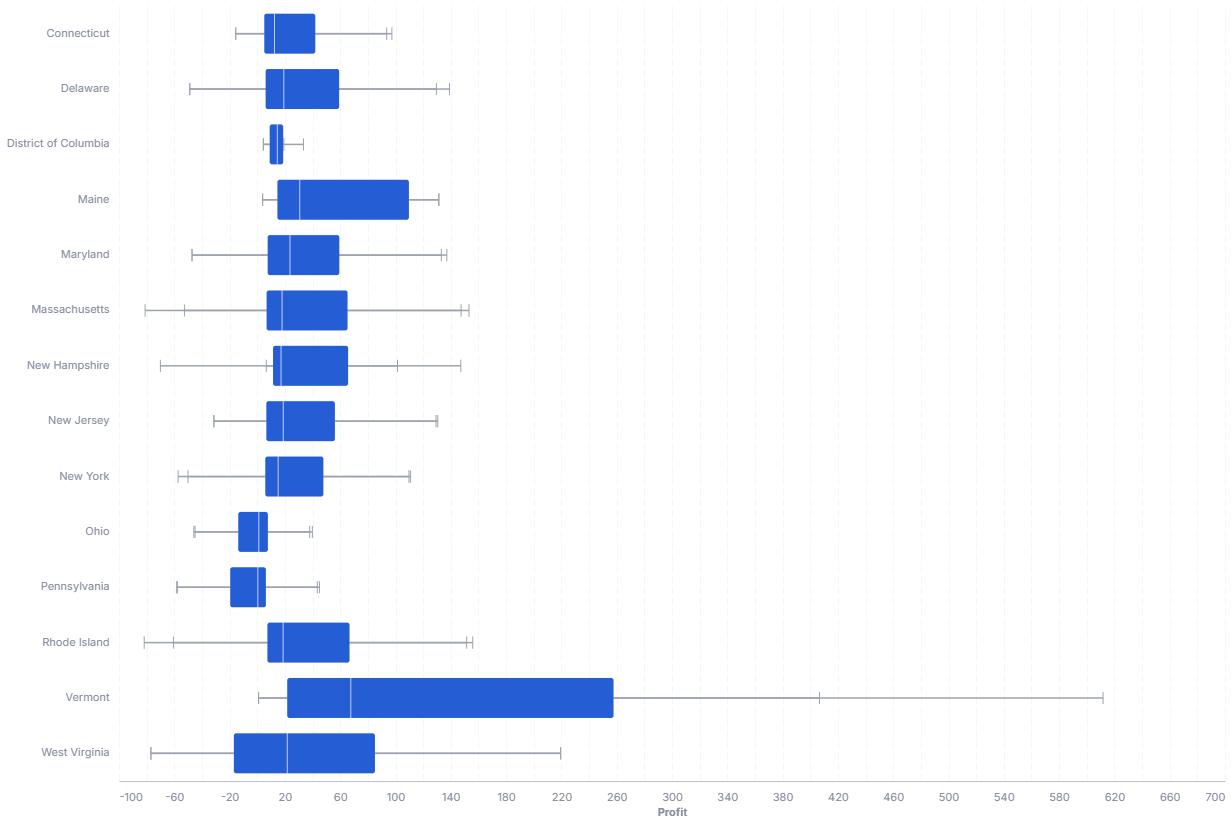
CustomChartDef box_plot_horizontal {
  label: 'Horizontal Box Plot'
  icon: 'hicon:chart-boxplot'
  description: 'To summarize the distribution of a quantitative value across categories by showing the median, quartiles, and range.'

  fields {
    field dimension {
      label: 'Dimension'
      type: 'dimension'
      sort {
        apply_order: 1
        direction: 'asc'
      }
    }
    field value {
      label: 'Value'
      type: 'dimension'
      data_type: 'number'
      sort {
        apply_order: 2
        direction: 'asc'
      }
    }
  }

  options {
    option show_outliers {
      type: 'toggle'
      label: 'Show outliers'
      default_value: false
    }
  }

  template: @vgl {
    "data": {
      "values": @{values}
    },

    "encoding": {
      "y": {
        "field": @{fields.dimension.name},
        "type": "nominal"
      }
    },

    "layer": [
      {
        "mark": {
          "type": "boxplot",
          "extent": 1.5,
          "size": 32,
          "outliers": @{options.show_outliers.value},
          "box": {"cornerRadius": 2},
          "median": {"strokeWidth": 2},
          "rule": {"size": 1.5},
          "ticks": {"color": "#9CA3AF", "size": 10},
          "tooltip": true
        },
        "encoding": {
          "x": {
            "field": @{fields.value.name},
            "type": "quantitative",
            "scale": {"zero": false},
            "axis": {"format": @{fields.value.format}, "formatType": "holisticsFormat"}
          },
          "opacity": {
            "condition": [
              {"test": "!length(data('box_hover_store'))", "value": 1},
              {"param": "box_hover", "empty": false, "value": 1}
            ],
            "value": 0.15
          }
        }
      },
      {
        "transform": [
          {
            "aggregate": [
              {"op": "min", "field": @{fields.value.name}, "as": "box_min"},
              {"op": "q1", "field": @{fields.value.name}, "as": "box_q1"},
              {"op": "median", "field": @{fields.value.name}, "as": "box_median"},
              {"op": "q3", "field": @{fields.value.name}, "as": "box_q3"},
              {"op": "max", "field": @{fields.value.name}, "as": "box_max"}
            ],
            "groupby": [@{fields.dimension.name}]
          }
        ],
        "params": [
          {"name": "box_hover", "select": {"type": "point", "fields": [@{fields.dimension.name}], "on": "mouseover", "clear": "mouseout"}},
          {"name": "normalPointSelection", "select": {"type": "point", "fields": [@{fields.dimension.name}], "toggle": "true", "clear": "mouseup"}},
          {"name": "hoverPointSelection", "select": {"type": "point", "fields": [@{fields.dimension.name}], "on": "mouseover", "clear": "mouseout"}}
        ],
        "mark": {"type": "rule", "size": 32, "opacity": 0, "tooltip": true},
        "encoding": {
          "tooltip": [
            {"field": @{fields.dimension.name}, "type": "nominal", "title": "Category"},
            {"field": "box_max", "type": "quantitative", "title": "Max", "format": @{fields.value.format}, "formatType": "holisticsFormat"},
            {"field": "box_q3", "type": "quantitative", "title": "Q3", "format": @{fields.value.format}, "formatType": "holisticsFormat"},
            {"field": "box_median", "type": "quantitative", "title": "Median", "format": @{fields.value.format}, "formatType": "holisticsFormat"},
            {"field": "box_q1", "type": "quantitative", "title": "Q1", "format": @{fields.value.format}, "formatType": "holisticsFormat"},
            {"field": "box_min", "type": "quantitative", "title": "Min", "format": @{fields.value.format}, "formatType": "holisticsFormat"}
          ]
        }
      }
    ],

    "holisticsConfig": {
      "crossFilterSignals": ["normalPointSelection"],
      "contextMenuSignals": ["hoverPointSelection"]
    }
  };;
}
Legacy syntax
CustomChart {
  fields {
    field group {
      type: "dimension"
      label: "Group by category"
    }
    field measure {
      type: "dimension"
      label: "Value to analyze"
      data_type: "number"
    }
  }

  options {
    option show_outliers {
        type: 'toggle'
        label: 'Show outliers'
        default_value: false
    }

    option box_size {
      type: 'number-input'
      label: 'Box Size'
      default_value: 90
    }

    option font {
      type: 'select'
      label: 'Chart Labels Font'
      options: ['monospace', 'sans-serif', 'serif', 'sans']
      default_value: 'sans-serif'
    }

    option box_color {
      type: 'color-picker'
      label: 'Box Color'
      default_value: '#0091B3'
    }

    option median_color {
      type: 'color-picker'
      label: 'Median Color'
      default_value: 'red'
    }

    option bckgrnd {
      type: 'color-picker'
      label: 'Chart Background Color'
      default_value: 'white'
    }

    option extent {
      type: 'input'
      label: 'Outlier detetction scale (may use "min-max" as input)'
      default_value: 1.5
    }

  }

  template: @vgl {
    "data": {
            "values": @{values}
    },

    "config": {
      "font": @{options.font.value},
      "background": @{options.bckgrnd.value},
      "autosize": {"type": "fit"}
    },

    "mark": {
      "type": "boxplot",
      "extent": @{options.extent.value},
      "median": {
        "color": @{options.median_color.value}
        },
      "outliers": @{options.show_outliers.value},
      "ticks": true
    },
    "encoding": {
      "x": {
          "field": @{fields.measure.name},
          "type": "quantitative"
      },
      "y": {
        "field": @{fields.group.name},
        "type": "nominal",
        "scale": {"zero": false}
      },
      "tooltip": {
        "field": @{fields.measure.name},
        "type": "quantitative"
      },
      "color": {
          "value": @{options.box_color.value}
      },
      "size": {"value": @{options.box_size.value}},
    }
  };;
}
Required fields
Every variant expects exactly two fields: a category dimension and the numeric value to summarize. The fields are identical across the Vertical and Horizontal variants, so the same table applies to both.
| Field | Label | Type | Role |
|---|---|---|---|
dimension | Dimension | dimension | Category that splits the data into one box per group. Sorted ascending (apply_order: 1). |
value | Value | dimension | Numeric observations (data_type: 'number') the box plot summarizes into median, quartiles, and whiskers. Sorted ascending (apply_order: 2). |
Data requirements: Pass raw, unaggregated rows (one row per observation), since the boxplot mark computes the median and quartiles itself; do not pre-aggregate to one value per category, or each box collapses to a single point.
Sample data: Each row is one observation. Repeat the category across many rows so the chart has a distribution to summarize.
| dimension | value |
|---|---|
| North | 120 |
| North | 135 |
| North | 98 |
| North | 210 |
| South | 88 |
| South | 142 |
| South | 119 |
| South | 305 |
Options
Set these options to adjust the chart without editing the Vega template. The CustomChartDef block above declares each option's type and allowed values. Both variants share the same option set.
| Option | Default | Effect |
|---|---|---|
show_outliers | false | Plots individual outlier points beyond the whiskers when on. |
Colors, box thickness, and whisker extent all follow the app theme rather than being configurable, so the box plot matches the rest of your dashboard in both light and dark mode.
Known limitations
-
Needs raw rows, not aggregates. The mark derives quartiles from the underlying values, so pre-aggregated data (one value per category) leaves nothing to summarize.
-
Each category needs enough observations. Boxes built from very few rows give misleading quartiles and whiskers. Make sure each group has a meaningful number of points.
-
Whisker extent changes which points count as outliers. A higher
extent(ormin-max) pulls the whiskers out and reclassifies points, so the same data can look outlier-free or outlier-heavy depending on the setting.