Error Bar
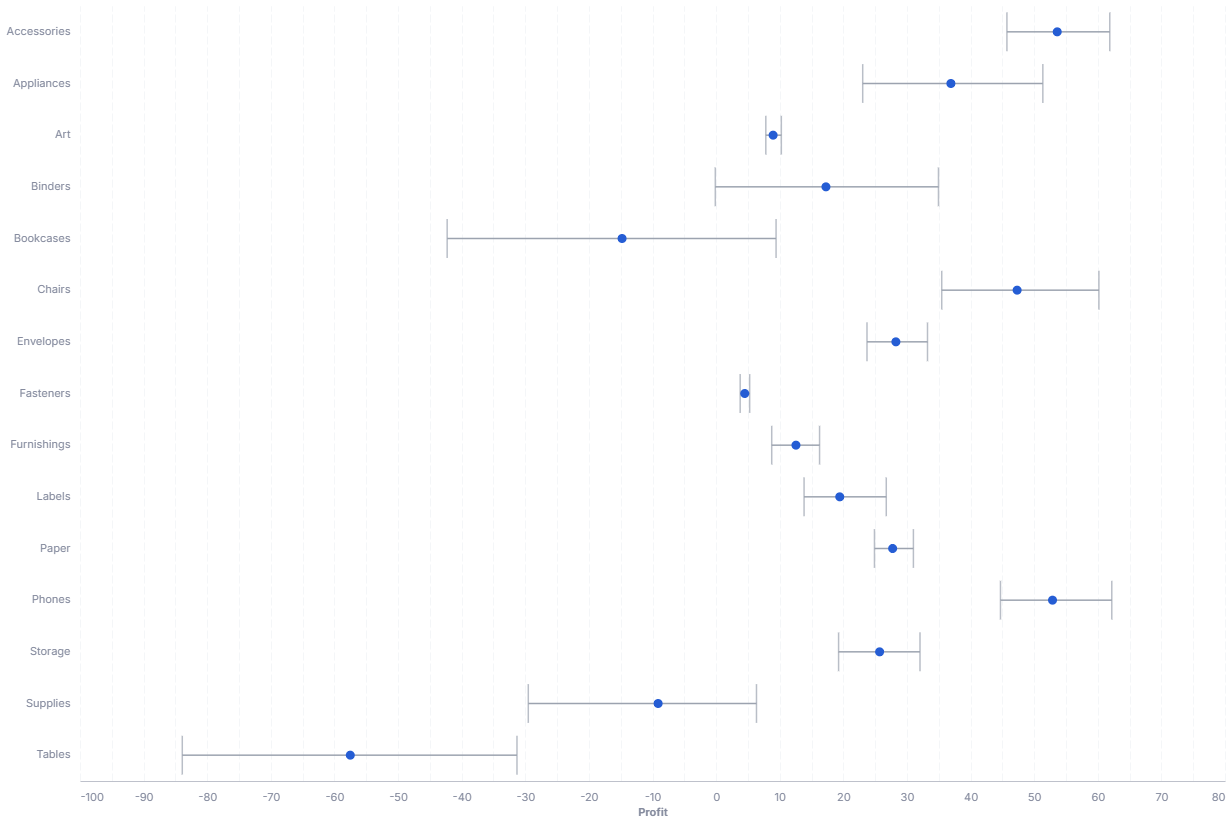
An error bar visualizes the uncertainty or degree of error in a reported measurement.
- Good for: showing the spread or confidence around a mean per category, comparing variability across groups, summarizing repeated measurements.
- Not great for: a single value with no spread (use a KPI or gauge), trends over time, or part-to-whole composition.
Syntax
Use the following AML definition to add the Error Bar to your custom chart library.
CustomChartDef error_bar {
  label: 'Error Bar'
  icon: 'hicon:chart-boxplot'
  description: 'To visualize the uncertainty or degree of error in a reported measurement across categories.'
  fields {
    field value {
      label: 'Value'
      type: 'dimension'
      data_type: 'number'
      sort {
        apply_order: 1
        direction: 'asc'
      }
    }
    field dimension {
      label: 'Dimension'
      type: 'dimension'
      sort {
        apply_order: 2
        direction: 'asc'
      }
    }
  }

  options {
    option extent {
      type: 'select'
      label: 'Error extent'
      options: [
        'ci',
        'stderr',
        'stdev',
        'iqr'
      ]
      default_value: 'ci'
    }
  }

  template: @vgl {
    "data": {
      "values": @{values}
    },
    "transform": [
      {"filter": "isValid(datum['@{fields.value.name}'])"},
      {
        "aggregate": [
          {"op": "mean", "field": @{fields.value.name}, "as": "center"},
          {"op": "count", "field": @{fields.value.name}, "as": "n"},
          {"op": "stdev", "field": @{fields.value.name}, "as": "stdev"},
          {"op": "ci0", "field": @{fields.value.name}, "as": "ci_lower"},
          {"op": "ci1", "field": @{fields.value.name}, "as": "ci_upper"},
          {"op": "q1", "field": @{fields.value.name}, "as": "iqr_lower"},
          {"op": "q3", "field": @{fields.value.name}, "as": "iqr_upper"}
        ],
        "groupby": [@{fields.dimension.name}]
      },
      {"calculate": "datum.stdev / sqrt(datum.n)", "as": "stderr"},
      {"calculate": "datum.center - datum.stdev", "as": "stdev_lower"},
      {"calculate": "datum.center + datum.stdev", "as": "stdev_upper"},
      {"calculate": "datum.center - datum.stderr", "as": "stderr_lower"},
      {"calculate": "datum.center + datum.stderr", "as": "stderr_upper"},
      {"calculate": "'@{options.extent.value}' === 'ci' ? datum.ci_lower : '@{options.extent.value}' === 'stderr' ? datum.stderr_lower : '@{options.extent.value}' === 'stdev' ? datum.stdev_lower : datum.iqr_lower", "as": "lower"},
      {"calculate": "'@{options.extent.value}' === 'ci' ? datum.ci_upper : '@{options.extent.value}' === 'stderr' ? datum.stderr_upper : '@{options.extent.value}' === 'stdev' ? datum.stdev_upper : datum.iqr_upper", "as": "upper"}
    ],
    "encoding": {
      "y": {
        "field": @{fields.dimension.name},
        "type": "ordinal"
      }
    },
    "layer": [
      {
        "mark": {"type": "rule", "color": "oklch(0.7 0.01 185)", "strokeWidth": 1.5},
        "encoding": {
          "x": {"field": "lower", "type": "quantitative", "scale": {"zero": false}, "axis": {"format": @{fields.value.format}, "formatType": "holisticsFormat"}},
          "x2": {"field": "upper"},
          "tooltip": [
            {"field": @{fields.dimension.name}, "type": "nominal", "title": "Category"}
          ],
          "opacity": {"condition": [{"test": "!length(data('error_hover_store'))", "value": 1}, {"param": "error_hover", "empty": false, "value": 1}], "value": 0.15}
        }
      },
      {
        "mark": {"type": "tick", "color": "oklch(0.7 0.01 185)", "size": 12, "thickness": 1.5},
        "encoding": {
          "x": {"field": "lower", "type": "quantitative", "scale": {"zero": false}},
          "tooltip": [
            {"field": @{fields.dimension.name}, "type": "nominal", "title": "Category"}
          ],
          "opacity": {"condition": [{"test": "!length(data('error_hover_store'))", "value": 1}, {"param": "error_hover", "empty": false, "value": 1}], "value": 0.15}
        }
      },
      {
        "mark": {"type": "tick", "color": "oklch(0.7 0.01 185)", "size": 12, "thickness": 1.5},
        "encoding": {
          "x": {"field": "upper", "type": "quantitative", "scale": {"zero": false}},
          "tooltip": [
            {"field": @{fields.dimension.name}, "type": "nominal", "title": "Category"}
          ],
          "opacity": {"condition": [{"test": "!length(data('error_hover_store'))", "value": 1}, {"param": "error_hover", "empty": false, "value": 1}], "value": 0.15}
        }
      },
      {
        "params": [
          {"name": "error_hover", "select": {"type": "point", "fields": [@{fields.dimension.name}], "on": "mouseover", "clear": "mouseout"}},
          {"name": "normalPointSelection", "select": {"type": "point", "toggle": "true", "clear": "mouseup"}},
          {"name": "hoverPointSelection", "select": {"type": "point", "on": "mouseover", "clear": "mouseout"}}
        ],
        "mark": {"type": "point", "filled": true, "size": 150},
        "encoding": {
          "x": {"field": "center", "type": "quantitative", "scale": {"zero": false}},
          "tooltip": [
            {"field": @{fields.dimension.name}, "type": "nominal", "title": "Category"},
            {"field": "center", "type": "quantitative", "title": "Mean", "format": @{fields.value.format}, "formatType": "holisticsFormat"}
          ],
          "opacity": {"condition": [{"test": "!length(data('error_hover_store'))", "value": 1}, {"param": "error_hover", "empty": false, "value": 1}], "value": 0.15}
        }
      }
    ],
    "holisticsConfig": {
      "crossFilterSignals": ["normalPointSelection"],
      "contextMenuSignals": ["hoverPointSelection"]
    }
  };;
}
 View on GitHub
Legacy syntax
CustomChart {
  fields {
    field point {
      type: "dimension"
      label: "Points"
    }
    field variety {
      type: "dimension"
      label: "Variety"
    }
  }
  template: @vgl
  {
      "data": {
        "values": @{values}
      },
      "layer": [
        {
          "mark": {
            "type": "point",
            "filled": true
          },
          "encoding": {
            "x": {
              "type": "quantitative",
              "field": @{fields.point.name},
              "scale": {
                "zero": false
              },
              "title": "Barley Yield",
              "aggregate": "mean"
            },
            "color": {
              "value": "black"
            }
          }
        },
        {
          "mark": {
            "type": "errorbar",
            "extent": "ci"
          },
          "encoding": {
            "x": {
              "type": "quantitative",
              "field": @{fields.point.name},
              "title": "Barley Yield"
            }
          }
        }
      ],
      "encoding": {
        "y": {
          "type": "ordinal",
          "field": @{fields.variety.name}
        }
      }
    }
  ;;;
}
Required fields
An Error Bar expects exactly two fields. Each input row is one observation, and the template groups observations by category to compute the mean and spread.
| Field | Label | Type | Role |
|---|---|---|---|
value | Value | dimension | Numeric observation on the x axis (data_type: 'number'). The mean sets the point, and the chosen extent sets the bar. Sorted ascending (apply_order: 1). |
dimension | Dimension | dimension | Category on the y axis (one error bar per value). Sorted ascending (apply_order: 2). |
Data requirements: Do not pre-aggregate. The template computes the mean and the error extent from the raw rows, so each category needs multiple observations for a meaningful spread.
Sample data:
| value | dimension |
|---|---|
| 42 | Region A |
| 47 | Region A |
| 39 | Region A |
| 51 | Region B |
| 55 | Region B |
| 49 | Region B |
| 33 | Region C |
| 38 | Region C |
Options
Set these options to adjust the chart without editing the Vega template. The CustomChartDef block above declares each option's type and allowed values.
| Option | Default | Effect |
|---|---|---|
extent | ci | How the template computes the error bar length. Options: ci (95% confidence interval), stderr (standard error), stdev (standard deviation), iqr (interquartile range). |
Known limitations
-
Needs multiple rows per category. The bar reflects spread across observations, so a single row per category produces a point with no visible error bar.
-
The center point is always the mean of
value. Showing a median or another statistic requires editing the template. -
One dimension only. The chart plots one category axis. Comparing a second grouping (for example, by color) requires editing the template.