Table Heatmap
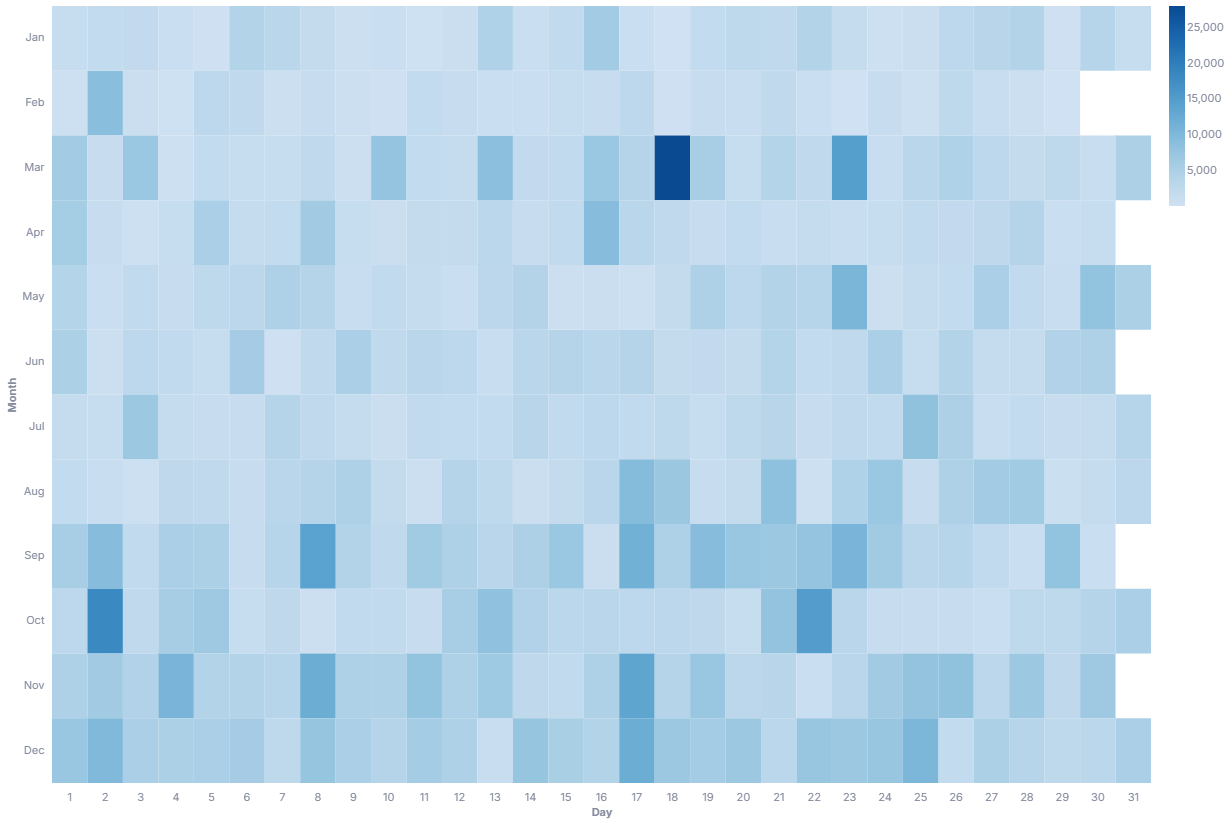
A table heatmap colors each cell of a calendar grid by a measure value, mapping day of month across the x axis and month down the y axis. It is useful for spotting daily and seasonal patterns at a glance, where darker cells mean larger values.
- Good for: daily activity over a year (orders per day, logins per day), seasonal patterns, spotting unusually high or low days.
- Not great for: non-date dimensions, comparing exact values between cells, or data spanning more than one calendar year (months collapse together).
Syntax
Use the following AML definition to add the Table Heatmap to your custom chart library.
CustomChartDef table_heatmap {
  label: 'Table Heatmap'
  icon: 'hicon:chart-table-heatmap'
  description: 'To reveal patterns across days and months by coloring each cell of a calendar grid by a measure value.'
  fields {
    field date {
      label: 'Date'
      type: 'dimension'
      data_type: 'date'
      sort {
        apply_order: 1
        direction: 'asc'
      }
    }
    field value {
      label: 'Value'
      type: 'measure'
      sort {
        apply_order: 2
        direction: 'desc'
      }
    }
  }
  template: @vgl {
    "data": {
      "values": @{values}
    },
    "params": [
      {"name": "normalPointSelection", "select": {"type": "point", "encodings": ["x", "y"], "toggle": "true", "clear": "mouseup"}},
      {"name": "hoverPointSelection", "select": {"type": "point", "encodings": ["x", "y"], "on": "mouseover", "clear": "mouseout"}}
    ],
    "mark": {
      "type": "rect"
    },
    "holisticsConfig": {
      "crossFilterSignals": ["normalPointSelection"],
      "contextMenuSignals": ["hoverPointSelection"]
    },
    "width": {"step": 13},
    "height": {"step": 13},
    "encoding": {
      "x": {
        "type": "ordinal",
        "field": @{fields.date.name},
        "title": "Day",
        "timeUnit": "date",
        "axis": {"format": "%e", "labelAngle": 0, "labelPadding": 8}
      },
      "y": {
        "type": "ordinal",
        "field": @{fields.date.name},
        "title": "Month",
        "timeUnit": "month",
        "axis": {"labelPadding": 8}
      },
      "color": {
        "type": "quantitative",
        "field": @{fields.value.name},
        "scale": {"scheme": "blues"},
        "legend": {
          "title": null
        },
        "aggregate": "max"
      },
      "tooltip": [
        {"field": @{fields.date.name}, "type": "temporal", "timeUnit": "month", "title": "Month"},
        {"field": @{fields.date.name}, "type": "temporal", "timeUnit": "date", "title": "Day"},
        {"field": @{fields.value.name}, "type": "quantitative", "aggregate": "max", "title": "Value", "format": @{fields.value.format}, "formatType": "holisticsFormat"}
      ]
    }
  }
  ;;
}
 View on GitHub
Legacy syntax
CustomChart {
  fields {
    field date {
      type: 'dimension',
      label: "Pick a date field",
    }
    field temperature {
      type: 'measure',
      label: "Then a number field",
    }
  }
  template: @vgl {
    "data": {
      "values": @{values}
    },
    "mark": {
      "type": "rect",
      "tooltip": true
    },
    "config": {
      "axis": {
        "domain": false
      },
      "view": {
        "step": 13,
        "strokeWidth": 0
      }
    },
    "encoding": {
      "x": {
        "axis": {
          "format": "%e",
          "labelAngle": 0
        },
        "type": "ordinal",
        "field": @{fields.date.name},
        "title": "Day",
        "timeUnit": "date"
      },
      "y": {
        "type": "ordinal",
        "field": @{fields.date.name},
        "title": "Month",
        "timeUnit": "month"
      },
      "color": {
        "type": "quantitative",
        "field": @{fields.temperature.name},
        "legend": {
          "title": null
        },
        "aggregate": "max"
      }
    }
  }
  ;;
}
Required fields
A Table Heatmap expects exactly two fields. Each row supplies one date and its measured value, and the template buckets those dates into a day-by-month grid.
| Field | Label | Type | Role |
|---|---|---|---|
date | Date | dimension | Date field; its day of month sets the x position and its month sets the y position. Sorted ascending (apply_order: 1). |
value | Value | measure | Drives the cell color, from light (low) to dark (high). Sorted descending (apply_order: 2). |
Data requirements: The date field must be a date type. The template takes max of value per day-month cell, so you don't need to pre-aggregate, though one row per day keeps the values exact.
Sample data:
| date | value |
|---|---|
| 2024-01-05 | 120 |
| 2024-01-18 | 86 |
| 2024-02-03 | 145 |
| 2024-02-21 | 60 |
| 2024-03-09 | 198 |
| 2024-03-27 | 110 |
Known limitations
-
Date dimension only. The x and y positions come from the day and month of one date field, so this chart cannot map two arbitrary dimensions.
-
One calendar year at a time. The y axis uses month with no year component, so dates from different years stack onto the same row. Filter to a single year to keep cells distinct.
-
Cells show one aggregated value. Each cell renders the
maxvalue for that day-month, so multiple rows on the same date collapse into a single colored cell rather than separate marks.