Migrate Databricks Metric Views to Holistics
This workflow is in private preview until it is available end to end. Holistics provides preview access to the CLI and skill. Validate all generated AML before using it in production.
How it works
The preview workflow retrieves the Metric View definition, gives it to a coding-agent skill, and produces editable Analytics Modeling Language (AML) files for review and publication.
- Databricks Metric View — A governed Metric View in Databricks
- Metric View definition (YAML) — Definition retrieved with the private-preview Holistics CLI
- AI migration skill — Coding-agent skill for the one-time assisted migration
- Holistics semantic layer (AMQL) — Editable Models, Relationships, Datasets, and metrics
- Reports and dashboards — Use the reviewed Dataset in reports and Canvas Dashboards
- metric-view → definition (Holistics CLI)
- definition → skill (migrate)
- skill → semantic-layer (review)
- semantic-layer → outputs (publish)
Start by identifying the governed measures you want to reuse in Databricks Catalog Explorer.
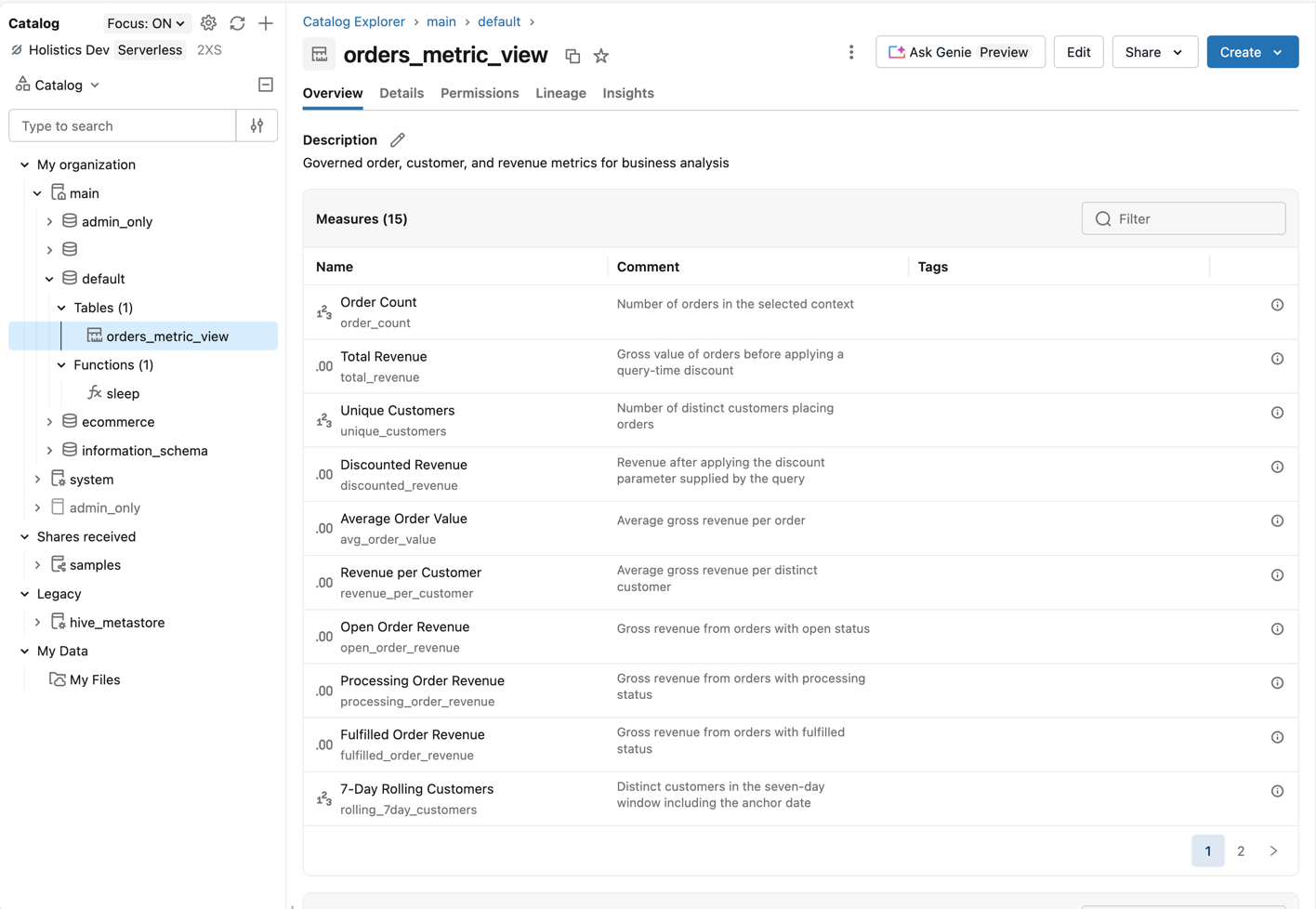
Before you begin
Prepare the connection, project, and preview tooling before retrieving the definition.
- A working Databricks connection
- A local Holistics project
- The
databricks_metric_views_to_amqlskill installed in your coding agent - Databricks privileges to run
DESCRIBEon the Metric View
Migrate a Metric View
Use one Metric View as the migration unit, then review the generated files as you would any other semantic-layer change.
-
Run the skill in your coding agent with the Metric View and Holistics data source you want to migrate:
/databricks_metric_views_to_amql Migrate the `main.default.orders_metric_view` Metric View from `your_databricks_data_source` into Models and a Dataset in the current Holistics project.The skill starts by pulling the Metric View definition into a local migration folder:
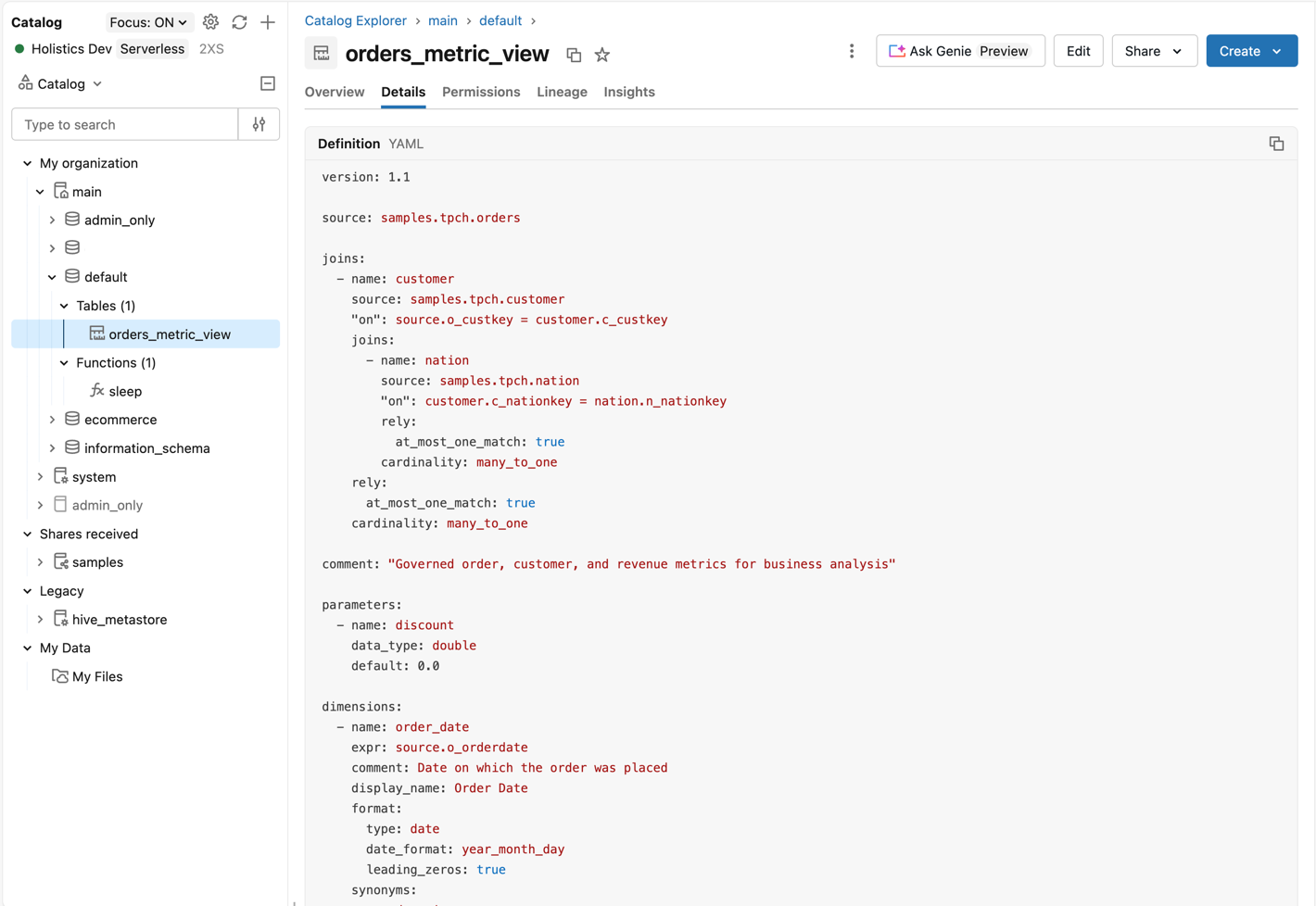
holistics query \'describe table extended `main`.`default`.`orders_metric_view` as json' \--data-source 'your_databricks_data_source' \--output 'metric-view-migration/orders_metric_view/source/raw.json'The returned metadata contains the YAML definition that describes the source, joins, dimensions, and measures.
-
Review the generated models, datasets (relationships, metrics, and row-level permissions), AI context, and source mappings. Adjust names and business context before publishing.
Complete the next two steps yourself or ask your coding agent to run them.
-
Validate the project:
holistics aml validate \models/*.model.aml \datasets/orders.dataset.aml -
Start the local preview sync:
holistics sync-code .This process keeps running until you press
Ctrl+C. Preview the Dataset in Reporting and Canvas Dashboards, then use your normal review and publishing workflow when the migration is ready.
Example source definition
For example, a Databricks Metric View can define nested many-to-one joins and governed measures in YAML.
version: 1.1
source: samples.tpch.orders
joins:
  - name: customer
    source: samples.tpch.customer
    on: source.o_custkey = customer.c_custkey
    cardinality: many_to_one
    rely:
      at_most_one_match: true
    joins:
      - name: nation
        source: samples.tpch.nation
        on: customer.c_nationkey = nation.n_nationkey
        cardinality: many_to_one
        rely:
          at_most_one_match: true
measures:
  - name: order_count
    expr: count(1)
    display_name: Order count
    comment: Number of orders
  - name: total_revenue
    expr: sum(source.o_totalprice)
    display_name: Total revenue
    comment: Total order revenue
Example Holistics Dataset
Source tables and joins become Models and Relationships. This excerpt shows the generated Dataset. The skill also generates the referenced orders, customers, and nations Models.
Dataset orders_dataset {
  label: 'Orders Semantic Layer'
  description: 'Orders with customer and nation context.'
  data_source_name: 'your_databricks_data_source'

  models: [orders, customers, nations]

  relationships: [
    relationship(orders.customer_id > customers.customer_id, true),
    relationship(customers.nation_id > nations.nation_id, true)
  ]

  metric order_count {
    label: 'Order count'
    description: 'Number of orders'
    type: 'number'
    definition: @aql count(orders.order_id);;
  }

  metric total_revenue {
    label: 'Total revenue'
    description: 'Total order revenue'
    type: 'number'
    definition: @aql sum(orders.total_price);;
  }
}
Continue in Holistics
After migration, treat the generated AML as the starting point for normal Holistics development.
- Add dimensions, metrics, descriptions, and AI context.
- Query the Dataset and build reusable analyses in Reporting.
- Publish curated experiences as Canvas Dashboards.
Validate the migration
Validation should cover both code correctness and business-result parity before the migrated Dataset is shared.
- Confirm the AML compiles with
holistics aml validate. - Review relationship keys and cardinality assumptions.
- Compare same-data totals by representative dimensions and a fixed date range.
- Test user permissions against the intended audience.
- Check query performance with representative reports.
holistics aml validate checks the AML project, but it does not prove numerical parity with the Databricks Metric View.
Current limits
Account for these private-preview limits when planning a migration.
| Limit | What to check |
|---|---|
| One-time migration | There is no automatic synchronization or round-trip conversion. Rerun and review the migration when the source changes. |
| Advanced measure behavior | Review complex Databricks parameters, windows, and semi-additive behavior manually. |
| Join guarantees | Validate the underlying data before carrying rely.at_most_one_match assumptions into relationship cardinality. |
| Multi-catalog sources | Three-part identifiers and sources spanning catalogs may need Query Models. |
| Generated code | The generated AML remains customer-owned and editable. Maintain it as part of your Holistics project. |
Related resources
Use these guides to set up the workflow and extend the migrated semantic layer.