Data app
Data apps are under development. Details on this page may change before launch.
Overview
A data app is a single HTML file with your own HTML, CSS, and JavaScript, so you can build tools with custom logic: a purchase-planning calculator, a what-if view that recalculates as inputs change, or a guided flow where each answer decides what to show next.
Every number in a data app comes from your semantic layer and runs with the viewer's permissions, so the logic is yours but the data stays governed.
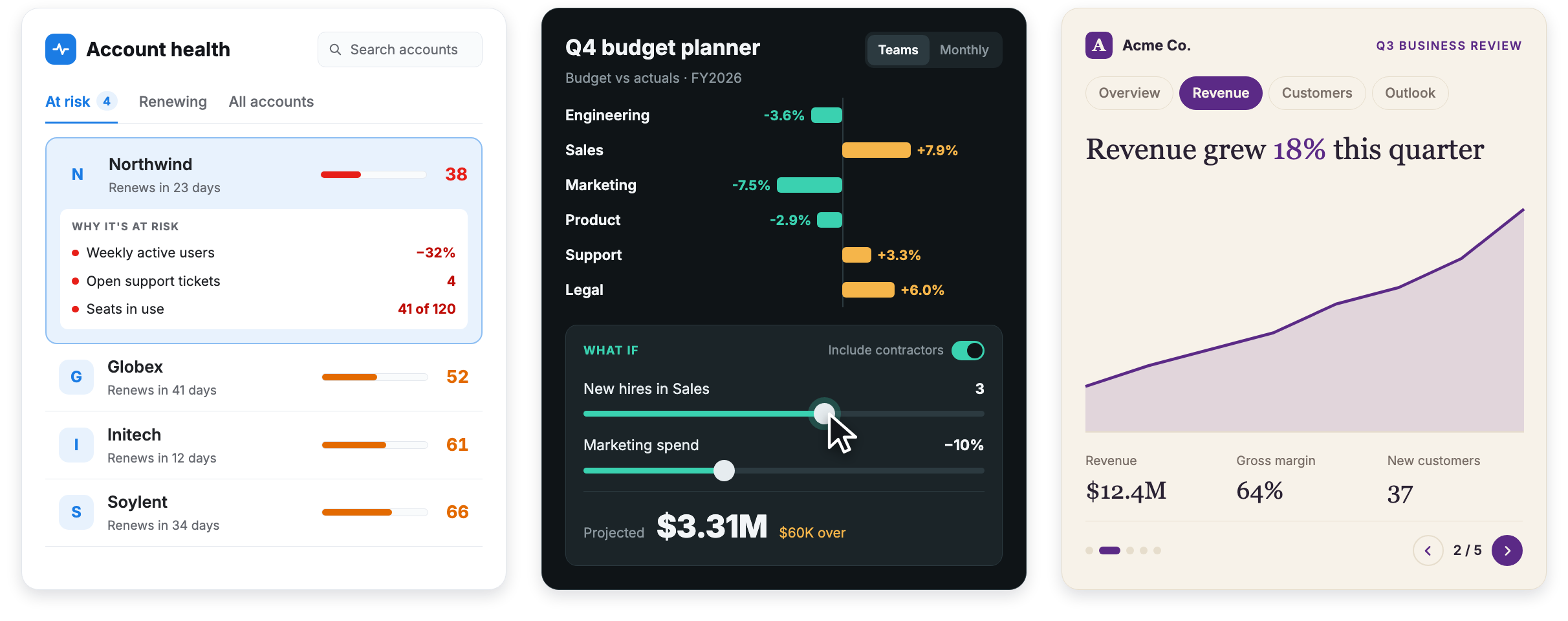
Use a Canvas dashboard with HTML layout instead. It comes with drill-down, cross-filtering, and explore built in. Choose a data app when you need custom logic it can't express.
Data apps are available only in the Reporting environment. They aren't tracked or stored in Git.
How it works
A data app runs in a sandbox that blocks it from calling your database or any other service. Libraries and fonts can load only from approved public CDNs. To get data, the app uses a JavaScript SDK provided by Holistics:
- The app declares its queries, written in AQL against your datasets, plus any filters, date drills, and cross-filters.
- Holistics runs each query as the viewer, so the viewer's dataset access and row-level permissions apply.
- The app renders the results however its code says: a chart, a table, a form, or a calculated answer.
- When the viewer changes a filter or input, only the affected queries run again.
Permissions
Data apps use the same permission model as dashboards:
- Create and edit: Admins and Analysts.
- View: Analysts can open all data apps by default, but still see only the data their dataset permissions allow. Explorers and Viewers need permission to open an app.
- Data: Each viewer sees only the rows they're allowed to see. If they can't access one of the app's datasets, queries on it return a permission error instead of data.
How to build a data app
You can write the code yourself, ask an AI agent to build the app for you, or import a dashboard you already built in Claude:
| Method | Best for |
|---|---|
| Write the code yourself | Developers who want full control |
| Holistics AI (coming soon) | Building from a prompt without leaving Holistics |
| External AI agents | Teams already working in Claude, Claude Code, Cursor, or similar |
| Import from Claude | Turning an existing Claude dashboard into a governed app |
Write the code yourself
If you prefer full control over your application's design and functionality, you can write the HTML, CSS, and JavaScript directly in Holistics.
- In Reporting, open the folder where you want to keep the app, then click + > New data app.
- Click Edit to open the data app editor, which shows your code next to a live preview with responsive preview sizes.
- Write your app in the Code tab, click Update preview to see it, and click Save when it's ready.
The editor's Console shows the app's errors, and Inspect shows each query's AQL, generated SQL, and any error, whether you wrote the code or an agent did.
With Holistics AI (coming soon)
You'll be able to describe the app you want in Holistics AI chat, for example: "Build a purchase-planning tool for the ops team: pick a product category, enter next month's expected demand, and see the suggested order quantity based on the last 90 days of sales." Holistics AI will pick the datasets, write the app, and save it to Holistics for you to review.
With an external AI agent
You can also build apps with your own agent: a coding agent such as Claude Code or Cursor, or a chat assistant such as Claude.ai or Claude Desktop.
Set up (once per agent):
- Connect the agent to Holistics MCP, so it can read your datasets and save apps to Holistics.
- Install the
holistics-reportingplugin (see Skills and plugins). Its data app skill teaches the agent the SDK, the sandbox rules, and how to write AQL.
Build an app:
- Describe the app to the agent, including who it's for.
- Confirm the datasets the agent shortlists, and answer its questions about anything that changes the numbers.
- The agent writes the app, saves it to Holistics, and gives you a link to open it.
If your agent can't connect to Holistics MCP, the skill falls back to copy and paste: you run a short script in the app's Code tab to share your dataset fields with the agent, then paste the HTML file it writes back into the editor.
Import a Claude dashboard
If you've already built a dashboard in Claude on Holistics data, you can turn it into a data app. See Import Claude dashboards.