From Power BI to Holistics
This document was written in June 2026, and may have become inaccurate as Holistics and Power BI continue to improve their products.
If you come from a Power BI background, this page maps Power BI concepts to their Holistics equivalents and explains where the two platforms diverge in philosophy.
TL;DR
| Dimension | Power BI | Holistics |
|---|---|---|
| Modeling language | DAX + TMDL | AMQL (AML + AQL) |
| ETL layer | Power Query (M) inside the file | Query models (SQL in .model.aml) + upstream dbt/SQL |
| Project format | .pbix (binary) or .pbip (as-code) | AMQL |
| Version control | Strong for model, weak for report | Uniform AMQL diffs across models, datasets, and dashboards |
| Authoring tool | Power BI Desktop (Windows-only) | Web IDE or local development (cross-platform) |
| Compute engine | VertiPaq in-memory (Import) or DirectQuery | SQL pushdown to warehouse |
| Reusability | Per-workspace semantic models | Reusable-first philosophy: • Reusable models across datasets • Reusable metrics across dashboards • Reusable dimensions and measures within a model • Modules to organize and share code |
| Self-service | Q&A, "Explore", report consumption | Dataset Explore, Canvas Dashboards |
Power BI vs. Holistics
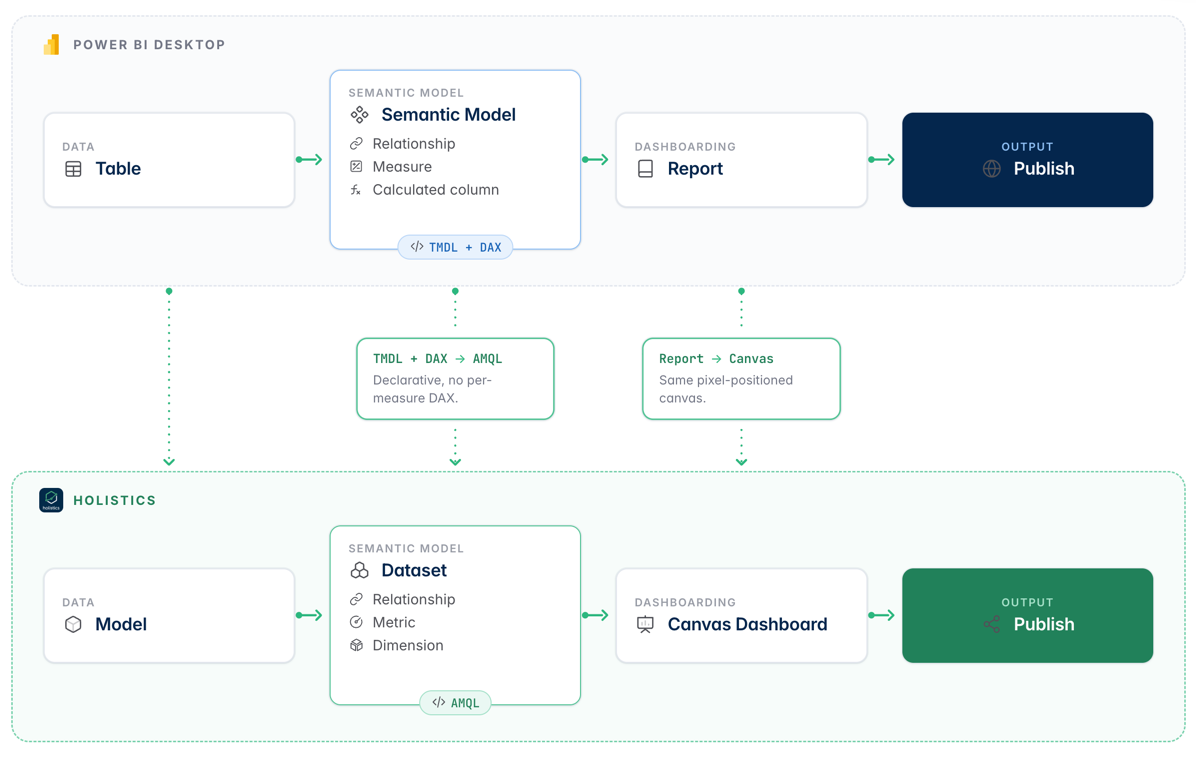
Power BI bundles modeling and visualization in one .pbix (or .pbip) project.
Holistics separates them: semantic layer (Models + Datasets) vs. presentation layer (Dashboards).
Core mapping:
- Power BI table → Holistics model
- Power BI semantic model → Holistics dataset
- Power BI report → Holistics dashboard
| Power BI artifact | Holistics equivalent | Key difference |
|---|---|---|
| Power Query (M) | Query model (.model.aml) | M materializes into VertiPaq on refresh; query model compiles SQL at runtime. |
| Table (in Semantic Model) | Model (.model.aml) | Power BI tables hold imported data; Holistics models are logical definitions only. |
| Semantic Model (formerly Dataset) | Dataset (.dataset.aml) | Power BI semantic model is workspace-scoped; Holistics datasets reuse models freely. |
| Relationship | Relationship | Holistics resolves join paths from selected fields. |
| Measure (DAX) | Metric (AQL / SQL) | DAX uses filter context; AQL uses explicit dimension scope. |
| Calculated column (DAX) | Dimension (AQL / SQL) | Calculated columns materialize in VertiPaq; dimensions compile inline into SQL. |
Report (.Report folder) | Canvas Dashboard | Power BI reports bind to one semantic model; Holistics dashboards span multiple datasets. |
| Dashboard | Canvas Dashboard | Power BI dashboards exist only in Power BI Cloud (Service); Desktop has no dashboard concept. Holistics has one unified Canvas Dashboard everywhere. |
| Workspace | Module | Power BI workspace = deployment + sharing; Holistics splits these into modules + permissions. |
.pbip project folder | AMQL repository | Power BI splits TMDL + JSON; Holistics uses one uniform AMQL syntax for everything. |
Modeling language
DAX and AQL take fundamentally different paths to the same goal: a reusable analytics language for the modern BI stack.
AQL is SQL++. Holistics leverages SQL as its foundation and builds common analytic functions (running total, percent of total, period over period, nested aggregation) on top of it. Everything compiles down to SQL that runs on your warehouse, but with semantic awareness baked in: joins, metrics, period comparisons, drill paths, and timezone handling.
So that when writing AQL, you don't need to worry about rewriting join paths, hand-rolling date logic, juggling SQL dialect differences across warehouses. You just need to focus on the core logic.
DAX takes a different approach. It's a proprietary expression language built around an in-memory engine, with its own syntax, its own execution model, and its own filter-context semantics.
DAX is powerful (and indeed we learnt many things from DAX). But disconnected from the SQL that already lives in your warehouse, your dbt project, and your team's everyday work. Every new hire pays a learning tax that doesn't transfer anywhere else.
| Aspect | Power BI | Holistics |
|---|---|---|
| Languages | DAX (logic) + TMDL (schema) | One language: AMQL = AML + AQL |
| Mental model | Filter context (implicit) | Dimension scope (explicit) |
| Time intelligence | Built-in DAX functions, requires marked Date table | Native period functions (relative_period, year(), quarter()) on any timestamp column |
| Nested aggregation | CALCULATE + iterators | First-class via metric/measure and dimension scope |
| Compiles to | VertiPaq query plan | SQL |
| SQL fallback | Not available (DAX only) | SQL measures supported alongside AQL |
Modeling power in Holistics comes from:
- AMQL: one declarative language for models, datasets, dashboards, and measures.
- Explicit dimension scope: a metric declares what it groups by.
- Behavior is predictable across dashboards.
- No surprise re-evaluation from filter context.
- Native period functions:
relative_period,year(),quarter(),month()work on any timestamp column.- No special Date table required.
- First-class nested aggregation via metric/measure composition.
- SQL fallback: when AQL isn't a fit, write SQL directly inside a measure or query model.
What this means for a team migrating off Power BI
- Your team's SQL skills still count. AQL builds on SQL instead of replacing it.
- Measures stay as readable SQL, so the logic still makes sense outside Holistics.
- Most analysts get productive in AQL within a few days.
- If a metric is easier to write in plain SQL, just write it in SQL. No need to fight the language.
Example: year-over-year sales
In DAX:
Sales YoY =
VAR CurrentSales = [Total Sales]
VAR PriorSales =
    CALCULATE([Total Sales], SAMEPERIODLASTYEAR('Date'[Date]))
RETURN
    DIVIDE(CurrentSales - PriorSales, PriorSales)
In Holistics AQL:
metric sales_last_year {
  label: 'Sales Last Year'
  type: 'number'
  definition: @aql
    total_sales | relative_period(orders.created_at, interval(-1 year))
  ;;
}

metric sales_yoy {
  label: 'Sales YoY % Change'
  type: 'number'
  definition: @aql
    safe_divide((total_sales - sales_last_year) * 100, sales_last_year)
  ;;
}
Or in SQL, for teams that want to stay in SQL:
measure total_sales {
  label: 'Total Sales'
  type: 'number'
  definition: @sql SUM({{ amount }});;
}
ETL layer
Power BI does ETL inside the file with Power Query (M), which materializes data into VertiPaq on refresh.
Holistics does light transforms in query models (SQL inside .model.aml) and pushes heavy ETL upstream to dbt or SQL jobs.
This keeps the BI layer thin and avoids the "logic trapped in the BI tool" problem. Warehouse tables and dbt models stay reusable by any consumer, not just Holistics.
| Concern | Power BI | Holistics |
|---|---|---|
| In-tool transform | Power Query (M) → VertiPaq | Query model (SQL in .model.aml) → compiled into runtime query |
| Language | M (proprietary) | SQL |
| Materialization | Imported into VertiPaq on refresh | None by default; runs live against the warehouse |
| Heavy ETL | M scripts inside .Dataset/definition/ | dbt / SQL upstream |
| Cross-tool reuse | Limited (Dataflows or duplicate models) | Native (any tool can read the warehouse / dbt models) |
| Version control | TMDL + M diffs | AMQL diffs |
Transformation in Holistics comes from:
- Query models:
.model.amlfiles whose source is a SQLSELECT.- Composed into the runtime query.
- No separate refresh step, no second copy of the data.
We offer the dbt integration to sync metadata between dbt models and Holistics models.
Example: an "active users only" view
Model active_users {
  type: 'query'
  data_source_name: 'warehouse'

  dimension ...

  query: @sql
    select id, email, signup_at
    from raw.users
    where deleted_at is null
  ;;
}
Version control
Power BI is text-serializable through .pbip, but only halfway. The semantic model side (.Dataset/, TMDL) gets clean Git diffs. The report side (.Report/report.json) is nested JSON that merge-conflicts often and usually breaks if hand-edited.
Holistics is text-native end-to-end. Models, datasets, dashboards, charts, and filters are all uniform AMQL text. The standard Git PR workflow applies to every layer, not just the semantic model.
| Aspect | Power BI (.pbip) | Holistics (AMQL) |
|---|---|---|
| Semantic model code | TMDL (Git-friendly) | AMQL (Git-friendly) |
| Report/dashboard code | Nested JSON (fragile diffs) | AMQL (clean diffs) |
| Authoring tool | Power BI Desktop (thick client) + VS Code for TMDL | Web IDE or local IDE (single language) |
| Deployment | Fabric Git Integration + Deployment Pipelines | Native dev/prod environments + PR merge |
| CI validation | Tabular Editor BPA + custom scripts | holistics aml validate + Validation API |
Here is example of project layouts side by side:
power-bi-project/                   holistics-project/
  project.pbip                        models/
  project.Dataset/                      tables/
    definition/                           orders.model.aml
      model.tmdl                          users.model.aml
      tables/orders.tmdl                queries/
      tables/users.tmdl                   active_users.model.aml
      expressions.tmdl  (M code)
  project.Report/                     datasets/
    definition.pbir                     ecommerce.dataset.aml
    report.json                         marketing.dataset.aml
                                      dashboards/
                                        sales.page.aml
                                        performance.page.aml
Version control in Holistics comes from:
- Uniform AMQL text for everything: models, datasets, dashboards, charts, filters.
- One language, one syntax, clean diffs across the whole stack.
- Git-backed projects with native GitHub, GitLab, Bitbucket integration.
- Dev/prod environments built in.
- Edit on a dev branch, preview in the UI, publish to prod.
A typical dashboard workflow in Holistics
- Branch off
master - Edit AMQL (Web IDE or local IDE with
holistics sync-code). Changes push to a Holistics dev branch within seconds. - Preview in Holistics UI on the dev branch. Iterate until the dashboard looks right.
- Commit and push
- Open a Pull Request
- CI runs validation to check syntax automatically:
holistics aml validatelocally before push, or Validation API in CI on every PR.
- Review and approve. Diffs are clean AMQL, so reviewers can read the actual change instead of nested JSON.
- Merge to
master. Holistics deploys to production.
╭─────────────╮     ╭─────────────╮     ╭─────────────╮     ╭─────────────╮
│ Branch off  │────▶│ Edit AML    │────▶│ Preview in  │────▶│ Commit +    │
│ main        │     │ (sync-code) │     │ Holistics   │     │ push        │
╰─────────────╯     ╰─────────────╯     ╰─────────────╯     ╰──────┬──────╯
                                                                   │
       ╭──────────────────────────────────────────────────────────╯
       ▼
╭─────────────╮     ╭─────────────╮     ╭─────────────╮     ╭─────────────╮
│ Open PR     │────▶│ CI:         │────▶│ Review +    │────▶│ Merge +     │
│             │     │ validate    │     │ approve     │     │ auto-publish│
╰─────────────╯     ╰─────────────╯     ╰─────────────╯     ╰─────────────╯
See the full setup guide at Local development workflow and PR Workflow for GitHub.
Authoring tool
Power BI authoring is anchored on a Windows-only desktop client.
Holistics offers a browser-based Web IDE for analysts and a fully local development workflow for engineers who prefer their own editor and coding agents.
| Aspect | Power BI | Holistics |
|---|---|---|
| OS support | Windows-only (Desktop) | Cross-platform (Web IDE and local IDE) |
| Authoring surface | Thick client + TMDL via VS Code/Tabular Editor | Web IDE or any local IDE (VS Code, Cursor, JetBrains, …) |
| AI / agent support | Copilot in Fabric (chat assistant) | First-class: MCP server, skills, and live AQL execution |
| Live sync | Manual save → publish, or Fabric Git Integration | holistics sync-code continuous bidirectional sync |
| Local validation | Tabular Editor "Best Practices Analyzer" | holistics aml validate CLI + Validation API in CI |
| Report authoring | Desktop-only (no text editor support) | AMQL text or visual Canvas editor |
Authoring options in Holistics come from:
- Web IDE:
- Cross-platform (any modern browser).
- Auto-completion, inline data preview, and visual chart configuration for analysts.
- No install.
- Local development with your own IDE + AI agents:
Compute engine
Power BI defaults to importing data into an in-memory VertiPaq engine and refreshing on a schedule. That insulates dashboards from warehouse load, but at the cost of an extra copy of the data, a refresh pipeline to maintain, and size limits to plan around.
Holistics pushes every query down to your data warehouse. There is no separate copy of the data, no scheduled refresh to babysit, and no size cap beyond what the warehouse itself supports. Dashboards inherit the warehouse's freshness and concurrency: if the warehouse is fast, dashboards are fast.
| Aspect | Power BI | Holistics |
|---|---|---|
| Storage | VertiPaq in-memory (Import) or live DirectQuery | None; queries hit the warehouse directly |
| Freshness | Refresh-bound (Import) or live (DirectQuery) | Always live |
| Performance lever | More VertiPaq memory, model optimization | Warehouse compute + caching + aggregate awareness |
| Size limits | 1 GB (Pro), up to 400 GB (Premium) | Warehouse-bound |
| Operational load | Refresh pipeline + capacity management | Inherits warehouse load |
Performance from Holistics comes from:
- Warehouse compute (scales independently of Holistics).
- Data caching inside Holistics.
- Aggregate awareness optimizes long-running queries by persisting pre-aggregated tables in the warehouse and routing queries to them automatically.
- No refresh pipeline to maintain: data is as fresh as the warehouse. Hence:
- No second copy to manage.
- Turning warehouse to the single source of truth.