Sigma
We checked this guide on 19 August 2026. Sigma and Holistics may change after this date.
Use this guide to translate familiar Sigma terms into Holistics concepts. The mappings are not always exact because the products organise analysis differently.
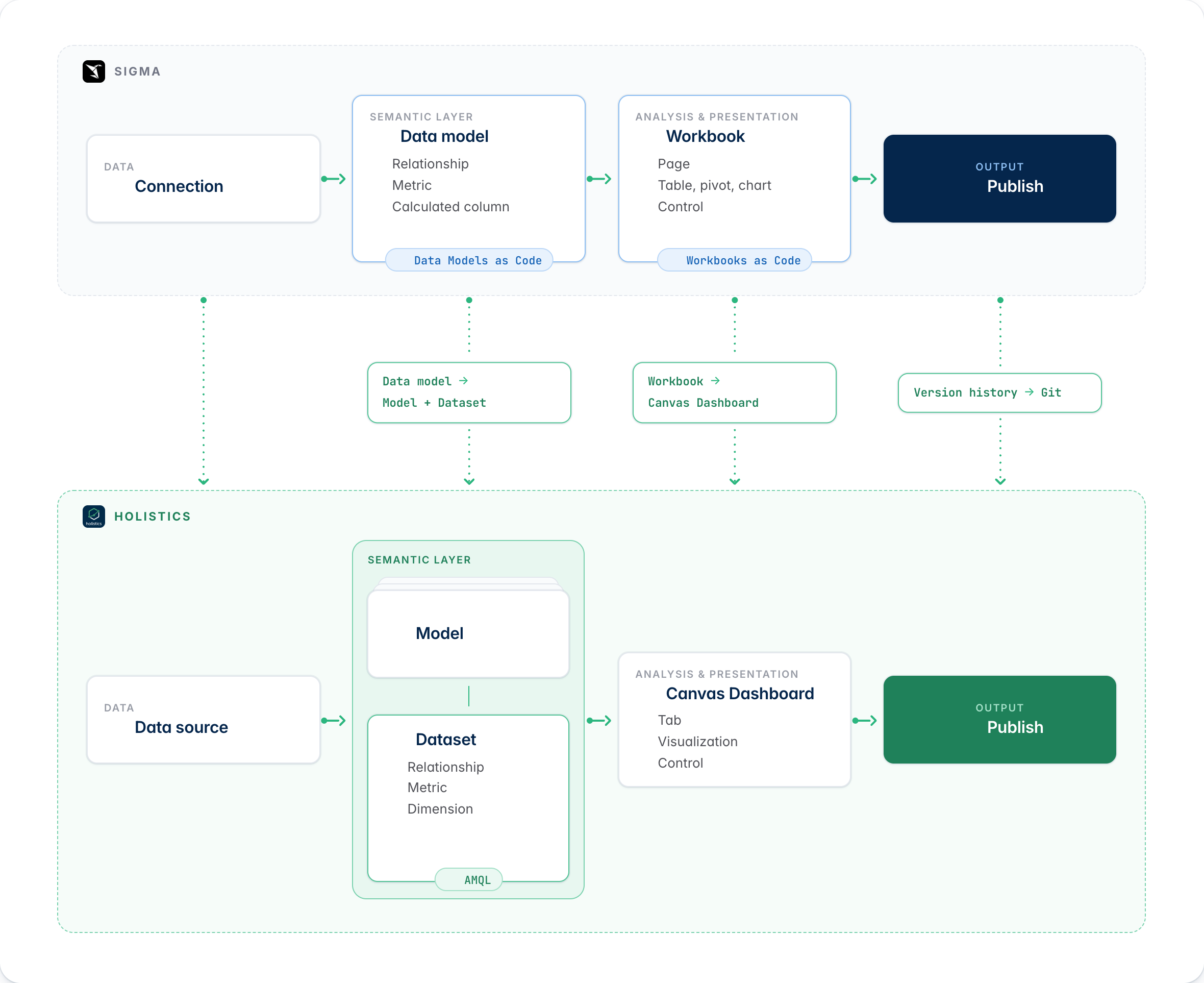
Sigma vs. Holistics
Sigma puts analysis and presentation in a workbook. Workbook pages contain tables, pivots, charts, controls and other elements. Reusable data models provide shared calculations and relationships.
Holistics separates the semantic layer from the presentation layer. Models and datasets define the data. Explore lets users analyse a published dataset. Canvas Dashboards present and share saved results.
The main mappings are:
- Sigma connection → Holistics data source
- Sigma data model → Holistics dataset, built from Holistics models
- Sigma model element or table → Holistics table model or query model
- Sigma workbook → Holistics Explore and Canvas Dashboard
- Sigma workbook element → Holistics dashboard block
| Sigma artifact | Holistics equivalent | Key difference |
|---|---|---|
| Connection or warehouse source | Data source | Both query connected data platforms. In Holistics, reports reach a data source through a dataset. |
| Data model | Dataset | Sigma groups reusable tables, metrics and relationships in a data model. Holistics groups related models in a dataset. |
| Model element or table | Table model or query model | A Sigma model element sits inside a data model. A Holistics model is a reusable definition over a table or SQL query. |
| Relationship | Relationship | Both define join logic. Holistics finds a join path between the models used in a query. |
| Metric | Dataset metric in AQL | Both define reusable aggregates. A Holistics metric can set its aggregation scope across related models. |
| Formula or calculated column | Dimension or Ad-hoc Field | Holistics uses semantic fields for reusable logic and Ad-hoc Fields for report-specific logic. |
| Workbook | Explore and Canvas Dashboard | Sigma combines analysis and presentation. Holistics separates dataset exploration from saved dashboard content. |
| Workbook page, table, pivot or chart | Canvas Dashboard and visualization block | A Sigma page belongs to a workbook. A Holistics dashboard is a separate object that contains blocks and can use tabs. |
| Control | Control block or filter | Both filter data or set parameters. Holistics controls connect to visualizations that query datasets. |
| Explore mode, custom view or saved view | Explore and a personal or shared dashboard | Sigma saves changes to a workbook as a view. Holistics saves useful Explore results as dashboard content. |
| Draft, publish, version history or version tag | Git branch, commit, pull request and publish | Sigma versions one document. Holistics can review and publish changes across the full analytics project. |
| Data Models as Code and Workbooks as Code | AMQL model and dataset files, and Canvas .page.aml files | Sigma exposes each object as JSON or YAML through APIs. Holistics stores project objects as source files. |
Example mapping
For example, suppose you analyse orders by customer.
In Sigma, one data model can contain Orders and Customers as table elements. The same data model can define their relationship and a Total revenue metric.
In Holistics, Orders and Customers are separate models. A Sales dataset includes both models, their relationship and the Total revenue metric. Users explore the Sales dataset or use it in a Canvas Dashboard.
Where the mappings are approximate
These differences matter when you plan a migration or design new content.
Data models map to 2 Holistics objects
A Sigma data model is a reusable semantic document for workbooks. Holistics splits this work between models and datasets. A model represents one table or query. A dataset brings models, relationships, fields and metrics together for Explore.
Workbooks split into analysis and presentation
Sigma uses one workbook for analysis and presentation. Holistics uses Explore for analysis and Canvas Dashboards for presentation.
Custom views do not map directly
The nearest Holistics result is an exploration saved to a personal or shared dashboard. This result is not a private version of a published workbook.
Versioning works at different levels
Sigma versions individual documents through drafts, published versions, history and tags. Holistics Git branches and commits can change the full AMQL project. Publishing moves the approved project state to production.
Code and AI development
Both products support code and AI-assisted development. They expose different product objects as code.
Sigma Data Models as Code uses its API to retrieve, create and update a data model as JSON or YAML. Workbooks as Code uses a similar representation for workbook pages, elements, formulas, layout and formatting.
Holistics stores models, datasets and Canvas Dashboards as AMQL files in one project. Teams can review changes through Git branches and pull requests. They can edit files in the web IDE or a local IDE, then publish approved changes.
The Holistics MCP Server gives compatible AI tools access to permitted workspace context. The AMQL files remain the versioned source.
Availability on 19 August 2026
Check availability before you compare or plan a code-based workflow:
- Sigma Data Models as Code: generally available through the v2 API. Sigma's release policy treats unlabelled features as generally available
- Sigma Workbooks as Code: private beta for selected customers. Private beta customers can use workbook code even though the general Data Models as Code guide lists workbook representations as unsupported
- Holistics Canvas Dashboard: available in Holistics 4.0. Holistics documents AMQL, Git, Model Context Protocol (MCP) and local AI-assisted development without beta labels
- Holistics external Git repository: available on the Standard plan and above. Holistics uses a hosted repository by default
Official sources
Use these official sources to check terms and current availability.
Sigma
- Sigma basics
- Tutorial: Intro to data models
- Define relationships in data models
- Create and manage metrics
- Create and interact with custom views
- Workbook lifecycle: explore, draft, and publish
- Workbook versions and version history
- Manage data models as code
- Workbooks as Code preview