Connect with GitHub App
Introduction
The Holistics GitHub App is the recommended way to connect a GitHub repository to Holistics. You install it once at the organization (or personal account) level, pick the repos you want Holistics to access, and you're done. Both code sync and the Pull Request Workflow are enabled in the same setup.
Compared to the SSH Deploy Key method, the GitHub App is:
- Org-level, so the connection isn't tied to anyone's personal account. It keeps working when a teammate leaves.
- No SSH required. The app uses HTTPS, which is useful for organizations that block SSH.
- Single setup. One flow covers both code sync and PR Workflow, instead of a Deploy Key plus Personal Access Token combo.
This guide is for GitHub repositories. For GitLab, Bitbucket, or any self-hosted SSH-compatible Git, use the SSH Deploy Key method instead.
Who can install the Holistics GitHub App?
Whether you can install the app depends on your role on GitHub:
- Personal account repos: you can always connect directly.
- GitHub org owners: you can connect to any repo in the org.
- Repo admins: you can connect to repos you administer, as long as your org owner has enabled the setting "Allow repository admins to install GitHub Apps". See GitHub's docs on limiting app installations.
- Other org members: you can't install the app directly. Ask your GitHub org owner to connect from Holistics, or use the SSH Deploy Key method instead.
If you can access your repo's Settings tab on GitHub, you're at least a repo admin.
Prerequisites
Before you start, make sure:
- You have a GitHub repository that is either empty or was previously connected to Holistics. If you need a fresh one, create an empty repo on GitHub. Don't initialize it with a README,
.gitignore, or license. - You meet the install requirements for your role above.
How to connect
-
In Holistics, go to Project Settings → Version Control Settings and click Connect to Git repository.
-
In the dialog, select GitHub, choose GitHub App (Recommended), and click Next.
-
Click Install on GitHub. A popup window opens to GitHub.
Allow popups from HolisticsYour browser must allow popups from Holistics for this step to work. If nothing happens when you click the button, check your browser's address bar for a blocked-popup icon and allow popups for the Holistics site, then try again.
-
On GitHub, complete the install:
- Pick the organization or personal account you want to install the app on.
- Choose All repositories or Only select repositories (and pick the ones you want).
- Click Install.
If the Holistics app is already installed on your org, GitHub will show an Update repository access page instead of the install page. Use it to add the target repo (or remove ones you no longer want), then click Save.
-
The popup closes and you return to Holistics. Select your repository from the dropdown.
-
Click Connect repository. Holistics validates the repo (it must be empty or previously connected) and completes the setup.
Once connected, your Version Control Settings page shows the connected repository, and you can toggle Enable PR Workflow to start using pull requests. No separate token needed.
Common issues
My repository isn't in the dropdown
This happens when the app was installed with Only select repositories and your target wasn't one of them.
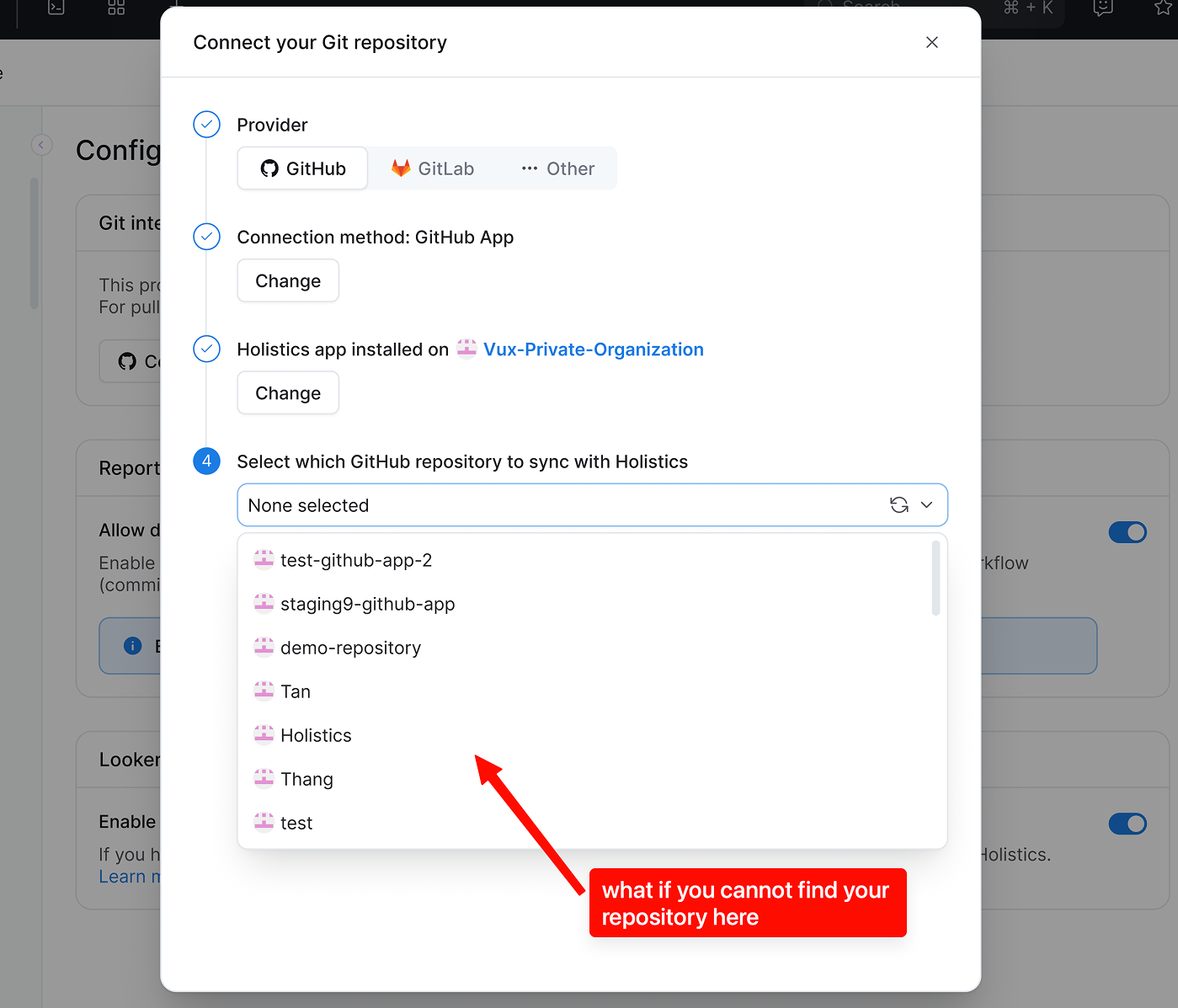
You have two options:
- Ask your GitHub org admin to open GitHub org settings → Installed Apps → Holistics → Repository access, add the repo, then refresh the dropdown in Holistics.
- Or, at Step 3, click Install on GitHub again to open the "Update repository access" page and add the repo yourself (if you have permission).
"Connection could not be completed" error
You'll see this if your GitHub org requires approval for new app installations. Even if an org owner approves the request on GitHub, the connection can't finish automatically. This is a GitHub platform limitation.
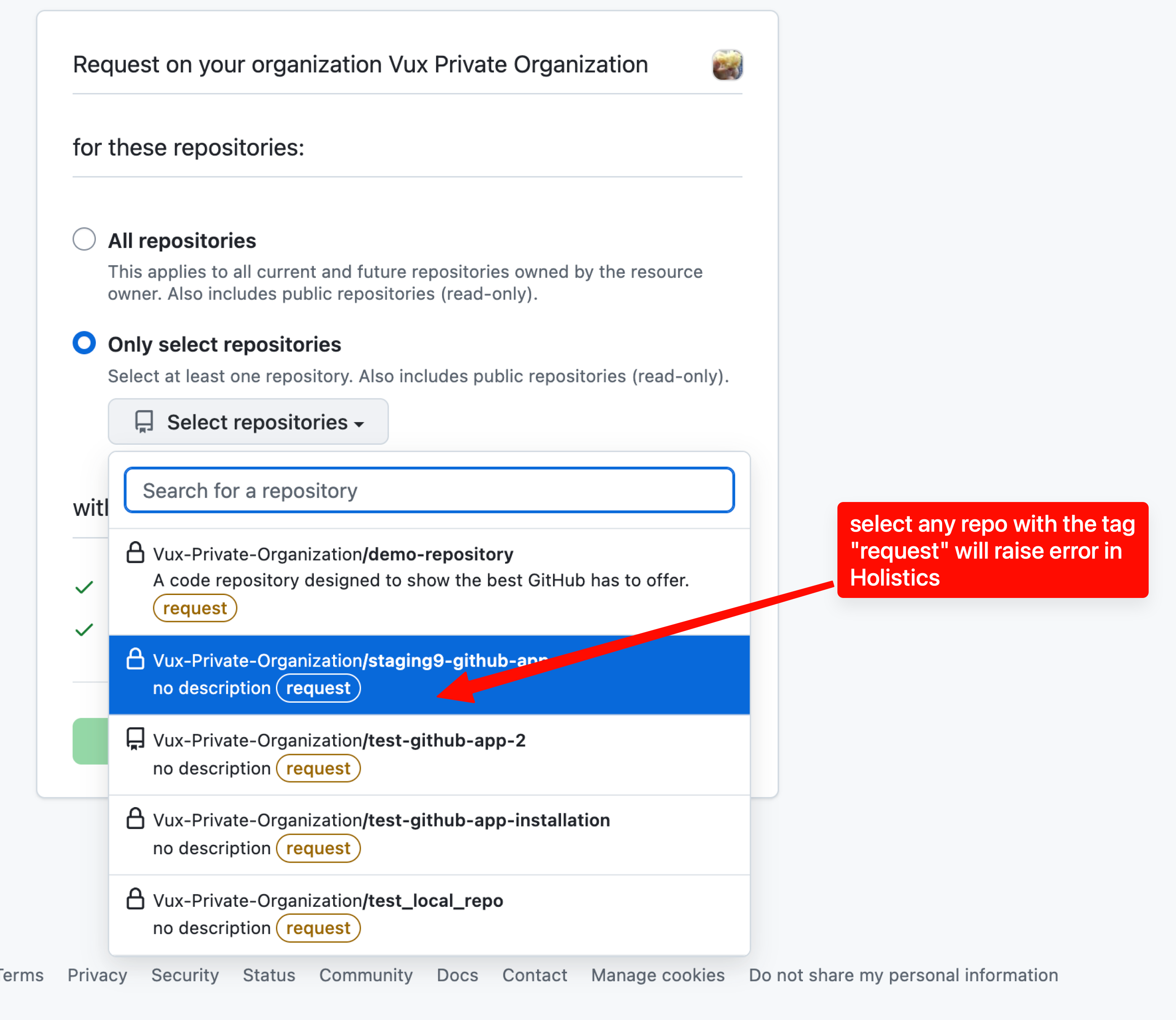
To get unblocked:
- Retry and select a repo you administer. Look for repos without the "request" label.
- Ask your org owner to connect from Holistics themselves (Project Settings → Version Control Settings). They'll go through the install directly, without a request step.
- Use SSH Deploy Key as a fallback.
I want to install on a different GitHub organization
At Step 3, click Change organization to pick a different org or personal account. Your previous installation isn't affected. The app stays installed there until an org admin removes it.
Managing the connection
If the app is uninstalled, suspended, or loses access to a repo, your Holistics development workflow keeps working normally. You can still edit code, create branches, and commit. What pauses is the sync to your GitHub repository and the ability to create pull requests, until the connection is restored.
Disconnect in Holistics vs. uninstall on GitHub
These are two different actions. Disconnecting in Holistics removes the integration from your project, but the Holistics GitHub App stays installed on your organization. If you want to fully remove the app, go to GitHub → Org settings → Installed GitHub Apps → Holistics → Uninstall.
This distinction matters because an installed app that isn't linked to any Holistics project is harmless, but it can be confusing to an org admin reviewing their installed apps later.
What happens if the GitHub App is uninstalled?
If someone uninstalls the app on GitHub, Holistics detects it right away and marks the integration as disconnected. You'll see an error state in Version Control Settings with options to Reconnect with GitHub App or Switch to SSH Deploy Key.
If multiple Holistics projects share the same GitHub App installation (same org, different repos), uninstalling affects all of them.
What happens if the app is suspended?
Suspension is different from uninstall. It's temporary. The integration pauses (code sync and PR Workflow are on hold) and Holistics shows a suspended state. When an org admin unsuspends the app on GitHub, the integration resumes automatically. No action needed from you.
What happens if repo access is revoked?
If an org admin removes your repo from the Holistics app's allowed list, the integration for that repo disconnects with a specific message: "Repository access was revoked in GitHub." Ask the admin to re-add the repo, and Holistics will reconnect automatically.
Switching from SSH Deploy Key to GitHub App
Already using the SSH Deploy Key method and want to move to GitHub App? You can switch without recreating your repo:
- In Holistics, unlink your current Deploy Key connection.
- Follow the steps above to connect via GitHub App, pointing to the same repo.
Branches and commit history are preserved. Only the authentication method changes. Your existing Personal Access Token (if you set one up for PR Workflow) is no longer needed and can be revoked on GitHub.
Security
The GitHub App method is designed around org-level control and least-privilege access:
- Org-level install, managed from GitHub org settings. Your IT/Security admin can see exactly what's installed, which repos it can access, and revoke it in one click.
- Scoped permissions. The app only requests
contents: read/write,pull requests: read/write, andmetadata: read. No org-level permissions, no administration access. - Short-lived tokens. Holistics doesn't store a long-lived token. Instead, it requests a fresh 1-hour installation token from GitHub each time it needs to perform a Git operation.
- No personal account dependency. The integration belongs to the organization, so team changes don't break anything.
Frequently asked questions
What permissions does the app request, and why?
The Holistics GitHub App only requests repository permissions. It does not request any organization or account permissions, so it has no visibility into your org membership, billing, or personal account data.
Within repository permissions, the app requests:
contents: read/write: to clone your repo and push commits.pull requests: read/write: to create PRs, track their status, and trigger auto-publish on merge.metadata: read: required by GitHub for all apps (basic repo info).
We don't request administration or any other repository permission beyond what's listed above.
Can the app create a new GitHub repository for me?
No. Creating repos would require GitHub's administration: write permission, which also allows repo deletion, branch protection changes, and more. That's a broader footprint than we want for a data integration. You'll need to create the empty repo on GitHub first, then connect.