[Beta] Controlling filter and grouping paths
Introduction
When you explore data in Holistics, using a dimension with a metric means the metric gets grouped or sliced by that dimension. If the dimension and metric come from different models, Holistics uses the relationships between them to generate the proper joins alongside the grouping.
As long as a relationship path exists between two models, Holistics will find a way to join them. This is usually what you want, but sometimes combining a dimension and metric from different models doesn't make analytical sense.
This document explains how to control the filtering and grouping behavior between models.
How to control filter and grouping behavior
Relationships in a dataset have a property called direction that controls which direction filters and groupings can flow between two models.
Dataset ecommerce {
  ...

  models: [dim_users, fact_orders]

  relationships: [
    relationship(fact_orders.user_id > dim_users.id, true, direction: 'one_way')
    //                                                      ^^^^^^^^^^^^^^^^^^^^
    //                                                     'one_way' or 'two_way'
    //                                              defaults to 'two_way' if not specified
  ]
}
Available values
| Value | Behavior | When to use |
|---|---|---|
one_way | Filters and groupings flow only from the "one" side (dimension) to the "many" side (fact). | Standard dimension to fact relationships. Use this as your default for * Star schema or * Galaxy schema. |
two_way | Filters and groupings can flow in both directions. This is the default if not specified. | * Many-to-many relationships * 1:1 relationships |
If you don't specify direction, it defaults to two_way.
How it works
Given a relationship fact_orders.user_id > dim_users.id:
- With
one_way: You can groupfact_ordersmetrics bydim_usersdimensions, but not the reverse. The dimension can filter and segment the fact, but the fact cannot reach back to filter or segment the dimension. - With
two_way(default): You can group in both directions. This allows more flexibility but can create unintended join paths in complex schemas.
Example use cases
When to use one_way
The most common use case for one_way is preventing invalid metric and dimension combinations in multi-fact setups like galaxy schemas. When you have multiple fact tables sharing common dimensions, bidirectional relationships can create unintended join paths that produce misleading results.
For example, in an e-commerce dataset with fact_orders and fact_inventory both connected to dim_products, you want to ensure that inventory metrics can only be grouped by product dimensions, not by user or order dimensions.
- [HTML node] — Dimension. Filters flow from here to dim_users, then to fact_orders.
- [HTML node] — Dimension shared by dim_cities and fact_orders.
- [HTML node] — Fact table. Its metrics can be grouped by users, cities, products, merchants, and categories.
- [HTML node] — Dimension of dim_products.
- [HTML node] — Dimension shared by fact_orders and fact_inventory.
- [HTML node] — Dimension of dim_products.
- [HTML node] — Fact table. Its metrics can only be grouped by product, merchant, and category dimensions.
- dim-cities → dim-users
- dim-users → fact-orders
- dim-products → fact-orders
- dim-merchants → dim-products
- dim-categories → dim-products
- dim-products → fact-inventory
Dataset ecommerce {
  ...

  models: [
    dim_users, dim_products, dim_cities,
    dim_merchants, dim_categories,
    fact_orders, fact_inventory
  ]

  relationships: [
    relationship(fact_orders.user_id > dim_users.id, true, direction: 'one_way'),
    relationship(fact_orders.product_id > dim_products.id, true, direction: 'one_way'),
    relationship(fact_inventory.product_id > dim_products.id, true, direction: 'one_way'),
    relationship(dim_users.city_id > dim_cities.id, true, direction: 'one_way'),
    relationship(dim_products.merchant_id > dim_merchants.id, true, direction: 'one_way'),
    relationship(dim_products.category_id > dim_categories.id, true, direction: 'one_way')
  ]
}
For a detailed walkthrough of this scenario, see Controlling which dimensions can be used with a metric.
When to use two_way
Use two_way when you genuinely need filters and groupings to flow in both directions between two models. Common scenarios include:
Dimension to dimension analysis
When you need to analyze one dimension filtered by another dimension, traversing through a fact table, you may need two_way to allow the filter to flow in both directions.
Consider this model: dim_users → fact_orders ← dim_products. If you want to answer questions like "How many unique products (from a specific category) were purchased by each user age group?", the query needs to traverse from dim_users through the fact tables to reach dim_products.
If all relationships are set to one_way, the filter flows from dim_users to fact_orders, but stops there. It cannot continue to dim_products because that would require flowing in the reverse direction. To enable this traversal, you would need to set the relationship between fact_orders and dim_products to two_way.
- [HTML node] — Dimension. Its filters flow to fact_orders, but fact_orders cannot filter it back.
- [HTML node] — Fact table joining users and products.
- [HTML node] — Dimension. two_way lets a filter from dim_users reach it through fact_orders.
- dim-users → fact-orders (one_way)
- dim-products → fact-orders (two_way)
Dataset ecommerce {
  ...
  models: [dim_users, fact_orders, dim_products]

  relationships: [
    relationship(fact_orders.user_id > dim_users.id, true, direction: 'one_way'),
    relationship(fact_orders.product_id > dim_products.id, true, direction: 'two_way')
  ]
}
1:1 relationships
When two models have a true one-to-one relationship, there's no risk of data fan-out in either direction, so two_way is appropriate.
For example, if each user can only be the admin of one merchant, and each merchant can only have one admin user, the relationship between dim_users and dim_merchants is 1:1. Grouping merchants by user attributes or users by merchant attributes will never inflate the results.
For 1:1 relationships, direction is always two_way and cannot be changed to one_way.
Overriding filter direction at the metric level
Sometimes you want to keep one_way as the default for safety, but allow specific metrics to traverse in the reverse direction. You can do this using with_relationships() to override the filter direction for individual metrics.
For example, say you want to answer: "What's the latest user sign-up date for each order status?" This query needs to go from fact_orders.status to dim_users.sign_up_date, which is the reverse of the normal dimension to fact flow. If the relationship is set to one_way, this query would be blocked.
Instead of changing the dataset relationship to two_way (which would affect all queries), you can override it just for this metric:
Dataset ecommerce {
  // ... models and relationships ...

  metric latest_user_signup_by_order_status {
    label: "Latest User Sign-up Date"
    definition: @aql
      max(dim_users.sign_up_date)
      | with_relationships(
          relationship(fact_orders.user_id > dim_users.id, true, direction: 'two_way')
        )
    ;;
  }
}
This approach keeps the default one_way protection for all other queries while allowing this specific metric to use bidirectional traversal.
Row-level permission and filter direction
Row-level permission (RLP) filters also travel through your relationships. By default they follow the relationship's direction, so a permission filter can only reach the models that end users can filter. When the two should differ, set the rlp_propagation property on the relationship.
The two properties do different jobs. direction controls what end users can group and filter by. rlp_propagation controls how far a permission filter can travel.
Available values
The rlp_propagation property supports the following values:
| Value | Behavior |
|---|---|
'inherit' (default when not specified) | Permission filters follow the relationship's direction. |
'two_way' | Permission filters flow in both directions, even when direction is 'one_way'. |
'one_way' | Permission filters flow only from the "one" side to the "many" side, even when direction is 'two_way'. |
Writing rlp_propagation: 'inherit' explicitly has no effect, since that is the default.
Default behavior: permission filters follow the relationship direction
Let's return to the ecommerce dataset from When to use one_way, now with a total_orders metric and a permission rule on dim_cities.region so each user only sees data for their permitted regions. Here the rule is defined with row-level permission as-code; the behavior is the same for rules created through the UI:
Dataset ecommerce {
  ...

  models: [
    dim_users, dim_products, dim_cities,
    dim_merchants, dim_categories,
    fact_orders, fact_inventory
  ]

  relationships: [
    relationship(fact_orders.user_id > dim_users.id, true, direction: 'one_way'),
    relationship(fact_orders.product_id > dim_products.id, true, direction: 'one_way'),
    relationship(fact_inventory.product_id > dim_products.id, true, direction: 'one_way'),
    relationship(dim_users.city_id > dim_cities.id, true, direction: 'one_way'),
    relationship(dim_products.merchant_id > dim_merchants.id, true, direction: 'one_way'),
    relationship(dim_products.category_id > dim_categories.id, true, direction: 'one_way')
  ]

  metric total_orders {
    label: 'Total Orders'
    type: 'number'
    definition: @aql count(fact_orders.id);;
  }

  permission regional_access {
    field: r(dim_cities.region)
    operator: 'matches_user_attribute'
    value: 'region' // user attribute
  }
}
Exploring total_orders on its own works as expected:
explore {
  measures {
    total_orders
  }
}
The permission filter flows dim_cities → dim_users → fact_orders, following the one_way direction of each relationship, and the total covers only the permitted regions.
Now break total_orders down by dim_products.name, without any city field:
explore {
  dimensions {
    dim_products.name
  }
  measures {
    total_orders
  }
}
This Explore fails with:
Some permission rules are not applied in this Explore. This is likely due to a missing relationship between the models.
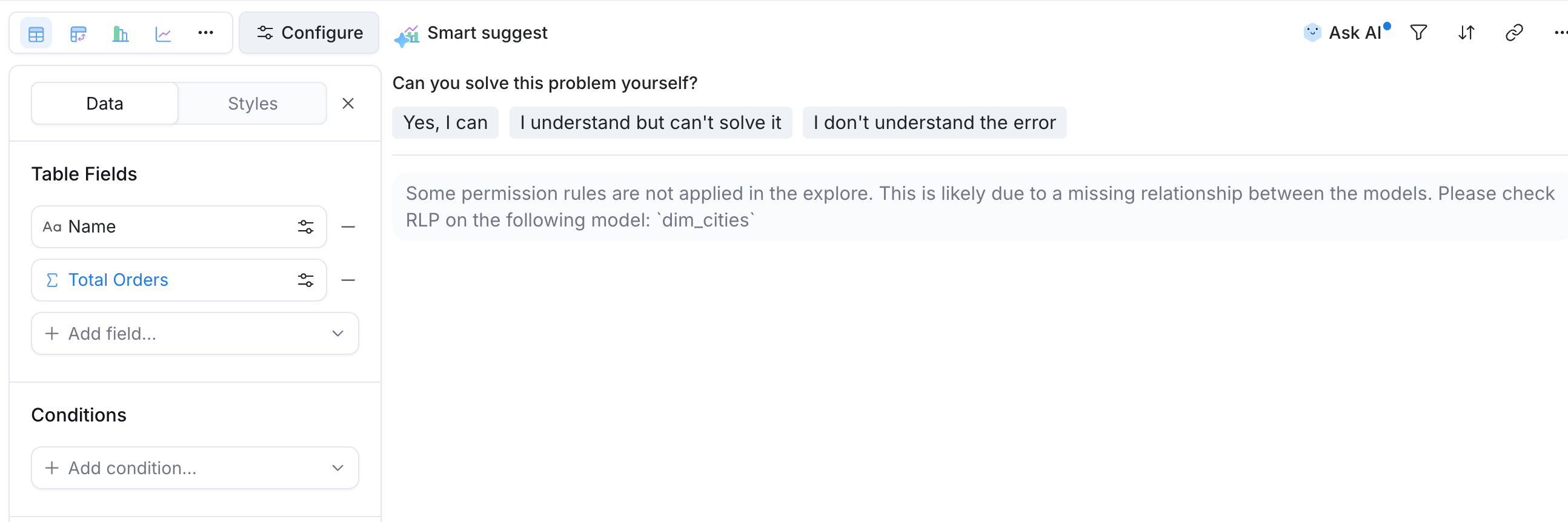
Here's why. Holistics checks every Explore against the permission rules on the dataset. If an Explore uses a field from a model the rule cannot filter, Holistics blocks the query rather than return unfiltered data. That check covers breakdowns too. Each dimension you break down by triggers a separate query that fetches that dimension's values.
For the dim_products value fetch, the permission filter would have to travel dim_cities → dim_users → fact_orders → dim_products. The last hop runs against the one_way direction of the fact_orders > dim_products relationship. Under the default rlp_propagation, permission filters stop where user filters stop, so the value-fetch query cannot be filtered and the whole Explore is blocked.
- permission regional_access field: dim_cities.region — Row-level permission rule defined on dim_cities
- [HTML node] — The permission rule filters this model on region.
- [HTML node] — Filtered through dim_cities.
- [HTML node] — The main query for total_orders is filtered here through dim_users.
- [HTML node] — Reachable only through fact_orders. That hop runs against one_way, and by default (inherit) permission filters follow the relationship's direction, so the value-fetch query cannot be filtered.
- Main query: total_orders, filtered via cities → users → orders Value-fetch query: dim_products.name cannot be filtered, so the whole Explore is blocked
- permission filter
- ✕ against one_way: blocked rlp_propagation defaults to inherit
- dim-cities → dim-users (one_way)
- dim-users → fact-orders (one_way)
- dim-products → fact-orders (one_way)
- permission → dim-cities (filters region)
- dim-cities → dim-users (1)
- dim-users → fact-orders (2)
- fact-orders → dim-products (✕ blocked)
This can feel unpredictable to end users. The metric alone works, adding a product breakdown fails, and adding a city field on top makes it work again because the dim_cities fetch can be filtered directly. See the row-level permission FAQ for the other cause of this error.
Choosing the fix
The right fix depends on one question: does it make sense for cities to filter products at all? There are three possible answers.
- No, not even through a permission rule. Leave the dataset as it is. The error is the safety check working as intended, and users under the rule simply cannot break orders down by product.
- Yes for the permission rule, but end users should still not break products down by city. Set
rlp_propagation: 'two_way'on thefact_orders > dim_productsrelationship. - Yes for both end users and the permission rule. Change that relationship to
direction: 'two_way'. Permission filters follow it by default, so norlp_propagationis needed.
Let only the permission rule cross: rlp_propagation: 'two_way'
Permission filters can now cross the blocking relationship in both directions while direction stays untouched:
Dataset ecommerce {
  ...

  relationships: [
    relationship(fact_orders.user_id > dim_users.id, true, direction: 'one_way'),
    relationship(fact_orders.product_id > dim_products.id, true, direction: 'one_way', rlp_propagation: 'two_way'),
    relationship(fact_inventory.product_id > dim_products.id, true, direction: 'one_way'),
    relationship(dim_users.city_id > dim_cities.id, true, direction: 'one_way'),
    relationship(dim_products.merchant_id > dim_merchants.id, true, direction: 'one_way'),
    relationship(dim_products.category_id > dim_categories.id, true, direction: 'one_way')
  ]
}
The dim_products value fetch is filtered through fact_orders, the permission check passes, and breaking total_orders down by product works.
- permission regional_access field: dim_cities.region — Row-level permission rule defined on dim_cities
- [HTML node] — The permission rule filters this model on region.
- [HTML node] — Filtered through dim_cities.
- [HTML node] — The main query for total_orders is filtered here through dim_users.
- [HTML node] — The value-fetch query for product names is filtered through fact_orders. That hop runs against one_way, but rlp_propagation='two_way' lets the permission filter cross.
- Main query: total_orders, filtered via cities → users → orders Value-fetch query: dim_products.name, filtered via cities → users → orders → products
- permission filter
- against one_way, allowed: rlp_propagation='two_way'
- dim-cities → dim-users (one_way)
- dim-users → fact-orders (one_way)
- dim-products → fact-orders (one_way)
- permission → dim-cities (filters region)
- dim-cities → dim-users (1)
- dim-users → fact-orders (2)
- fact-orders → dim-products (3)
This only affects security propagation. End users still cannot group or filter against the one_way direction, so the guardrails you set up with direction stay intact.
Let everyone cross: direction: 'two_way'
If the city to product path is valid for end users too, change the relationship's direction instead:
Dataset ecommerce {
  ...

  relationships: [
    relationship(fact_orders.user_id > dim_users.id, true, direction: 'one_way'),
    relationship(fact_orders.product_id > dim_products.id, true, direction: 'two_way'),
    relationship(fact_inventory.product_id > dim_products.id, true, direction: 'one_way'),
    relationship(dim_users.city_id > dim_cities.id, true, direction: 'one_way'),
    relationship(dim_products.merchant_id > dim_merchants.id, true, direction: 'one_way'),
    relationship(dim_products.category_id > dim_categories.id, true, direction: 'one_way')
  ]
}
Permission filters follow the new direction by default, so the same breakdown works. This also lets end users break products down by city and other user fields, so use it only when that combination is valid. See Dimension to dimension analysis.