How Holistics handles joins
Introduction
For business users that use drag-and-drop report interface day by day, it may not be that important to understand what is happening behind the scenes as long as "it works".
However, for analysts, it is important to understand fully Holistics' underlying mechanism for joining to ensure the results are calculated correctly.
How we generate SQL based on different join types
By default, Holistics uses LEFT JOIN (also known as LEFT OUTER JOIN) for both many-to-one and one-to-one relationships. For many-to-one, the model on the "many" side goes on the left of the join. If you have verified that a relationship's keys always match, you can opt into INNER JOIN instead with nullable=false.
Consider an example where we want to count total revenue generated by different genders of the users.

Using Data Exploration, the result may look like this:
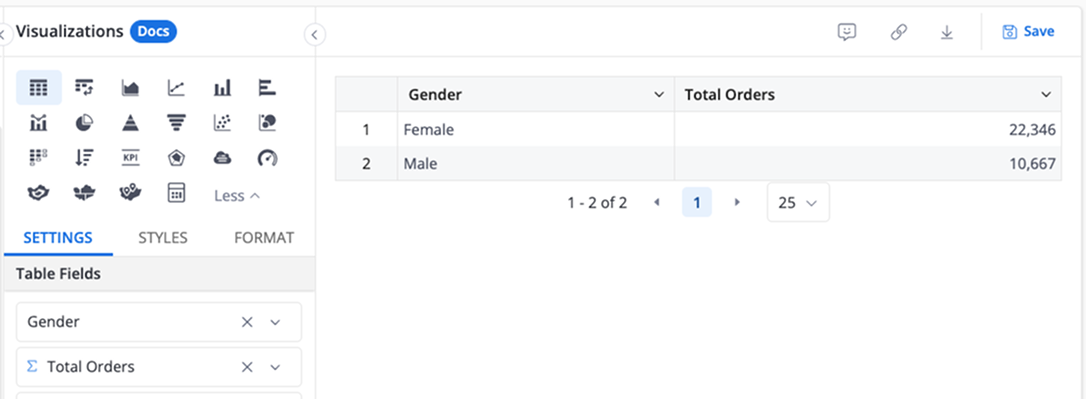
The final SQL will look like this:
SELECT
  U.gender,
  SUM(O.revenue) as total_orders
FROM orders O
LEFT JOIN users U ON O.user_id = U.id
GROUP BY 1
This preserves rows from the "many" table even when there's no matching record on the "one" side (referential integrity). In the example above, orders whose user_id doesn't exist in users are still counted.
Fan-out with one-to-many relationships
Fan-out happens when a join duplicates rows on the "one" side of a one-to-many relationship. For example, joining orders to order_items repeats each order once per item. An aggregate like SUM(orders.delivery_attempts) then counts the same order multiple times and returns an inflated result.

Holistics detects and resolves this automatically. Every relationship declares its cardinality, so the query engine knows when a join path could duplicate rows. It then restructures the query: aggregate first, then join the deduplicated results. This works for any measure whose aggregation Holistics can see (AQL measures, UI aggregations, and business calculations). Only custom measures written in raw SQL can't be verified. Rather than return a wrong number, Holistics blocks those with the error Cannot combine selected fields due to potential fan-out issues.
For the full mechanism and how to fix that error, see fan-out and how Holistics resolves it.
Referential integrity and join types
Take the (Orders, Users) example above. Consider scenario where there are orders records of user ID = 5, but in the users model, no corresponding record of user ID 5 found. This is a violation of the referential integrity rule between orders and users (many-to-one relationship).
If we use INNER JOIN for the above query, the result set would eliminate orders rows with unfounded users. This is dangerous and will underreport the sales results.
Therefore, using INNER JOIN does not resolve referential integrity violation correctly.
-- IMPORTANT: This is not what Holistics does
-- Using INNER JOIN
SELECT
  U.gender,
  SUM(O.revenue) as total_orders
FROM orders O
INNER JOIN users U ON O.user_id = U.id
GROUP BY 1
Generally speaking, Holistics will opt to use OUTER JOIN when dealing with referential integrity issues. In some situation, this will add query performance overhead, but it ensures that all records will be accounted for and not fall into referential integrity violation traps.
Opting into INNER JOIN with nullable=false
If you have verified that your data has no such violations, you can declare it by adding nullable=false to the relationship:
Dataset sales {
  ...
  relationships: [
    // Default (nullable=true): generates LEFT JOIN
    relationship(sales_fact.store_id > stores.id, true),

    // Non-nullable: generates INNER JOIN
    relationship(sales_fact.date > date_dimension.date, true, nullable=false)
  ]
}
nullable is an assertion about your data, not a join instruction. Setting it to false declares that the joining column on the "many" side is never NULL and every value matches exactly one row in the target model. Under that assertion, INNER JOIN returns exactly the same results as LEFT JOIN (there are no unmatched rows to drop), so Holistics can safely generate the faster join type.
Why INNER JOIN is faster
Data warehouses optimize INNER JOIN much more aggressively than LEFT JOIN. Filters on the dimension side can be pushed through the join into the fact table scan, partition pruning works normally (ClickHouse, for example, skips pruning when the filter sits on the right-hand side of a LEFT JOIN), and the join processes far fewer rows, which reduces memory pressure.
Take a query that sums sales, filtered by a date dimension field. With the default nullable=true:
SELECT SUM("sales_fact"."SalesAmount") AS "sales_amount"
FROM Sales_Fact "sales_fact"
LEFT JOIN Date_Dimension "date_dimension"
  ON "sales_fact"."Date" = "date_dimension"."Date"
WHERE "date_dimension"."Date" >= '2026-02-01'
  AND "date_dimension"."Date" < '2026-03-01'
With nullable=false on the relationship:
SELECT SUM("sales_fact"."SalesAmount") AS "sales_amount"
FROM Sales_Fact "sales_fact"
INNER JOIN Date_Dimension "date_dimension"
  ON "sales_fact"."Date" = "date_dimension"."Date"
WHERE "date_dimension"."Date" >= '2026-02-01'
  AND "date_dimension"."Date" < '2026-03-01'
Both queries return the same result when referential integrity holds. The INNER JOIN version, however, lets the warehouse prune partitions on the fact table and push the date filter down, which can turn a full-table scan into a small ranged read. On large, partitioned fact tables the difference is often an order of magnitude in both query time and memory usage.
What happens when the assertion is wrong
If the data actually contains NULL or orphaned foreign keys, nullable=false makes the INNER JOIN drop those fact rows silently. There is no error or warning; totals simply shrink whenever the join is involved.
Consider this data, with relationship(orders.product_id > products.id, true, nullable=false):
orders
| id | product_id | amount |
|---|---|---|
| 1 | P1 | 100 |
| 2 | P2 | 50 |
| 3 | NULL | 40 |
products
| id | name |
|---|---|
| P1 | Chair |
| P2 | Desk |
"Total amount" on its own needs no join and returns 190. "Total amount by product name" requires the join, and the INNER JOIN drops order 3, returning 150. The two reports disagree with no error anywhere. With the default nullable=true, the breakdown would instead show a NULL product group with amount 40, and both reports would agree at 190.
Holistics does not validate the assertion against your data, so keeping it truthful is the modeler's responsibility.
When it is safe to use
Use nullable=false only when both of these hold:
- The foreign-key column is
NOT NULL, or you have verified there are no NULLs. - Every foreign-key value exists in the target model: an enforced foreign-key constraint, or a verified guarantee such as a date dimension covering all fact dates.
A quick check to run before enabling it:
SELECT COUNT(*)
FROM sales_fact f
LEFT JOIN date_dimension d ON f.date = d.date
WHERE d.date IS NULL;
-- Must return 0. Otherwise nullable=false will drop these rows.