Why relationships, not joins
Introduction
In raw SQL, every analytical question commits you to a specific FROM table and a specific JOIN sequence. Change the question, rewrite the SQL. Add a model, edit every query that touches it. Holistics breaks that coupling: you declare how tables relate once on a dataset, and the SQL gets derived per query.
This page is for analysts and engineers used to writing SQL by hand, or to tools where joins are declared inside an explore (Looker, dbt-style metric layers).
Joins vs relationships
A JOIN is an instruction to combine two tables: this one with that one, on this condition. A relationship records that two tables are connected (which keys link them, and at what cardinality) without saying how to combine them. People conflate the two often, and the conflation usually shows up later, when a question changes shape and the existing JOINs don't fit it.
Joins
A JOIN can be written inline in a query, or declared in a model file (for e.g., Looker). Either way, a JOIN is an instruction to combine tables. It commits to a root, a join type (LEFT, INNER, OUTER, etc.), and a condition. The JOIN sits inside a specific access path: from this table, join those tables, this way.
-- Inline JOIN (raw SQL): written per query
FROM orders LEFT JOIN users ON orders.user_id = users.id
# Declared JOIN (Looker-style): part of an explore, committed to a root and a join type
explore: orders {
  join: users {
    type: left_outer
    sql_on: ${orders.user_id} = ${users.id} ;;
    relationship: many_to_one
  }
}
When a user picks fields via the explore's field picker (say orders.amount and users.name), Looker compiles the declaration plus the selection into SQL:
-- Compiled output: structurally identical to writing the JOIN inline
SELECT orders.amount, users.name
FROM orders LEFT JOIN users ON orders.user_id = users.id
The declared JOIN becomes an inline JOIN at query time. Same kind of object, written once and reused, but still committed to the same root and the same join type as if you'd hand-written it.
Relationships
A relationship is a different object. It records how two tables connect: which keys link them, and with what cardinality (one user has many orders, for example). It doesn't commit to a root or a join type. It just records the connection and stays out of the way of any specific access path.
Dataset ecommerce {
  models: [orders, users, cities, countries]
  relationships: [
    relationship(orders.user_id > users.id, true),
    relationship(users.city_id > cities.id, true),
    relationship(cities.country_code > countries.code, true)
  ]
}
Holistics holds your relationships as a graph and picks the access path per query: which root, which join type, which traversal. The same relationship gets reused across queries that traverse it in different ways.
Why Holistics declares relationships instead of joins
A JOIN commits you to a root model: the table right after FROM. With FROM orders as your root, you can answer questions per order; for questions per user, you need a different query rooted at FROM users. Each new root means a new dataset or explore to build and maintain. A relationship doesn't commit to a root, so one declaration serves any question that traverses it.
In raw SQL, the JOIN sequence and the question are written together. Every query commits to both: a specific FROM table as root, and a specific path of joins to reach the dimensions and metrics you want. The choice of root decides which rows make it into the final result.
select ...
from table_a -- table_a is considered as root
  left join ...
This matters because the right root depends on the question, not the schema. Take the same four models (orders, users, cities, countries) and ask three different questions:
-- Total revenue by country
SELECT countries.name, SUM(orders.amount) AS revenue
FROM orders -- orders is root model
  LEFT JOIN users ON orders.user_id = users.id
  LEFT JOIN cities ON users.city_id = cities.id
  LEFT JOIN countries ON cities.country_code = countries.code
GROUP BY 1;

-- How many users live in each city
SELECT cities.name, COUNT(users.id) AS user_count
FROM cities -- cities is root model
  LEFT JOIN users ON users.city_id = cities.id
GROUP BY 1
ORDER BY 2 DESC;

-- Total orders per user, including users who haven't bought anything yet
SELECT users.name, COUNT(orders.id) AS order_count
FROM users -- users is root model
  LEFT JOIN orders ON orders.user_id = users.id
GROUP BY 1
ORDER BY 2 DESC;
Same models, three roots. Every new question is new SQL written and maintained, and every schema change ripples across every query that touches the affected tables.
Holistics splits connection from question. The connection is a property of the dataset (declared once, as a graph of > relationships between models). The question is a property of the query (the fields you select). Holistics derives the JOINs each time, picking the root per query based on which models the dimensions, metrics, and filters touch. There's no fixed root, no pre-committed dataset.
One dataset, many questions
Take those four models (orders, users, cities, countries) connected by relationships. Three different business questions, three different SQL "starting points" needed:
| Question | What you'd ask in Holistics | Generated FROM |
|---|---|---|
| Total orders per country | dim: countries.name, metric: count(orders.id) | FROM orders |
| Total users per country | dim: countries.name, metric: count(users.id) | FROM users |
| Total cities per country | dim: countries.name, metric: count(cities.id) | FROM cities |
In a join-based tool, those three questions need three queries, or three datasets if your tool fixes the FROM table at definition time. The SQL is structurally different for each.
In Holistics, all three metrics live in the same dataset and can sit on the same chart, table, or filter without any of that. The relationships graph stays the same; the root shifts based on which model your metric points at.
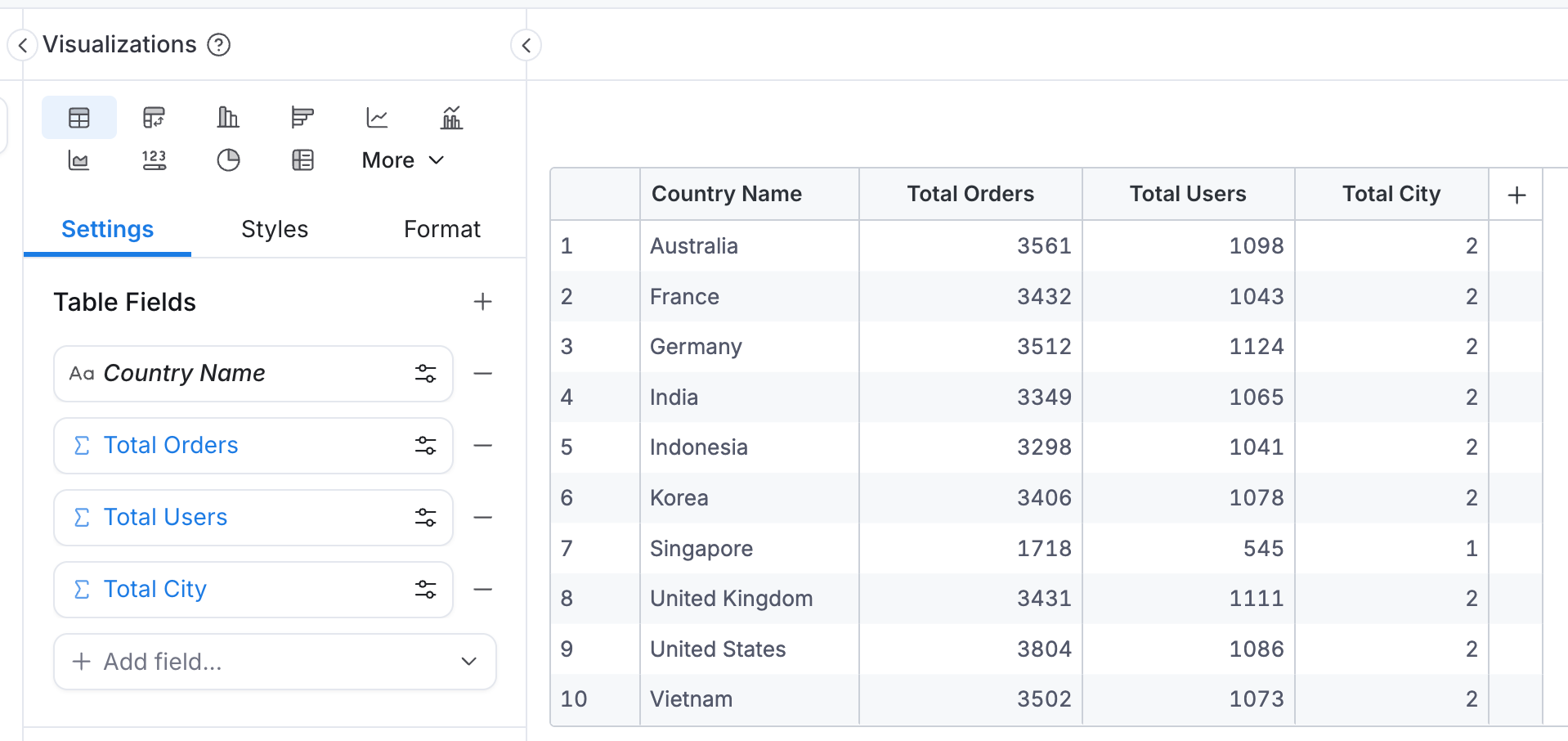
Concretely, with countries.name as the dimension and all three metrics on the same chart, Holistics emits one CTE per metric (each rooted at the model the metric counts) and FULL JOINs them on the shared dimension:
WITH orders_by_country AS (
  SELECT countries.name, COUNT(orders.id) AS total_orders
  FROM orders
    LEFT JOIN users ON orders.user_id = users.id
    LEFT JOIN cities ON users.city_id = cities.id
    LEFT JOIN countries ON cities.country_code = countries.code
  GROUP BY 1
),
users_by_country AS (
  SELECT countries.name, COUNT(users.id) AS total_users
  FROM users
    LEFT JOIN cities ON users.city_id = cities.id
    LEFT JOIN countries ON cities.country_code = countries.code
  GROUP BY 1
),
cities_by_country AS (
  SELECT countries.name, COUNT(cities.id) AS total_cities
  FROM cities
    LEFT JOIN countries ON cities.country_code = countries.code
  GROUP BY 1
)
SELECT
  COALESCE(o.name, u.name, c.name) AS country,
  o.total_orders,
  u.total_users,
  c.total_cities
FROM orders_by_country o
  FULL JOIN users_by_country u ON o.name = u.name
  FULL JOIN cities_by_country c ON COALESCE(o.name, u.name) = c.name
Notice the three FROM clauses: orders, users, cities. Each metric gets its own root, picked automatically from the model it counts. You wrote no SQL for this.
For more details on how Holistics generates these joins (LEFT vs FULL OUTER per cardinality, fan-out auto-resolution, referential integrity), see how Holistics handles joins.
Adding a model doesn't cascade
Production datasets grow. New entities, new tables, new business units land in your model regularly, and the cost of incorporating each addition determines how well your modeling layer keeps up over time.
Take the ecommerce dataset and add merchants to it. Suppose you also need products.merchant_id and merchants.city_id so merchants can be filtered by city.
In a join-based tool, that addition cascades:
- Add the
merchantstable to your data model, and edit every existing query that joinsproductsand should now surface merchant data to bring in the new join. - For each new merchant-anchored question ("revenue per merchant", "merchants per city", "products per merchant"), build a new query rooted at the right starting table. Repeat for every downstream question that combines merchants with the rest of your model.
In Holistics, the same addition is two lines:
Dataset ecommerce {
  models: [orders, order_items, users, products, cities, countries, merchants]
  relationships: [
    relationship(orders.user_id > users.id, true),
    relationship(order_items.order_id > orders.id, true),
    relationship(order_items.product_id > products.id, true),
    relationship(users.city_id > cities.id, true),
    relationship(cities.country_code > countries.code, true),
    relationship(products.merchant_id > merchants.id, true),
    relationship(merchants.city_id > cities.id, true)
  ]
}
Every existing query still works. Questions involving merchants ("revenue by merchant", "products per merchant city", "merchants per country") become askable from the same dataset, with no new SQL written. Holistics traverses the bigger graph the same way it traversed the smaller one.
Built-in fan-out resolution
Cardinality is recorded on every relationship. That tells Holistics when joining a "one"-side aggregate against a "many"-side dimension would otherwise inflate the result. Instead of joining and then aggregating, Holistics first reduces the "many" side to distinct (key, dimension) pairs, then joins back.
For example, ask the ecommerce dataset for count(users.id) grouped by orders.status. The path is users → orders (one user has many orders), so a naive join would count each user once per order they placed; a user with five cancelled orders would inflate the cancelled count by five. Holistics first reduces orders to distinct (user_id, status) pairs, then joins back to users:
WITH user_status_pairs AS (
  SELECT user_id, status
  FROM orders
  GROUP BY 1, 2
)
SELECT
  s.status,
  COUNT(users.id) AS user_count
FROM users
  LEFT JOIN user_status_pairs s ON users.id = s.user_id
GROUP BY 1
Each user contributes one row per status they have orders in, not one per order. For the mechanism, see fan-out and how Holistics resolves it.
Join-based tools solve the same overcounting under different names. Looker, for example, calls it symmetric aggregates. With relationships, the resolution falls out of cardinality you've already declared, with no extra metadata or per-query setup.
The mental shift: think about the question, not the join recipe
If you're SQL-fluent, your first reflex when asked "what's revenue by country?" is probably to start sketching: FROM orders LEFT JOIN users LEFT JOIN cities LEFT JOIN countries. That instinct isn't wrong. Holistics just asks you to start one step earlier in the thought process.
The shift is to start with the question and what it needs to be answered:
- What am I measuring? The metric (total orders, revenue, registered users, users who placed an order).
- What am I grouping by? The dimensions (country, month, product category).
- What grain do I want? The row level (one row per country? per user per month?).
Once you can answer those, the JOIN is just the SQL Holistics emits to fulfill the question.
The same questions drive the model layer too. "What am I measuring?" maps to a fact model; "what am I grouping by?" maps to a dimension model. The relationships you declare between them are how those answers stay durable: build the graph once, and every variant of the question becomes askable without new SQL. For the common shapes (star, galaxy, snowflake, role-playing dimensions), see modeling patterns.
Handling path ambiguity
As the relationship graph grows, the same pair of models can end up connected by more than one path. In the ecommerce dataset extended with merchants, there are two valid paths from countries to order_items:
countries → cities → users → orders → order_items(orders by customer country)countries → cities → merchants → products → order_items(orders by merchant country)
These are not the same question. Customer country and merchant country are different facts about the same row.
Holistics resolves this with a ranking algorithm: tier first (one-to-many is preferred over many-to-many through junctions), then explicit overrides via with_relationships(), then path length. When there's a clear winner, Holistics uses it silently. When multiple paths tie on all three criteria, Holistics picks one and shows a warning so you can make the call explicit.
In practice, most ambiguities resolve silently. Holistics picks the shorter, higher-tier path, which usually matches what you'd have written by hand. The warning only fires when there's a genuine tie.
In a join-based tool, ambiguity doesn't arise the same way: you wrote the JOIN sequence, so you've already chosen the path. That's a real upside (no ambiguity warnings, no tie-breaking), but it's the same property that makes new questions costly. You pay the explicit-path cost on every query in exchange for never being surprised.
For the full ranking algorithm and override mechanics, see Path ambiguity in dataset.
When you want explicit control
Relationships are the default for a reason: they handle most analytics questions concisely, without you writing SQL per question. But sometimes you need precise control over how a specific query gets joined, or you need to do something relationships can't express at all. Holistics gives you those tools without making you give up the relationship-based design.
with_relationships() for per-metric path control
When a single metric needs a non-default join path, wrap it with with_relationships(). This is useful for:
- Forcing a specific path through an ambiguous graph: "Products bought by city residents" might need to traverse
cities → users → orders → order_items → productsinstead of the default directcities → merchants → products. - Role-playing dimensions: when
fct_ordershas multiple date fields (created_at,delivered_at,cancelled_at) all referencingdim_dates, you mark only one as the active relationship and usewith_relationships()to switch to the others per metric. See Role-playing dimensions for the full pattern.
Here, the metric counts products but forces traversal through merchants, regardless of the dataset's default path:
metric products_bought_by_city_residents {
  definition: @aql
    products
      | count(products.id)
      | with_relationships(
          relationship(products.merchant_id > merchants.id, false, 'two_way')
        )
  ;;
}
Reference: with_relationships().
nullable=false for verified referential integrity
Holistics defaults to LEFT JOIN because it preserves every fact row even when a foreign key is NULL or has no match. That safety has a cost: warehouses optimize INNER JOIN far more aggressively (join pushdown, partition pruning, lower memory).
When you have verified that a relationship's keys always match, you can record that fact on the relationship, and Holistics will generate an INNER JOIN for it:
relationship(sales_fact.date > date_dimension.date, true, nullable=false)
This stays true to the relationship philosophy: you're stating a property of the data (referential integrity holds), not writing a join instruction, and the engine derives the join type from it. If the assertion is wrong, though, the INNER JOIN silently drops unmatched fact rows. See how Holistics handles joins for the failure mode and a verification query.
Query models when relationships aren't enough
Some questions cannot be expressed through relationships alone. The relationship grammar is equi-join only (modelA.field = modelB.field), which rules out:
- Non-equi joins. Range or inequality predicates the relationship grammar can't express. The classic case is matching a fact to the SCD Type 2 dimension version that was active when the event happened:
fct.event_date BETWEEN dim_history.valid_from AND dim_history.valid_to. Sessionization (events.ts BETWEEN sessions.start AND sessions.end) and range bucketing land here too. - UNIONs across unrelated tables. Combining rows from sources that aren't connected by foreign keys (e.g., merging two event streams into one analytical model).
Sometimes you just need to write SQL.
For these cases, build a query model. A query model is a model whose source is a SQL query, not a database table. It plugs into your dataset like any other model: you can define dimensions and metrics on it, relate it to other models, and query it through the same UI.
But query models come with a real cost. The SQL inside is static, which means the flexibility relationships give you (dynamic root model, grain control, automatic path resolution across questions) doesn't apply within that query model. Every new question that needs the SQL shaped differently becomes a new query model.
Treat them as a deliberate fallback, not a default. Use a query model when relationships genuinely can't express the problem; otherwise, prefer relationships even if the result feels less explicit.
Reference: Query models.
Where to go next
Foundations:
Patterns and edge cases:
- Modeling patterns
- Path ambiguity in dataset
- Show all dimension values (including empty)
- Role-playing dimensions
- Fan-out and how Holistics resolves it
References and escape hatches: