# Dynamic Dimensions Selection
> Learn how to create dimensions that change based on context or user input
:::tip knowledge checkpoint
A grasp of these concepts will help you understand this documentation better:
- [Parameter Fields](/docs/modeling/param-fields)
- [AQL Expression](/as-code/reference/expression)
- [Dimension](/docs/model-fields#dimensions)
:::
## Introduction
Using [Parameter Fields](/docs/modeling/param-fields), we can create a chart with a dropdown input that allows users to change the chart's dimension dynamically.
## Dynamic Dimension Selection
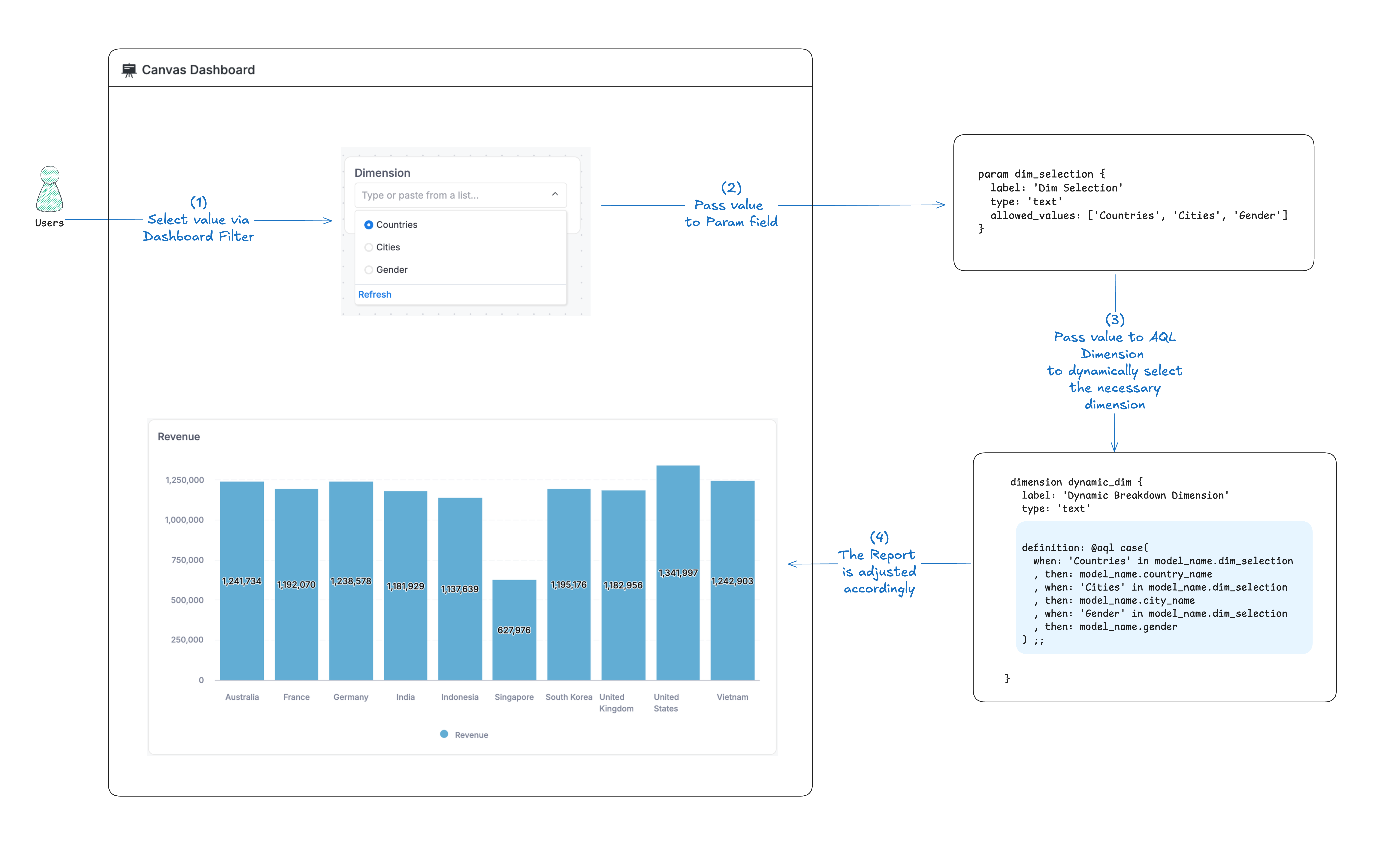
Assuming that you have a model `users_model` with `country_name`, `city_name`, and `gender` dimensions. You want to build a dashboard that let user pick which dimension to break down by.
In the video, you want your metric to be dynamically broken down by `Countries`, `Cities`, and `Genders`
This can be implemented using [Parameter Field](/docs/modeling/param-fields) and [AQL Expression](/as-code/reference/expression)
```typescript
// This is a model with a dynamic dimension set via a parameter
Model users_model {
dimension country_name { }
dimension city_name { }
dimension gender { }
}
```
### Step 1: Create a Parameter Field
First, create a [Parameter Field](/docs/modeling/param-fields) in the model.
```typescript
// This is a model with a dynamic dimension set via a parameter
Model users_model {
dimension country_name { }
dimension city_name { }
dimension gender { }
// Parameter to allow users to choose which dimension to use dynamically
//highlight-start
param dim_choice {
label: 'Dimension Choice'
type: 'text'
allowed_values: ['Countries', 'Cities', 'Gender']
}
//highlight-end
}
```
### Step 2: Create a Dynamic Dimension
Create a Dynamic Dimension that changes based on the selected parameter value.
```typescript
// This is a model with a dynamic dimension set via a parameter
Model users_model {
dimension country_name { }
dimension city_name { }
dimension gender { }
// Parameter to allow users to choose which dimension to use dynamically
param dim_choice { }
// Dynamic dimension that changes based on the selected parameter value
dimension breakdown_dim {
label: 'Dynamic Breakdown Dimension'
type: 'text'
//highlight-start
definition: @aql case(
when: 'Countries' in users_model.dim_choice
, then: users_model.country_name
, when: 'Cities' in users_model.dim_choice
, then: users_model.city_name
, when: 'Gender' in users_model.dim_choice
, then: users_model.gender
) ;;
//highlight-end
}
}
```
### Step 3: Use `Dynamic Breakdown Dimension` in the report
In the report, you can use `Dynamic Breakdown Dimension` as a dimension to break down your metric.
### Step 4: Use `Dimension Selector` Parameter Field in the dashboard filter
In the dashboard filter, you can use `Dimension Selector` Parameter Field to dynamically choose which dimension to use in the report.
## Advanced: Dimension selection across multiple models
:::warning Coming Soon
This feature is under development and will be coming soon!
:::