# Passing Filter Parameters via URL
> How to build pre-filtered dashboard by directly manipulating the dashboard's URL
## Introduction
In Holistics, you can filter a dashboard either by using the Filter pane directly on the dashboard or by adding string parameters to the dashboard URL.
Passing filter parameters via URL query strings is particularly useful in the following scenarios:
1. **Building a filtered dashboard without opening it**
2. **Dynamically populating pre-filtered dashboard links**
Imagine you have a **Performance Overview** dashboard with a **User ID** filter and need to create specific dashboard URLs for each user, this feature can simplify the process.
Instead of manually filtering the dashboard to get the link, you can quickly generate them as shown below:
User ID
User Email
Dashboard URL
1
john.brown@gmail.com
url?user_id=1
2
helen.tong@gmail.com
url?user_id=2
3
albert.einstein@gmail.com
url?user_id=3
...
...
...
## How It Works
You can add URL parameters to either the widget URL or the dashboard URL to pre-fill Interactive Controls such as [Filters](/docs/filters), [Period-over-Period Comparison](/docs/period-comparison), and [Date Drill](/docs/interactions/date-drills).
URL parameters can be used for both internal dashboards and [shareable links](/docs/delivery/shareable-links).
These parameters are also applied to hidden controls (filters that are not visible on the dashboard).
## URL Syntax
The basic syntax is straightforward: start with the report URL, add a question mark, and then append your filter syntax:
```aml
dashboard_url?&
```
- **Filtering multiple fields**: Use the “&” character to separate between different condition.
e.g. url?country=Vietnam&status=delivered
- **Filtering multiple values for a single field:** Use multiple instances of the same parameter name.
e.g. url?gender=male&gender=female
In which:
- **url**: The base URL of the dashboard or widget.
- **block_uname**: A unique identifier for the Filter, PoP Comparison, or Date Drill.
- **operator**: The operation to apply (e.g., equals, contains).
- **value**: The value passed to the interactive controls.
:::tip Note
- If you add an invalid value through URL parameters (e.g. add a string input to a Number filter), you’ll see an invalid indicator next to that interactive control.
- If you input multiple values for a single-select control, the last value will take effect.
:::
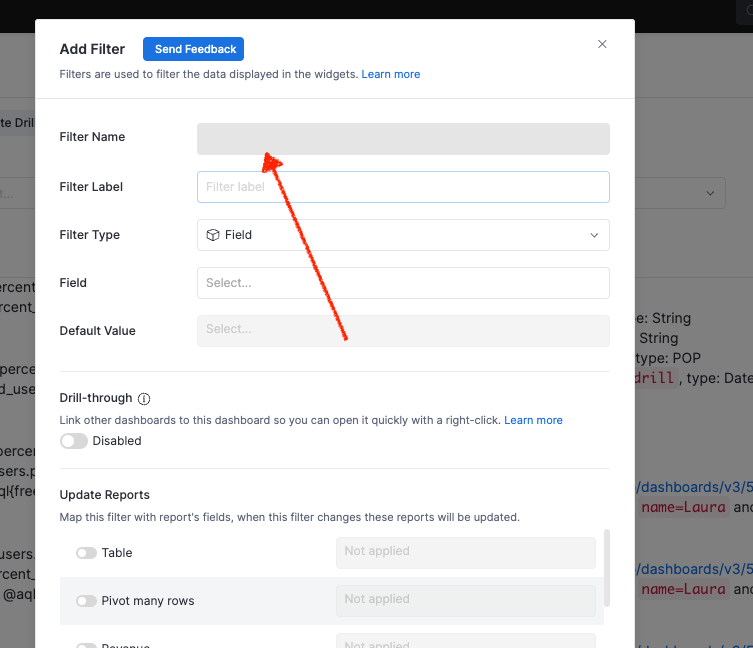
### Obtaining the Unique Identifier (block_uname)
To get the unique identifier (uname) of an interactive control:
1. Open the dashboard containing the control.
2. Click on the settings icon for the control.
3. In the settings modal, locate the “Filter Name” (or PoP Name, or Date-drill Name).
### Supported Operators
Currently, we support the following operators:
Field Type
Operators
Syntax
Example
Note
Filter
String, Boolean
is
=
url?country=Vietnam
url?is_male=false
String/Boolean query is case-sensitive
Number
equal to
=
url?score=8
url?score=8.0
Date, Datetime
matches
=
url?created_date=2020-01-24
url?created_time=2020-01-24 03:00
url?created_time=last week
Support both absolute and relative datetime
Period-over-Period Comparison
previous period
=
url?pop=prev 1 year
custom period
=
url?pop=2022-01-01 - 2022-02-01
none
=
url?pop=2022-01-01 - 2022-02-01
Date-drill
is
=
url?date_drill=Month
url?date_drill=year
Date-drill is case-INsensitive
## Other: Programmatically Generating Pre-filtered Dashboard URLs
If you generate filtered dashboards URLs programmatically, you can also use our API endpoint. The resulting URL will contain a single `_fstate` value, this parameter stores information about the applied controls and filters.
For detailed information, refer to the API documentation: [Build a Dashboard URL with preset filter states](/api/v2/reference/dashboards-build-url)
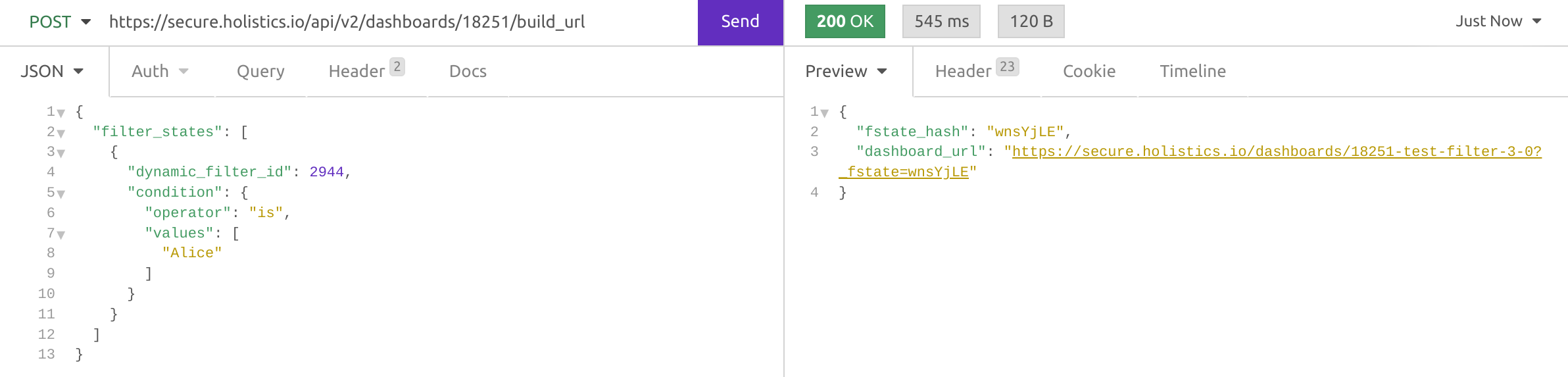
The advantage of using API to generate filtered dashboard URLs:
- If you have a lot of filter values, it won’t run the risk of exceeding the URL length limit that browsers impose.
- Using the API ensures better accuracy of logic of the filter conditions, since the condition logic is constructed using a JSON object.