Embed events: Control embedded dashboards with JavaScript
Introduction
Embed events let you control embedded Holistics dashboards from your application using JavaScript. Send commands, listen for user interactions, and keep your app and dashboard in sync, all through the browser's standard postMessage API.
Use cases include:
- Filter sync: Push filter values from your app into the dashboard, or listen when users change filters inside the iframe and apply those values elsewhere in your app.
- Dashboard navigation: Build a custom menu (horizontal nav, tab-style switcher) in your app that triggers dashboard changes inside the iframe with a smooth, no-reload experience.
- Error handling & token refresh: React to errors from the iframe by showing contextual messages to users, notifying admins, or automatically refreshing an expired JWT token to keep the session alive.
How it works
Communication flows in two directions between your application (the host) and the Holistics iframe (embedded analytics):
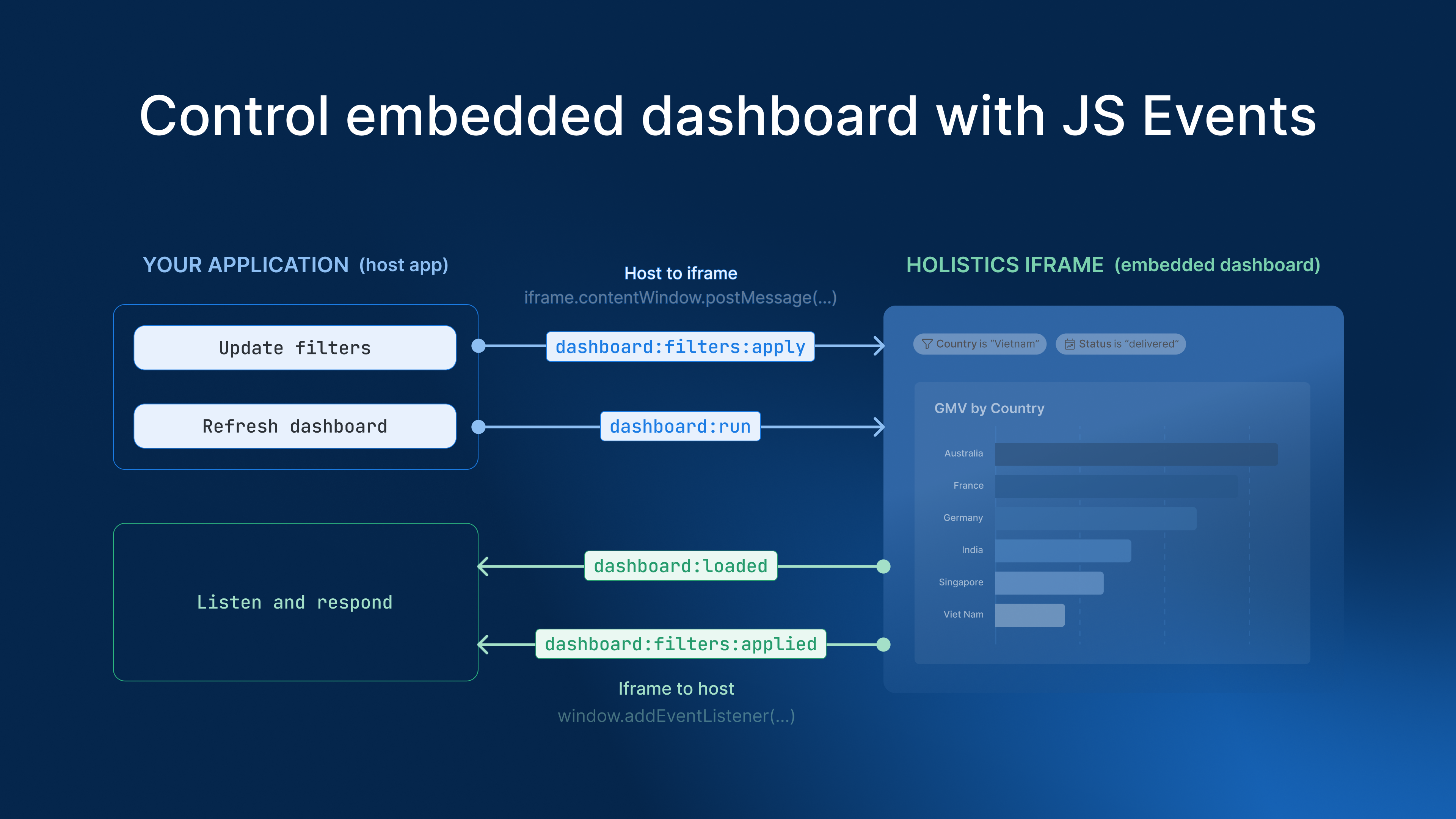
Host to iframe: Your app sends commands (e.g., update filters, navigate to a different dashboard) by calling iframe.contentWindow.postMessage().
Iframe to host: The embedded dashboard emits events (e.g., filter changed, navigation completed) via parent.postMessage(), and your app listens with window.addEventListener("message", ...).
Supported events
| Event | Direction | Description |
|---|---|---|
embed:loaded | iframe to host | Emits when the embed is ready. Includes a list of all available dashboards and datasets. |
page:change | host to iframe | Switch the iframe to a different dashboard or object without reloading. |
page:changed | iframe to host | Emits after a navigation action completes. Echoes back the current page path. |
dashboard:run | host to iframe | Refresh the current dashboard. |
dashboard:loaded | iframe to host | Emits once when the dashboard finishes its initial load. Includes metadata and default filter values. dashboard:filters:applied does not emit during this load. |
dashboard:filters:apply | host to iframe | Apply filter values to the current dashboard. Only takes effect after dashboard:loaded has emitted. |
dashboard:filters:applied | iframe to host | Emits when the user or dashboard:filters:apply changes filter values, after dashboard:loaded. |
embed:token:refresh | host to iframe | Pass a new JWT token to extend the embed session. |
embed:error | iframe to host | Emits when an error occurs inside the embed. |
Host to iframe
Your app sends these commands to control the embedded dashboard:
page:change
Switch the iframe to a different dashboard or object without reloading.
Event structure:
{
  eventName: "page:change",
  payload: {
    path: string,
  }
}
Event properties:
path/objects/{object_name} for a dashboard or dataset, or /ai for the Ask AI page.dashboard:filters:apply
Apply filter values to the current dashboard and reload its data without reloading the iframe. This command only takes effect after dashboard:loaded has emitted.
Event structure:
{
  eventName: "dashboard:filters:apply",
  payload: {
    filters: {
      [block_name]: {
        operator: string,
        values: string[],
        modifier?: string,
      }
    }
  }
}
Event properties:
filtersoperator: Filter operator (e.g.,"is","is_in_the_range").values: Array of filter values to apply.modifier: Optional. Filter modifier (e.g., for relative date ranges).
dashboard:run
Refresh the current dashboard.
Event structure:
{
  eventName: "dashboard:run",
}
No payload required.
embed:token:refresh
Pass a new JWT token to extend the embed session without reloading the iframe.
Event structure:
{
  eventName: "embed:token:refresh",
  payload: {
    token: string,
  }
}
Event properties:
tokenIframe to host
The embedded dashboard emits these events to notify your app:
embed:loaded
Emits when the embed is ready. Provides a list of all dashboards and datasets available in the embed, useful for building custom navigation.
Event structure:
{
  eventName: "embed:loaded",
  payload: {
    objects: {
      dashboards: [
        {
          uname: string,
          id: string,
          title: string,
          path: string,
          workspace?: 'org' | 'personal',
        }
      ],
      datasets: [
        {
          uname: string,
          id: string,
          title: string,
        }
      ],
    }
  }
}
Event properties:
objects.dashboardsuname: Unique identifier for the dashboard.id: Dashboard ID.title: Display title.path: URL path to the dashboard.workspace: Optional.'org'if the dashboard belongs to the organization workspace,'personal'if it belongs to a personal workspace.
objects.datasetsuname: Unique identifier for the dataset.id: Dataset ID.title: Display title.
dashboard:loaded
Emits once when the dashboard finishes its initial load. At this point, dashboard metadata and default filter values are available to the host app. Note: dashboard:filters:applied only emits for filter changes made after this event. The initial filter values captured here do not trigger it.
Event structure:
{
  eventName: "dashboard:loaded",
  payload: {
    dashboard: {
      uname: string,
      id: string,
      title: string,
      path: string,
      workspace?: 'org' | 'personal',
    },
    filters: {
      [block_name]: {
        operator: string,
        values: unknown[],
        modifier?: string,
      }
    }
  }
}
Event properties:
dashboarduname: Unique identifier for the dashboard.id: Dashboard ID.title: Display title.path: URL path to the dashboard.workspace: Optional.'org'or'personal'.
filtersoperator: Filter operator.values: Array of current filter values.modifier: Optional. Filter modifier.
page:changed
Emits after a navigation action completes. Echoes back the current page path so your app can stay in sync.
Event structure:
{
  eventName: "page:changed",
  payload: {
    path: string,
  }
}
Event properties:
path/objects/{object_uname} or /ai).dashboard:filters:applied
Emits whenever filter values change on the dashboard, either by the user or programmatically via dashboard:filters:apply. This event is only active after dashboard:loaded has emitted; filter changes during the initial load (including default filter values) do not trigger it. Only the changed filters are included in the payload.
Event structure:
{
  eventName: "dashboard:filters:applied",
  payload: {
    dashboard: {
      uname: string,
      id: string,
      title: string,
      type: string,
    },
    filters: {
      [block_name]: {
        operator: string,
        values: unknown[],
        modifier?: string,
      }
    }
  }
}
Event properties:
dashboarduname: Unique identifier for the dashboard.id: Dashboard ID.title: Display title.type: Dashboard type.
filtersoperator: Filter operator.values: Array of current filter values.modifier: Optional. Filter modifier.
embed:error
Emits when an error occurs inside the embed (e.g., invalid object name, permission denied, or token expired).
Event structure:
{
  eventName: "embed:error",
  payload: {
    error: {
      message: string,
    }
  }
}
Event properties:
error.messageUse cases
The examples below assume you have a Holistics dashboard embedded in an iframe like this:
<iframe
  id="holistics-embed"
  src="https://your-holistics-domain.com/embed/EMBED_KEY?_token=JWT_TOKEN"
  style="width: 100%; height: 700px; border: 0"
  allowfullscreen
></iframe>
All code samples reference this iframe by its id="holistics-embed" and use https://your-holistics-domain.com as the origin for postMessage calls.
Sync filters between your app and the dashboard
Your app has its own UI controls (dropdowns, date pickers, search bars) alongside an embedded dashboard. When a user interacts with filters on either side, you want both to stay in sync.
Example: An e-commerce platform has a region dropdown in the app's header bar. Below it, a sales dashboard is embedded. When a user picks "Europe" from the dropdown, the dashboard should filter to European data. Conversely, if the user changes the region filter inside the dashboard, the app's dropdown should update to match.
This works in two directions:
App to dashboard: Your app pushes filter values into the iframe when the user interacts with your UI.
// Push filters back into the iframe
const iframe = document.getElementById("holistics-embed");

iframe.contentWindow.postMessage(
  {
    eventName: "dashboard:filters:apply",
    payload: {
      filters: {
        building_id: {
          operator: "is",
          values: ["123"],
        },
        date_range: {
          operator: "is_in_the_range",
          values: ["last_30_days"],
        },
      },
    },
  },
  "https://your-holistics-domain.com"
);
Dashboard to app: The iframe emits a dashboard:filters:applied event when the user changes a filter inside the dashboard, and your app listens and updates its own state.
// Listen for filter changes from the iframe
window.addEventListener("message", (event) => {
  if (event.origin !== "https://your-holistics-domain.com") return;

  if (event.data?.eventName === "dashboard:filters:applied") {
    const { filters } = event.data.payload;
    // Store filter state in your app
    myApp.filters.set(filters);
  }
});
Persist filter values across sessions
Users often expect their filter selections to carry over the next time they open a dashboard. If someone filters a sales dashboard down to their own team today, they shouldn't have to redo that filtering tomorrow.
The iframe itself doesn't persist state between page loads, so you handle this in your app: capture filter values as the user sets them, store them wherever makes sense (browser localStorage for a single device, or your own backend if you want the values to follow the user across devices), and reapply them the next time that user opens the embed.
1. Capture and store filter values
Listen for dashboard:filters:applied and save the values:
window.addEventListener("message", (event) => {
  if (event.origin !== "https://your-holistics-domain.com") return;

  if (event.data?.eventName === "dashboard:filters:applied") {
    const { filters } = event.data.payload;

    // Store all filter values to localStorage
    const stored = JSON.parse(localStorage.getItem("dashboard_filters") || "{}");
    localStorage.setItem("dashboard_filters", JSON.stringify({ ...stored, ...filters }));
  }
});
2. Reapply stored values on the next visit
You can reapply the values in two ways:
-
Add filter values to the embed URL: When you build the iframe URL, append the stored values as default filter values. The dashboard opens already filtered, with no extra round trip. This works for
is,equal to, andmatches-style conditions:// last_used_filters: { region_filter: "Europe", status_filter: "delivered" }function buildEmbedUrl(token, last_used_filters) {const params = new URLSearchParams({ _token: token, ...last_used_filters });return `https://{region_domain}.holistics.io/embed/${embed_key_id}/objects/sales_dashboard?${params}`;} -
Apply filter values when the dashboard loads: For conditions URL parameters can't express (relative dates, exclusions), reapply the stored values with
dashboard:filters:apply, sending this event oncedashboard:loadedemits for the current dashboard:window.addEventListener("message", (event) => {if (event.origin !== "https://your-holistics-domain.com") return;if (event.data?.eventName === "dashboard:loaded") {const filters = JSON.parse(localStorage.getItem("dashboard_filters") || "{}");// Apply filter values to the current dashboard and reload its data without// reloading the iframe. Only takes effect after dashboard:loaded has emitted.iframe.contentWindow.postMessage({ eventName: "dashboard:filters:apply", payload: { filters } },"https://your-holistics-domain.com");}});
Navigate between dashboards without reloading the iframe
You may want to build your own navigation for embedded dashboards: a tab-style switcher, a sidebar menu, or dashboards nested inside your app's existing navigation hierarchy. Instead of reloading the iframe each time, use page:change to switch dashboards seamlessly.
Example: A SaaS platform has a horizontal tab bar with "Overview", "Sales", and "Support" tabs. Each tab maps to a different embedded dashboard. Clicking a tab sends a page:change command, and the iframe swaps the dashboard instantly without a full reload.
const iframe = document.getElementById("holistics-embed");

function switchDashboard(dashboardName) {
  iframe.contentWindow.postMessage(
    {
      eventName: "page:change",
      payload: { path: `/objects/${dashboardName}` },
    },
    "https://your-holistics-domain.com"
  );
}

// Wire up your custom tab navigation
document.querySelector('[data-tab="overview"]').onclick = () => switchDashboard("overview");
document.querySelector('[data-tab="sales"]').onclick = () => switchDashboard("sales_overview");
document.querySelector('[data-tab="support"]').onclick = () => switchDashboard("support_metrics");
The iframe confirms the navigation with a page:changed event, echoing back the new path so your app can track which action completed and update the active tab state.
Trigger a dashboard refresh after external changes
When your app modifies data that the dashboard depends on (e.g., user submits a form, imports a file, or completes an action), you can tell the embedded dashboard to refresh so it reflects the latest data.
async function handleFormSubmit(data) {
  await saveToDatabase(data);

  const iframe = document.getElementById("holistics-embed");
  iframe.contentWindow.postMessage(
    { eventName: "dashboard:run", payload: {} },
    "https://your-holistics-domain.com"
  );
}
Track user interactions for analytics or logging
Listen for events from the embedded dashboard to understand how your users interact with analytics. You can log filter changes, navigation, and errors to your own analytics or monitoring system.
window.addEventListener("message", (event) => {
  if (event.origin !== "https://your-holistics-domain.com") return;

  const { eventName, payload } = event.data;

  switch (eventName) {
    case "dashboard:filters:applied":
      analytics.track("embed_filter_changed", payload);
      break;
    case "page:changed":
      analytics.track("embed_navigation", payload);
      break;
    case "embed:error":
      errorTracker.capture("embed_error", payload);
      break;
  }
});
Handle errors and refresh expired tokens
The iframe emits embed:error events when something goes wrong (invalid object name, permission denied, or an expired token). Your app can listen for these and respond accordingly: show a contextual error message, notify an admin, or automatically refresh the token to keep the session alive.
const iframe = document.getElementById("holistics-embed");

window.addEventListener("message", async (event) => {
  if (event.origin !== "https://your-holistics-domain.com") return;

  if (event.data?.eventName === "embed:error") {
    const { error } = event.data.payload;

    if (error.code === "token_expired") {
      // Generate a new token and push it into the iframe without reloading
      const newToken = await generateEmbedToken();
      iframe.contentWindow.postMessage(
        {
          eventName: "embed:token:refresh",
          payload: { token: newToken },
        },
        "https://your-holistics-domain.com"
      );
    } else {
      // Show error to the user or notify your team
      showErrorToast(`Embed error: ${error.message}`);
      notifyAdmin(error);
    }
  }
});
Security best practices
Always validate the event.origin before processing any message. This prevents other iframes or windows from spoofing events:
window.addEventListener("message", (event) => {
  // Only accept messages from your Holistics domain
  if (event.origin !== "https://your-holistics-domain.com") return;

  // Process event...
});