[Upcoming] Localization for embedded analytics
This feature is not yet available. This document is not final and may change during development. We'll update this page when it launches.
Introduction
When you serve customers who speak different languages, they expect their analytics in their own language. Holistics lets you serve one dashboard to every viewer and have its text render in whichever language that viewer belongs to. There are no duplicate dashboards to maintain and no separate Embed Portal per language.
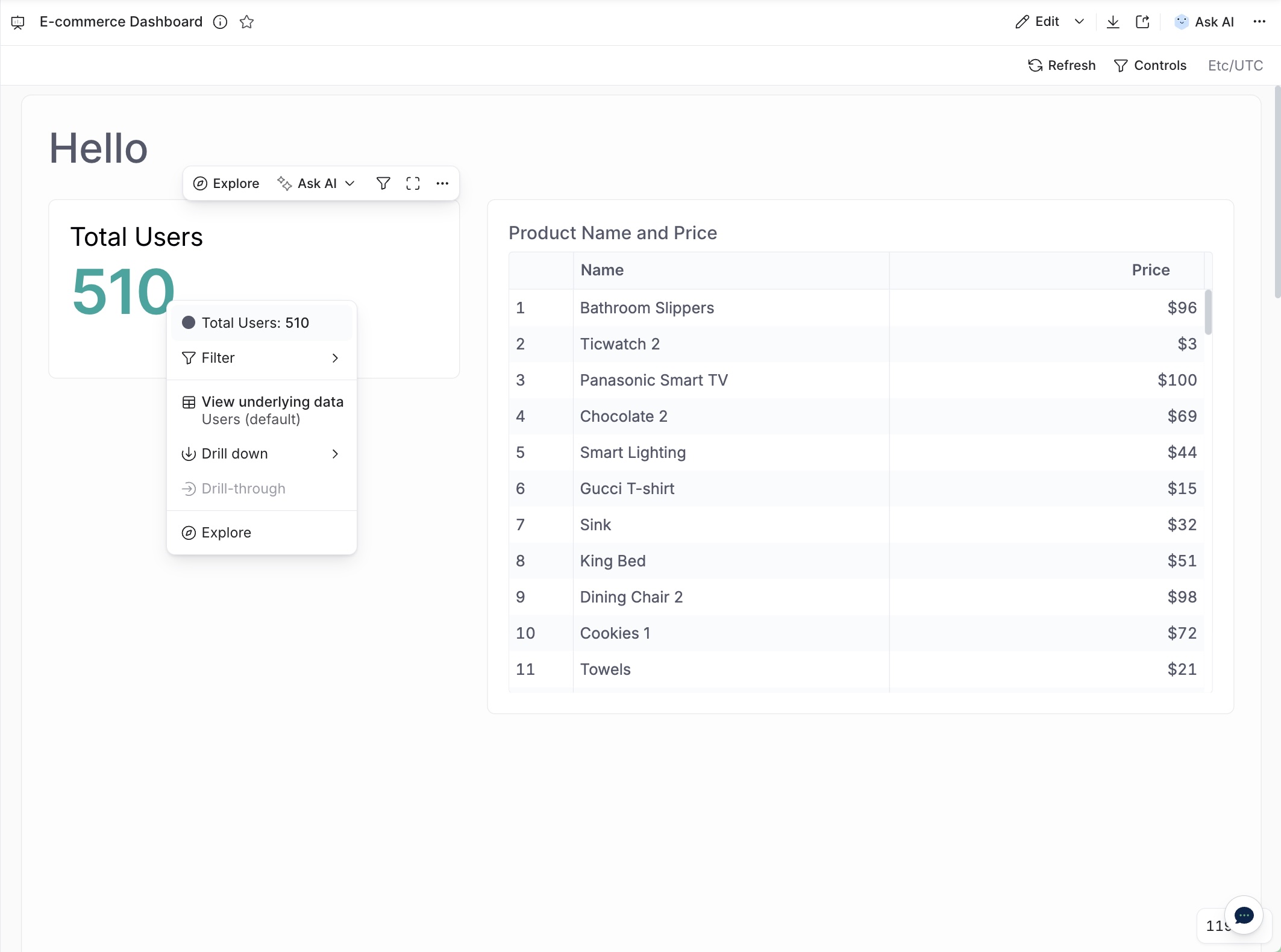
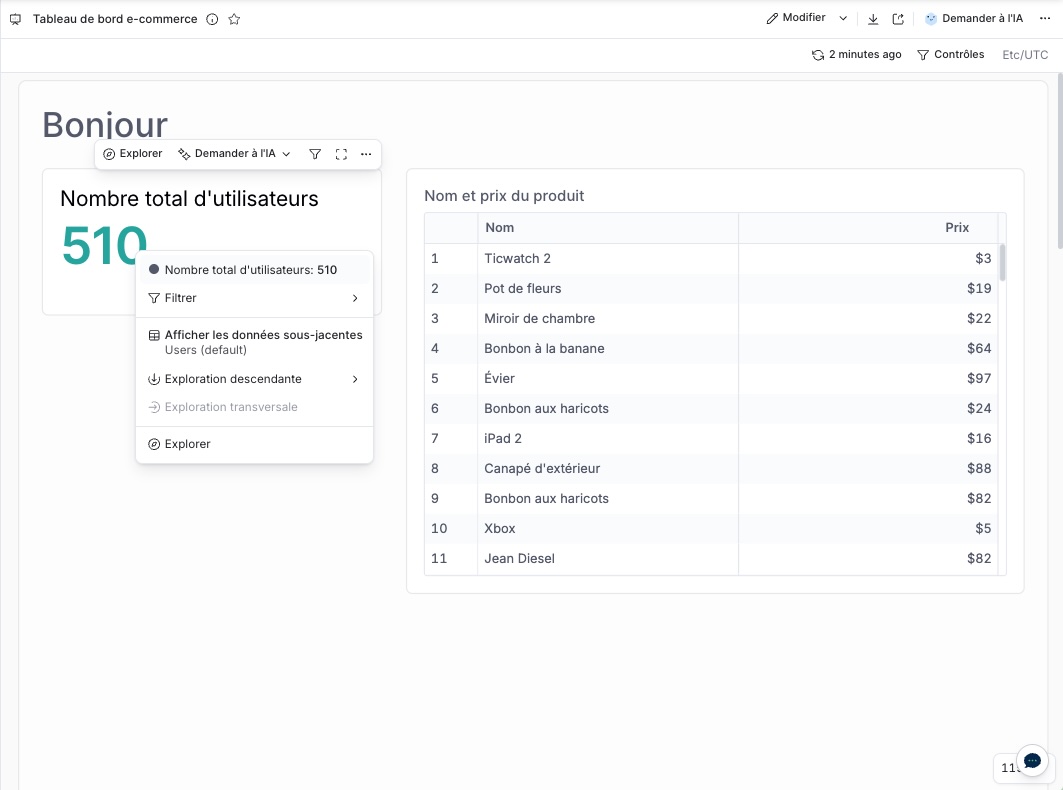
Here is the same dashboard, viewed by an English speaker and a French speaker:
What gets localized
The text on a dashboard comes from three different places, and each one is handled differently.
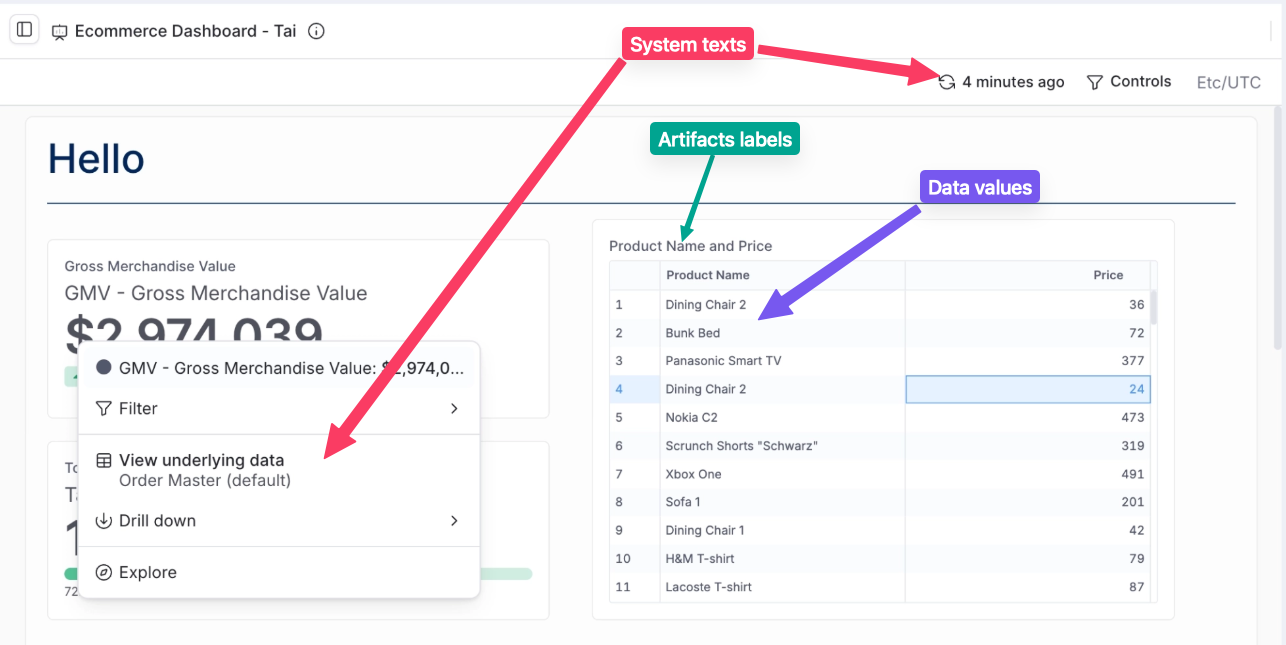
- System texts are the application's own text: buttons, menus, notifications, and error messages. Holistics translates these, so there is nothing for you to set up. The supported languages are French (
fr-FR) and Spanish (es-ES). If your viewers need another language, tell us and we will add it for you. - Dashboard texts are what your analysts authored: the dashboard title, text blocks, chart labels, and field labels. You supply the translations in a file and Holistics swaps the text at view time. This is where nearly all of the setup work sits, so it gets its own section below.
- Data values are the rows returned from your database, such as product names. These live in your data rather than in Holistics, so you handle them in your data model.
| Text type | Status | What you do |
|---|---|---|
| System texts | 🟡 To be implemented by Holistics | Nothing |
| Dashboard texts | 🟡 To be implemented by Holistics | Author translation files |
| Data values | ✅ Available today | Add localized columns to your model |
The language user attribute
All three cases key off a single user attribute. You pass it in the embed payload, so your application decides the language for each viewer:
const embed_payload = {
  // ... other settings
  user_attributes: {
    language: ["fr-FR"]
  }
}
A language is identified by a BCP 47 tag: a language plus a region, such as en-US, fr-FR, or zh-CN. The value is wrapped in an array because every user attribute in the embed payload takes an array (see the embed payload reference).
If a viewer arrives with no language attribute, they see the dashboard in the language it was authored in.
Localizing dashboard texts
You translate these labels once in a translation file, and Holistics applies the right file to each viewer.
Translation files live in the AML repo at settings/locales/<language>.json, one file per language, kept separate from the dashboard code. The key is the authored source text and the value is its translation. At view time, Holistics replaces each authored text with the entry matching the viewer's language attribute, so one dashboard serves every language.
If a text has no matching entry in the translation file, Holistics shows the original text as is. Nothing errors and nothing renders blank, so untranslated strings simply appear in their source language. We still recommend covering every dashboard text so viewers get a fully localized experience.
Step 1. Identify your translation keys
Every authored text in the dashboard definition is a translation key: the dashboard title, the Markdown text block content, the viz block label, and each field label.
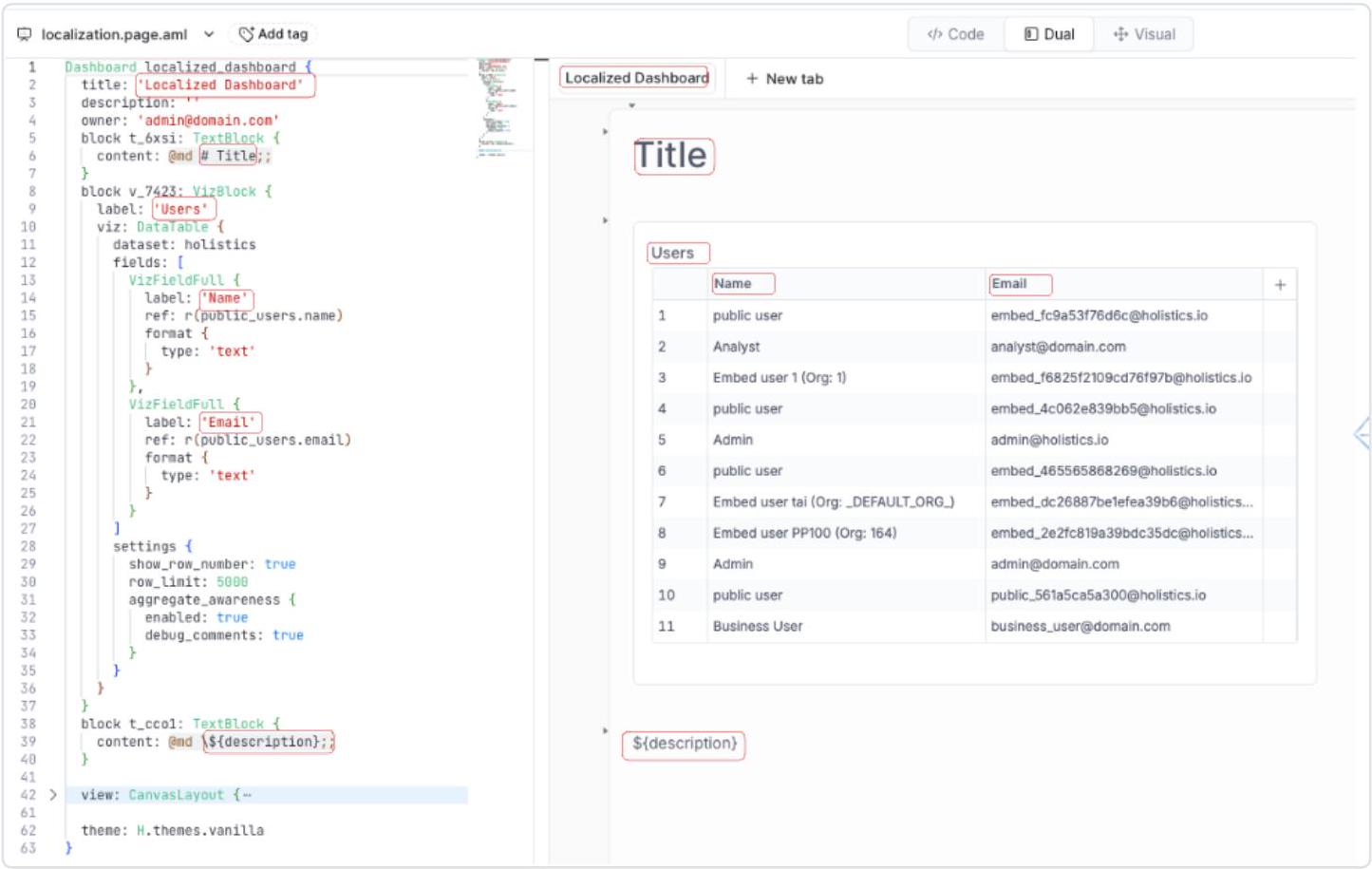
A key does not have to be the literal source text. For long or multi-line content, such as a Markdown description, define a custom key instead: any unique string like ${description}, referenced from the dashboard as a variable. The translation file then supplies the whole block for each language, which saves you repeating a paragraph as a key.
Step 2. Create a translation file per language
Create one file per language under settings/locales/ in the AML repo, and make sure every text in your dashboards has an entry.
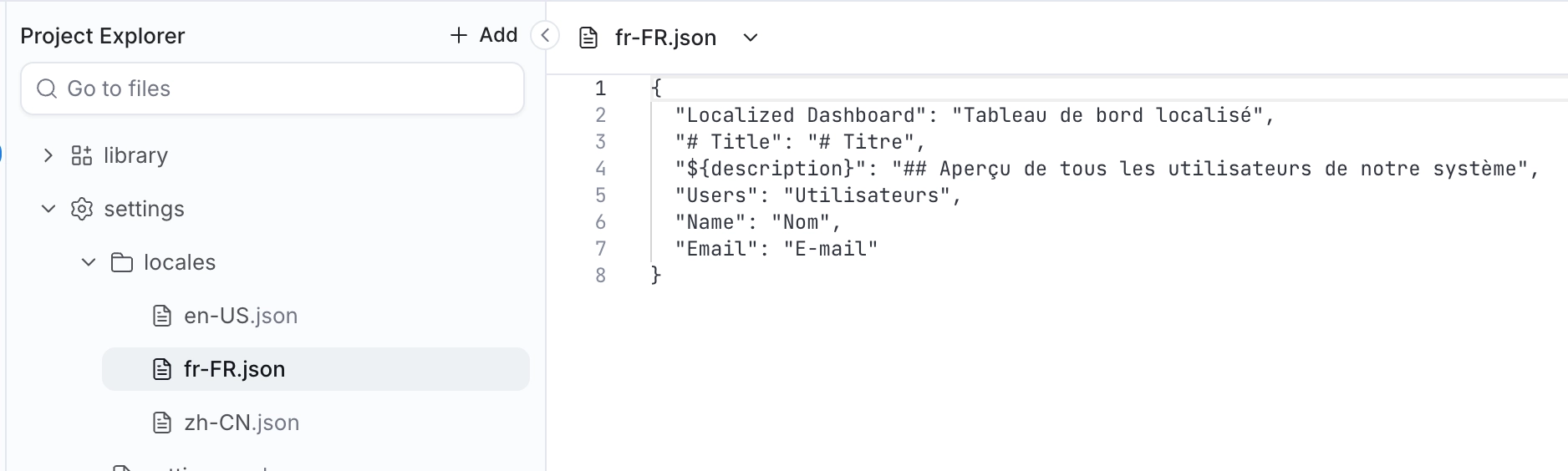
{
    "Localized Dashboard": "Tableau de bord localisé",
    "# Title": "# Titre",
    "${description}": "## Aperçu de tous les utilisateurs de notre système",
    "Users": "Utilisateurs",
    "Name": "Nom",
    "Email": "E-mail"
}
Because translations sit in their own files rather than inside dashboard code, you can hand a file straight to a translator, and the same entries get reused across every dashboard that uses those labels.
Authoring and deploying translation files
Your tenant admins and analysts author these files in Development alongside the AML, review them, and deploy them like any other change. They are versioned in Git with the rest of your project, so a translation update follows the same review path as a model or dashboard change.
Step 3. Pass the viewer's language
Set language for the viewer in the embed payload, as described in the language user attribute. The same value also drives system texts and data values, so you only set it once.
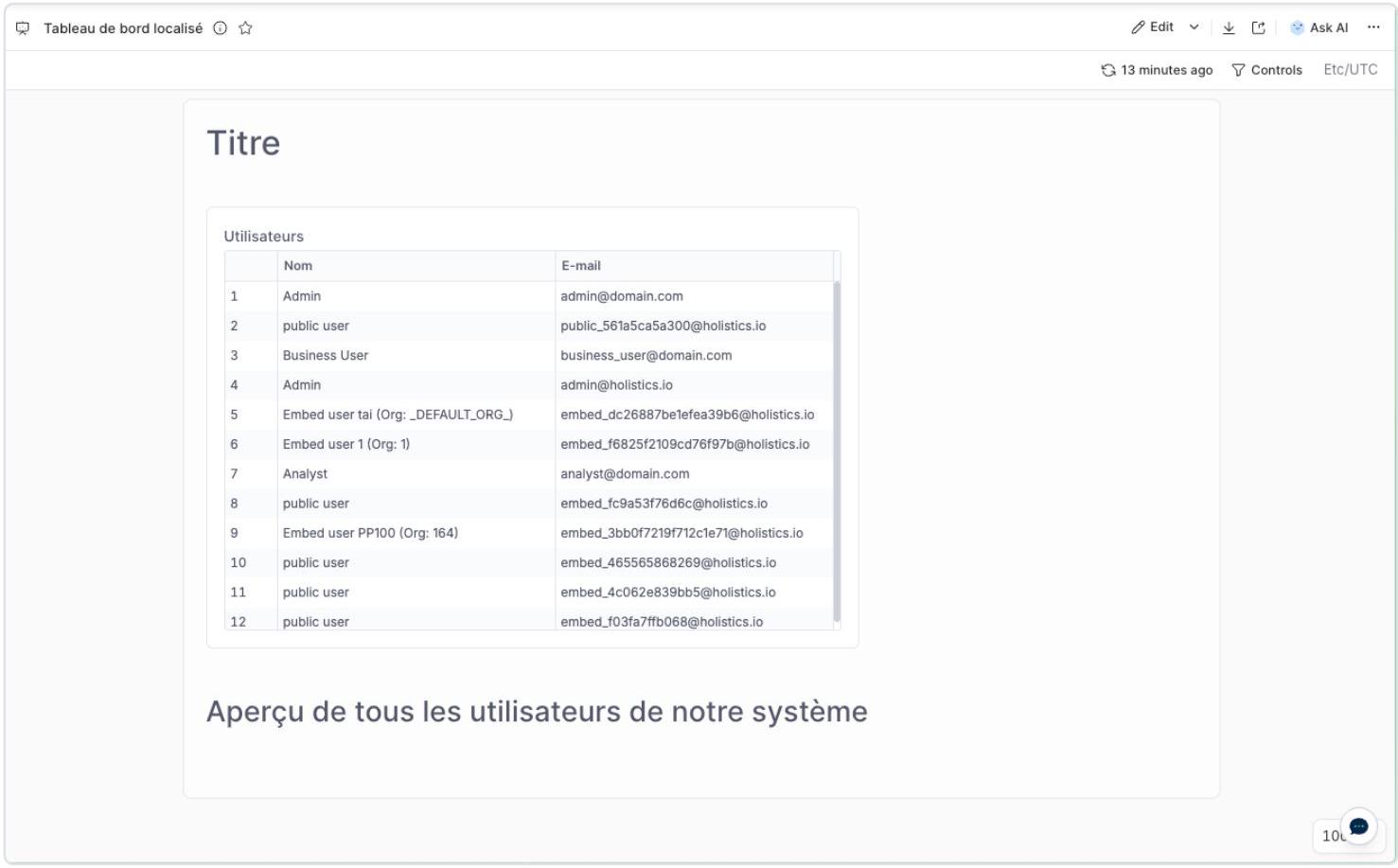
What the viewer sees
Every authored label renders in the viewer's language, from the same single dashboard.
Localizing data values
Data values come straight from your database, so Holistics has no translated version of them to reach for. Store the translations in your data, then pick the right one in your data model.
Start by keeping a column per language:
| product_id | name_en_us | name_fr_fr | name_es_es |
|---|---|---|---|
| 101 | Chair | Chaise | Silla |
| 102 | Table | Table | Mesa |
| 103 | Lamp | Lampe | Lámpara |
Then branch on the viewer's language to choose a column. The language user attribute is available in AQL as H.current_user.language:
dimension localized_product_name {
  label: 'Product Name (localized)'
  type: 'text'
  definition: @aql case(
      when: H.current_user.language == 'fr-FR', then: products.name_fr_fr,
      when: H.current_user.language == 'es-ES', then: products.name_es_es,
      else: products.name_en_us
  );;
}
This part works today and does not depend on the rest of this page.
Not in scope
A few things are not covered by this feature:
- Locale formatting (number separators, date order, currency, and timezone) is a set of formatting rules rather than text lookups, so it is handled separately as user or organization settings.
- The date filter's matches operator, which accepts natural language time expressions, is not available in this version.
FAQ
Find answers to common questions about localizing your embedded dashboards and integrating with other Holistics features.
Does localization work with Ask AI (conversational analytics)?
Yes, and this part is already available today. Add a response preference to your custom AI context file that tells the AI to reply in the viewer's language:
const ai_context = @md

## Response preferences
- Always reply in ${H.current_user.language}

;;
Since the instruction references the same language user attribute you pass in the embed payload, each embedded viewer gets AI answers in their own language.
Related resources
- Embed payload reference: Full list of embed payload options, including user attributes
- Row-level permissions: Use user attributes to control data access
- Embed Portal: Persist your embedded content as code