How to Filter Elements in ARRAY Fields
Many modern data warehouses support ARRAY data types (e.g. Snowflake, PostgreSQL, BigQuery, Redshift). This guide describes a practical workaround in Holistics to filter rows based on whether a specific value exists inside an array field.
This guide uses PostgreSQL syntax for its examples, but the concepts can be adapted to other databases that support array functions.
Use case
You have an orders table with a column like applied_promo_codes (ARRAY of text). You want a dashboard filter such as "promo code contains SAVE10" and have Holistics return all orders that include SAVE10 in that array.
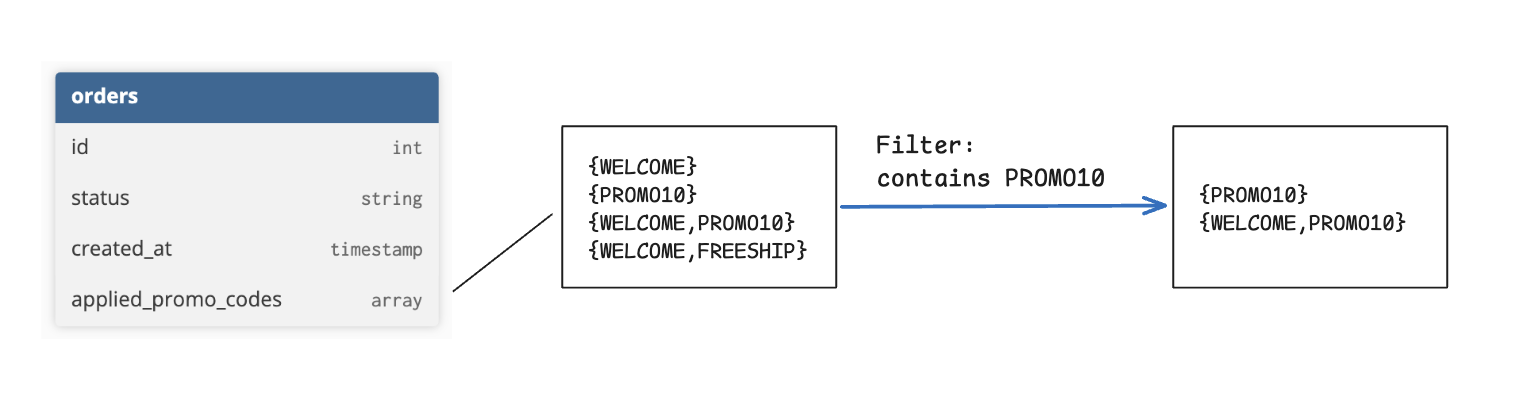
Approach 1: Simple contains filter
Convert the ARRAY into a text representation and use Holistics’ built-in contains text filter.
dimension applied_promo_codes {
  label: 'Applied Promo Codes'
  type: 'text'
  hidden: true
  definition: @sql {{ #SOURCE.applied_promo_codes }}::text;;
}
Then apply a text filter with contains on applied_promo_codes.
Limitation:
The contains operator performs substring matching. For example, filtering on PROMO10 may also match PROMO100.
If you require exact element matching, use Approach 2.
For available text filter operators, see: https://docs.holistics.io/docs/filters/text-filters#available-operators
Approach 2: Delimiter-based filter (avoid false positives)
To ensure exact matches, wrap each array element with delimiters (i.e. ,, #) before converting it to text. This prevents partial matches such as PROMO10 matching PROMO100.
dimension applied_promo_codes {
  label: 'Applied Promo Codes'
  type: 'text'
  hidden: true
  definition: @sql concat('#', array_to_string({{ #SOURCE.applied_promo_codes }}, '#'), '#');;
}
Create a parameter to capture the desired promo code value:
param array_value_param {
  label: 'Array Value'
  type: 'text'
}
Then filter using a delimiter-aware LIKE condition on applied_promo_codes, ensuring only exact promo code matches are returned.
model.applied_promo_codes LIKE concat('%#', model.array_value_param | first(), '#%')
Apply this as an AQL condition at the widget or metric level, and map a dashboard filter to array_value_param.