AML Theme and Colors
A grasp of these concepts will help you understand this documentation better:
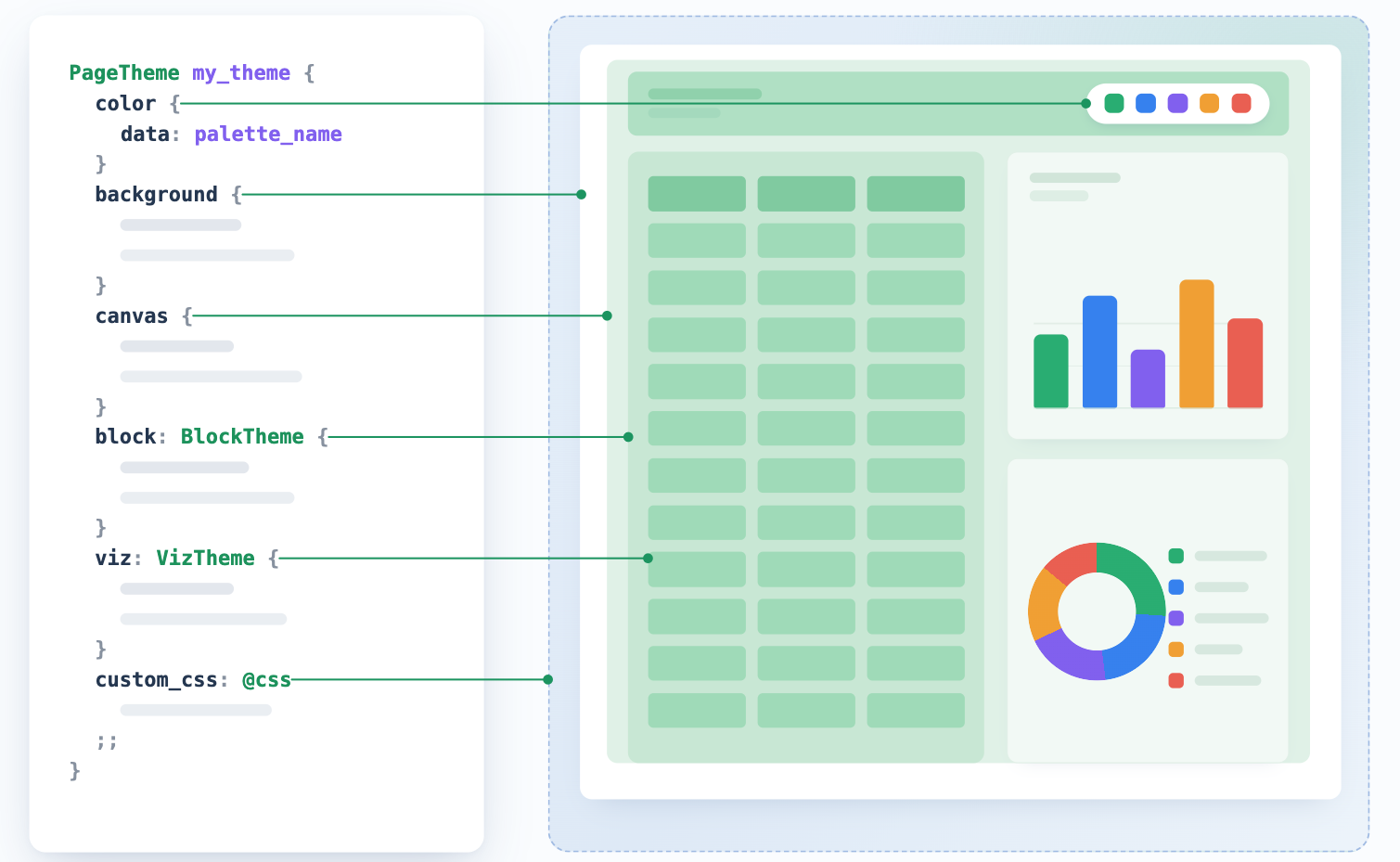
Dashboard themes in Holistics are defined using three AML objects: PageTheme, BlockTheme, and VizTheme. These can be declared inline in a dashboard file or in a shared file (e.g. themes.aml) for reuse across dashboards. Each object maps to a level in the dashboard visual hierarchy:
// Reusable theme declared in themes.aml
PageTheme my_theme {
  color {
    data: palette_name
  }
  canvas { ... }
  block { ... }
  viz { ... }
}
See Dashboard Themes for how-to guides on applying and creating themes.
PageTheme
PageTheme is the top-level theme object. It controls the full visual hierarchy of a dashboard: page background, canvas area, block styling, and visualization styling.
| Parameter name | Description |
|---|---|
color | Default color palette for all charts in the dashboard |
background | Background of the outer page viewport |
canvas | Styling for the main canvas area |
block | Default styling for all blocks |
viz | Default styling for all visualizations |
custom_css | Custom CSS injected into the dashboard |
color
Sets the default color palette for all charts in the dashboard.
| Parameter | Description | Accepted values |
|---|---|---|
data | The color palette to use for chart data series | A ColorPalette identifier defined in your project |
background
Controls the outermost page container (the viewport surrounding the canvas).
| Parameter | Description | Accepted values |
|---|---|---|
bg_color | Background color | Any valid CSS <color> e.g. "#ffffff", "rgb(255 0 153)" |
bg_image | Background image | Any valid CSS <image> e.g. "https://...", "linear-gradient(blue, red)" |
bg_repeat | How the background image repeats | false, true, "x", "y", "space", "round" |
bg_size | How the background image is sized | "cover", "contain" |
canvas
Controls the primary reporting area that contains all dashboard blocks.
| Parameter | Description | Accepted values |
|---|---|---|
border.* | Canvas border | See BorderTheme |
background.* | Canvas background | See BgTheme |
shadow | Canvas shadow effect | "none", "sm", "md", "lg" |
opacity | Canvas opacity | Number between 0 and 1 |
block
Default styling applied to all blocks in the dashboard. Can be overridden per block using BlockTheme.
| Parameter | Description | Accepted values |
|---|---|---|
label.* | Font styling for block titles | See FontTheme |
text.* | Font styling for block text content | See FontTheme |
border.* | Block border | See BorderTheme |
background.* | Block background | See BgTheme |
padding | Internal block padding | Number, String, or DetailedSpacing |
shadow | Block shadow effect | "none", "sm", "md", "lg" |
opacity | Block opacity | Number between 0 and 1 |
viz
Default styling for data visualizations (except maps).
viz.table
Note: Table styling has an override hierarchy: general styles are overridden by header, then sub_header, then sub_title.
| Parameter | Description | Accepted values |
|---|---|---|
general.bg_color | Table body background color | Any valid color value e.g. "#ffffff" |
general.hover_color | Row hover background color | Any valid color value |
general.banding_color | Alternating row color | Any valid color value |
general.font_size | Font size for all table text | Number or String e.g. 12, "12px" |
general.font_color | Font color for all table text | Any valid color value |
general.font_family | Font family for all table text | Any valid font family name |
general.border_color | Table outer border color | Any valid color value |
general.border_width | Table border and grid line thickness | Number or String |
general.grid_color | Table grid line color | Any valid color value |
header.bg_color | Header background color | Any valid color value |
header.font_size | Header font size | Number or String |
header.font_color | Header font color | Any valid color value |
header.font_weight | Header font weight | "light", "normal", "medium", "semibold", "bold", "extrabold" |
sub_header.bg_color | Pivot Table sub-header background color | Any valid color value |
sub_header.font_size | Pivot Table sub-header font size | Number or String |
sub_header.font_color | Pivot Table sub-header font color | Any valid color value |
sub_header.font_weight | Pivot Table sub-header font weight | "light", "normal", "medium", "semibold", "bold", "extrabold" |
sub_title.font_size | Metric Sheet subtitle font size | Number or String |
sub_title.font_color | Metric Sheet subtitle font color | Any valid color value |
sub_title.font_weight | Metric Sheet subtitle font weight | "light", "normal", "medium", "semibold", "bold", "extrabold" |
sparkline.line.color | Metric Sheet line color of the sparkline | Any valid color value |
sparkline.line.width | Metric Sheet line width of the sparkline | Number or String |
sparkline.column.color | Metric Sheet column color of the sparkline | Any valid color value |
sparkline.column.width | Metric Sheet column width of the sparkline | Number or String |
viz.metric_kpi
| Parameter | Description | Accepted values |
|---|---|---|
alignment | Aligns all KPI Metric elements inside the visualization | "left", "right", "center" |
label.* | Font styling for the KPI label | See FontTheme |
value.* | Font styling for the KPI value | See FontTheme |
progress.text.* | Font styling for the progress caption | See FontTheme |
progress.indicator.* | Background of the filled progress bar | See BgTheme |
progress.track.* | Background of the progress bar track | See BgTheme |
trend.positive.text.* | Font styling for positive trend text | See FontTheme |
trend.positive.background.* | Background of positive trend badge | See BgTheme |
trend.negative.text.* | Font styling for negative trend text | See FontTheme |
trend.negative.background.* | Background of negative trend badge | See BgTheme |
trend.neutral.text.* | Font styling for neutral trend text | See FontTheme |
trend.neutral.background.* | Background of neutral trend badge | See BgTheme |
viz.color
This syntax is used to override the color palette at the visualization level. To set a dashboard-wide palette in a PageTheme, the color block is sufficient.
| Parameter | Description | Accepted values |
|---|---|---|
data | The color palette to use for chart data series | A ColorPalette identifier defined in your project |
custom_css
Injects custom CSS into the dashboard. Accepts any valid CSS code.
PageTheme my_theme {
  custom_css: @css
    .my-class { color: red; }
  ;;
}
See Custom CSS for details and examples.
BlockTheme
BlockTheme overrides the block styling from PageTheme for a specific block. It accepts the same parameters as the block section of PageTheme.
Dashboard my_dashboard {
  block text_block: TextBlock {
    theme: BlockTheme {
      background {
        bg_color: 'transparent'
      }
    }
  }
}
VizTheme
Use theme { } inside any viz property to override its styling for that block. Accepts the same parameters as the viz section of PageTheme.
- Table
- KPI Metric
- Color palette
Dashboard my_dashboard {
  block table_name: VizBlock {
    viz: PivotTable {
      theme {
        table {
          general {
            bg_color: 'white'
          }
        }
      }
    }
  }
}
Dashboard my_dashboard {
  block kpi_name: VizBlock {
    viz: MetricKpi {
      theme {
        metric_kpi {
          alignment: "center"
          value {
            font_color: "#1357A0"
            font_weight: "bold"
          }
          trend {
            positive {
              background { bg_color: "#DCFCE7" }
            }
            negative {
              background { bg_color: "#FEE2E2" }
            }
          }
        }
      }
    }
  }
}
Dashboard my_dashboard {
  block chart_name: VizBlock {
    viz: LineChart {
      theme {
        color {
          data: palette_name
        }
      }
    }
  }
}
ColorPalette
ColorPalette defines a named set of colors that can be applied to chart data series. Palettes are declared in .palette.aml files and referenced by name in the color parameter of PageTheme or project settings.
| Parameter | Description | Accepted values |
|---|---|---|
title | Display name shown in the palette picker | String |
categorical.colors | Ordered list of colors for chart data series | Array of CSS color strings (hex, rgb, oklch, etc.) |
ColorPalette my_palette {
  title: "My Palette"
  categorical {
    colors: [
      "#FF5733",
      "#33FF57",
      "#3357FF"
    ]
  }
}
See Color Palettes for a full guide on creating and applying palettes.
DynamicPageTheme
DynamicPageTheme pairs two PageTheme objects so a dashboard's theme switches with the viewer's light/dark mode setting. A PageTheme itself has no light or dark variant of its own - the pairing lives entirely in this wrapper.
| Parameter | Description | Accepted values |
|---|---|---|
light | Theme rendered when the viewer's app mode is Light | A PageTheme identifier, or an inline PageTheme {} |
dark | Theme rendered when the viewer's app mode is Dark, or System resolved to dark | A PageTheme identifier, or an inline PageTheme {} |
DynamicPageTheme is most commonly declared inline in a dashboard's theme property:
Dashboard ecommerce_dashboard {
  theme: DynamicPageTheme {
    light: classic_light
    dark: classic_dark
  }
}
It can also be declared as a standalone, named object (e.g. in themes.aml) and reused across dashboards, the same way a PageTheme can. In this case, the light/dark pairing is fixed for every dashboard that references it:
// themes.aml
DynamicPageTheme classic_dynamic {
  light {},
  dark {},
}

// dashboard file
Dashboard ecommerce_dashboard {
  theme: classic_dynamic
}
See Dashboard Themes for the GUI equivalent and how this compares to a static theme.
Helper types
FontTheme
Used for text styling in blocks and visualizations.
| Property | Description | Accepted values |
|---|---|---|
font_family | Font family. Learn more | String |
font_source | Source URL for a custom web font (used to load the font if not already available) | String |
font_size | Font size (e.g. 14, "14px", "1rem") | Number or String |
font_color | Font color | String |
font_weight | Font weight | "light", "normal", "medium", "semibold", "bold", "extrabold" |
font_style | Font style | "normal", "italic" |
letter_spacing | Letter spacing | Number or String |
text_decoration | Text decoration | "underline", "overline", "line-through" |
text_transform | Text transform | "uppercase", "lowercase", "capitalize" |
BgTheme
Used for background styling in canvas, block, and KPI Metric progress bars and trend badges.
| Property | Description | Accepted values |
|---|---|---|
bg_color | Background color | String |
bg_image | Background image | String |
bg_repeat | How the background image repeats | Boolean, "x", "y", "space", "round" |
bg_size | How the background image is sized | "cover", "contain" |
BorderTheme
Used for border styling in canvas and block.
| Property | Description | Accepted values |
|---|---|---|
border_width | Border width | Number, String, or DetailedSpacing |
border_radius | Corner roundness | Number, String, or DetailedRadius |
border_color | Border color | Any valid CSS <color> |
border_style | Border style | "none", "solid", "dotted", "dashed", "inset", "outset", "ridge", "groove", "double" |
DetailedSpacing
Used for specifying different spacing values for each side of an element (e.g. border_width, padding).
| Property | Description | Type |
|---|---|---|
top | Spacing for the top side | Number or String |
left | Spacing for the left side | Number or String |
bottom | Spacing for the bottom side | Number or String |
right | Spacing for the right side | Number or String |
padding: {
  top: 10,
  left: "5px",
  bottom: 10,
  right: "5px"
}
DetailedRadius
Used for specifying different border-radius values for each corner of an element (e.g. border_radius).
| Property | Description | Type |
|---|---|---|
top_left | Radius for the top-left corner | Number or String |
top_right | Radius for the top-right corner | Number or String |
bottom_left | Radius for the bottom-left corner | Number or String |
bottom_right | Radius for the bottom-right corner | Number or String |
border_radius: {
  top_left: 5,
  top_right: "10px",
  bottom_left: 5,
  bottom_right: "10px"
}