Holistics CLI
Introduction
The Holistics CLI tool provides a powerful tooling to interact with Holistics services. This tool allows developers and analysts to integrate Holistics capabilities directly into their analytics development pipeline.
With the Holistics CLI, you can:
- Sync local AML code with the Holistics cloud in continuous bidirectional sync
- Compile AML files into JSON objects
- Validate AML repositories for errors
- Integrate and upload dbt models
The CLI tool is a self-contained binary that does not require installing any additional dependencies.
Installation
For macOS and Linux
Run the following command to install the Holistics CLI:
curl -fsSL https://holistics.io/cli/install | bash
The installation script supports bash, zsh, and fish. If you are using other shells, please update PATH to include ~/.holistics/bin.
The CLI is not compatible with MacOS 12.x (Monterey), which reached end of life on September 16, 2024. There are 2 solutions:
- Upgrade to MacOS 13 (Ventura) or later
- If you have Node.js installed, you can run the CLI from source code, please refer to: https://github.com/holistics/holistics-cli#how-to-run-the-code-via-node
For Windows
At the moment, we do not have an installation script for Windows. Please manually download the latest release, then add it to your Path in the Environment Variables.
Configure Git line endings
Windows ends lines with CRLF, while macOS and Linux use LF. If some of your teammates work on macOS or Linux, this difference can show up as changes on every line and cause unnecessary conflicts. To avoid this, configure Git on Windows to use LF like macOS and Linux. The setting below only applies to this repo, so your other repos aren't affected.
When you clone the repo, pass the setting to git clone:
git clone -c core.autocrlf=input <repo-url>
If you've already cloned the repo, run this inside it, then reset the repo so its files are checked out with LF line endings:
git config core.autocrlf input
git rm -r --cached .
git reset --hard
Resetting the repo deletes all your uncommitted work. Back it up first.
Authentication
OAuth (recommended)
The CLI opens your browser to complete login — no API key needed.
App domain
holistics auth apac
holistics auth us
holistics auth eu
holistics auth <your-domain>.holistics.io
API key
Find your API key under profile menu > User settings in Holistics.
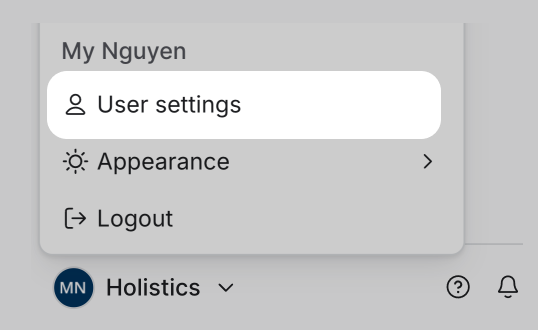
holistics auth secure <api_key>
holistics auth us <api_key>
holistics auth eu <api_key>
Pass the full custom domain as the address:
holistics auth <your-domain>.holistics.io <api_key>
A successful auth prints:
Logging into https://<secure/us/eu>.holistics.io
Authentication successful. Info:
- ID: 12345
- Email: [email protected]
- Server URL: https://<secure/us/eu>.holistics.io
The CLI saves your credentials in ~/.holistics.yml and reuses them for subsequent commands.
For backwards compatibility, the CLI still allows the use of the environment variable HOLISTICS_HOST to specify the server location.
HOLISTICS_HOST will take precedence over the saved address.
However, this is deprecated and will be removed in the future.
Either of the following ways will still work:
HOLISTICS_HOST=eu.holistics.io holistics auth <api-key>
export HOLISTICS_HOST=eu.holistics.io
holistics auth <api-key>
Quick Start
Upload a dbt model
To upload a dbt model, you need to have a manifest JSON file.
For example, to upload manifest.json to data source demodb, run the following command:
holistics dbt upload --file-path manifest.json --data-source demodb
Compile AML files
In order to compile AML files, the current working directory must be the root directory of a valid AML repository.
To compile AML models, run the following command:
holistics aml compile **/*.model.aml
Modules Overview
The Holistics CLI is organized into several modules, each with its own set of commands and options.