Query Datasets via API
This guide shows you how to query your metrics and dimensions programmatically. You can either execute queries and get results as JSON, or retrieve the generated SQL to run elsewhere. For background on why this matters, see Open Semantic Layer.
How it works
You specify which dimensions and metrics you want. Holistics executes the query against your data warehouse and returns the aggregated results.
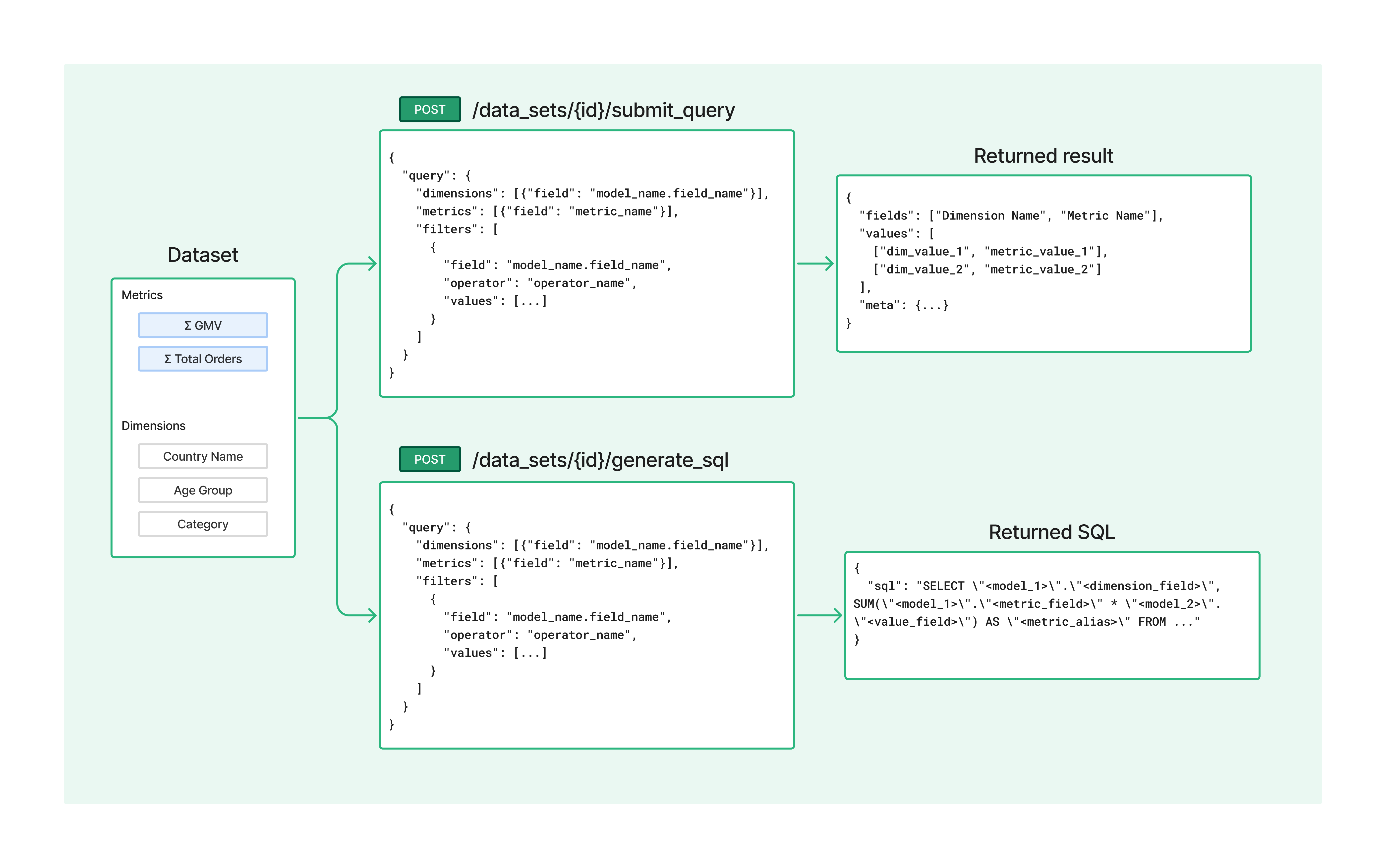
The API handles all the complexity: joining tables, applying aggregations, respecting relationships, and enforcing permissions. Your external application just receives clean, governed data.
Quick start
1. Get your API key
Go to User Settings in Holistics and generate an API key. You'll include this key in every API request using the X-Holistics-Key header.
2. Find your dataset ID
Your metrics and dimensions are organized in datasets. To query them, you'll need the dataset ID.
Option A: From the URL
Navigate to your dataset in Holistics. The ID is in the URL:
https://secure.holistics.io/data_sets/12345/explore
                                      ^^^^^
                                    Dataset ID
Option B: Via API
List all datasets you have access to:
GET /api/v2/data_sets
3. Build and send your query
Build a query specifying the dimensions and metrics you want, then POST it to one of two endpoints:
| Endpoint | Returns |
|---|---|
/data_sets/{id}/submit_query | Executes the query and returns data as JSON |
/data_sets/{id}/generate_sql | Returns the generated SQL |
Both endpoints accept the same request body:
{
  "query": {
    "dimensions": [{"field": "model_name.field_name"}],
    "metrics": [{"field": "metric_name"}],
    "filters": [
      {
        "field": "model_name.field_name",
        "operator": "operator_name",
        "values": [...]
      }
    ]
  }
}
- dimensions: Fields to group by (e.g.,
countries.name,products.category) - metrics: Aggregated measures to calculate (e.g.,
gmv,order_count) - filters: Apply filter to your query (e.g.,
countries.continent_name is Asia)
Example: curl
curl -X POST \
  -H "X-Holistics-Key: YOUR_API_KEY" \
  -H "Content-Type: application/json" \
  -d '{
    "query": {
      "dimensions": [{"field": "ecommerce_countries.name"}],
      "metrics": [{"field": "gmv"}]
    }
  }' \
  https://secure.holistics.io/api/v2/data_sets/12345/submit_query
Example: Python
import requests

response = requests.post(
    "https://secure.holistics.io/api/v2/data_sets/12345/submit_query",
    headers={
        "X-Holistics-Key": "YOUR_API_KEY",
        "Content-Type": "application/json"
    },
    json={
        "query": {
            "dimensions": [{"field": "ecommerce_countries.name"}],
            "metrics": [{"field": "gmv"}]
        }
    }
)
response.raise_for_status()  # Raises an HTTPError for bad responses (4xx or 5xx)

data = response.json()
4. Get results
The response format depends on which endpoint you called.
submit_query response
Returns the query results as JSON:
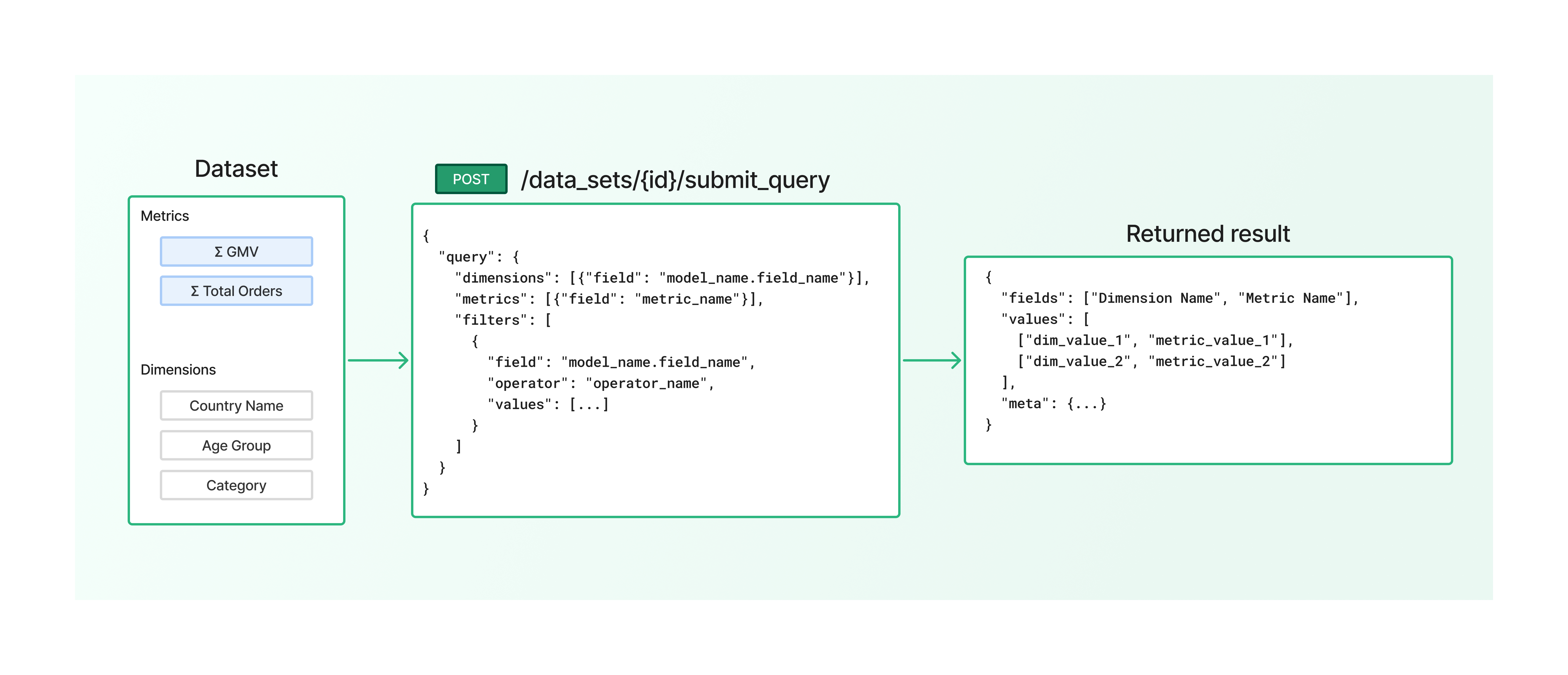
{
  "fields": ["Country Name", "GMV (Gross Merchandise Value)"],
  "values": [
    ["United States", "1341997"],
    ["India", "1181929"],
    ["Australia", "1241734"]
  ],
  "meta": {"page": 1, "page_size": -1, "num_rows": 10}
}
generate_sql response
Returns the generated SQL from the API call. Use this to audit query logic, debug joins, or run the SQL directly in your data warehouse.
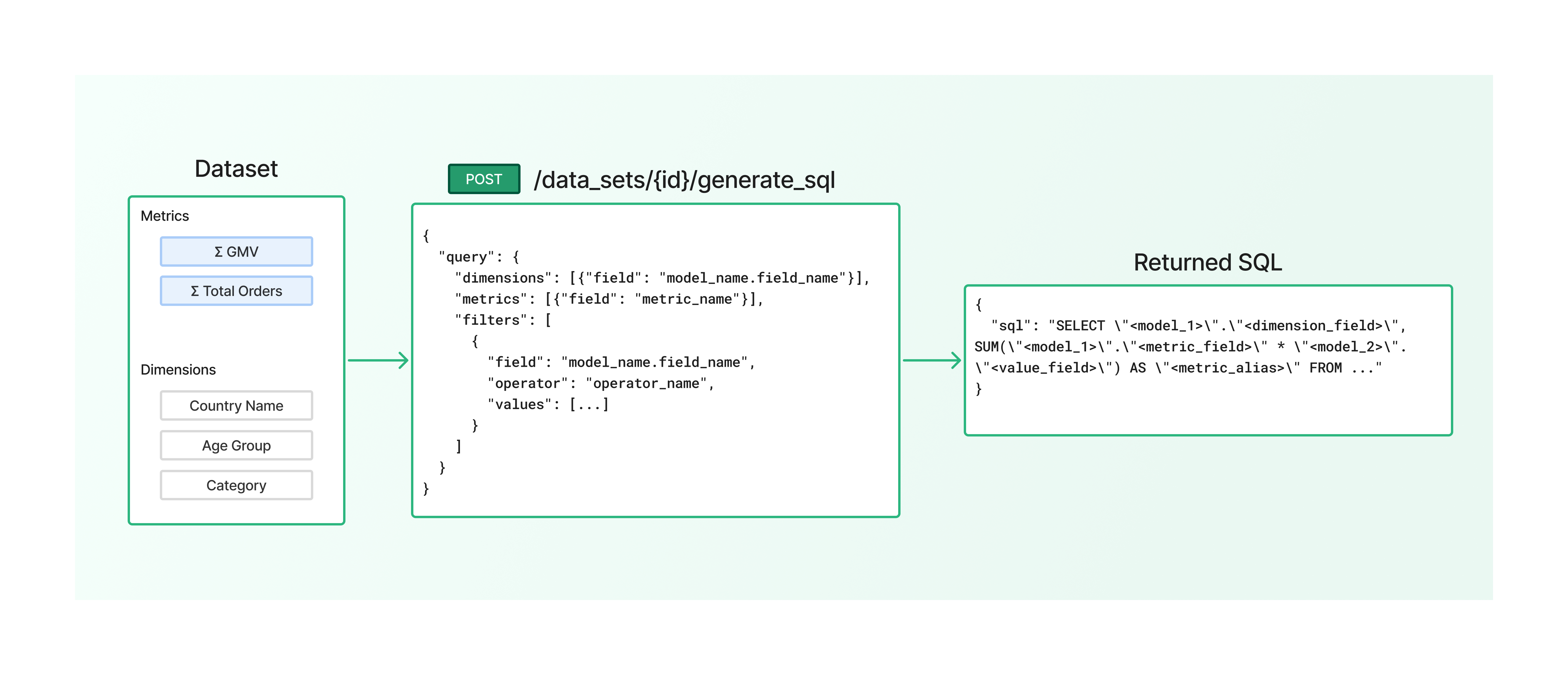
{
  "sql": "SELECT \"ecommerce_countries\".\"name\", SUM(\"order_items\".\"quantity\" * \"order_items\".\"price\") AS \"gmv\" FROM ..."
}
API reference
Endpoints
| Endpoint | Method | Description |
|---|---|---|
/data_sets | GET | List available datasets |
/data_sets/{id} | GET | Get available dimensions and metrics |
/data_sets/{id}/submit_query | POST | Query data and return results |
/data_sets/{id}/generate_sql | POST | Get generated SQL without executing |
Query object
| Field | Type | Description |
|---|---|---|
dimensions | array | Fields to group by: [{"field": "model.field_name"}] |
metrics | array | Measures to calculate: [{"field": "metric_name"}] |
filters | array | Conditions to filter data |
limit | number | Maximum rows to return |
Query examples
Basic query
Query GMV by country:
{
  "query": {
    "dimensions": [{"field": "countries.name"}],
    "metrics": [{"field": "gmv"}]
  }
}
Multiple dimensions
Break down by country and product category:
{
  "query": {
    "dimensions": [
      {"field": "countries.name"},
      {"field": "products.category"}
    ],
    "metrics": [
      {"field": "gmv"},
      {"field": "order_count"}
    ]
  }
}
Filter by value
Only include orders from specific countries:
{
  "query": {
    "dimensions": [{"field": "countries.name"}],
    "metrics": [{"field": "gmv"}],
    "filters": [
      {
        "field": "countries.name",
        "operator": "is",
        "value": ["United States", "United Kingdom"]
      }
    ]
  }
}
Filter by date range
Query data for a specific time period:
{
  "query": {
    "dimensions": [{"field": "orders.created_date"}],
    "metrics": [{"field": "gmv"}],
    "filters": [
      {
        "field": "orders.created_date",
        "operator": "between",
        "value": ["2025-01-01", "2025-12-31"]
      }
    ]
  }
}
Limit results
Get top 10 results:
{
  "query": {
    "dimensions": [{"field": "products.name"}],
    "metrics": [{"field": "gmv"}],
    "limit": 10
  }
}
Filter operators
| Operator | Description | Example value |
|---|---|---|
is | Equals any of the values | ["USA", "UK"] |
is_not | Not equal to any of the values | ["Unknown"] |
is_null | Value is null | [] |
not_null | Value is not null | [] |
greater_than | Greater than | [100] |
less_than | Less than | [1000] |
between | Between two values (inclusive) | ["2025-01-01", "2025-12-31"] |
contains | Contains substring | ["phone"] |
does_not_contain | Does not contain substring | ["test"] |
starts_with | Starts with substring | ["John"] |
ends_with | Ends with substring | [".com"] |
is_true | Boolean is true | [] |
is_false | Boolean is false | [] |
last | Within last N periods | [7, "day"] |
next | Within next N periods | [30, "day"] |
before | Before a date | ["2025-01-01"] |
after | After a date | ["2025-01-01"] |
matches | Matches regex pattern | ["^test.*"] |
matches_user_attribute | Matches current user's attribute | ["department"] |
Regional endpoints
| Region | Base URL |
|---|---|
| APAC | https://secure.holistics.io/api/v2 |
| US | https://us.holistics.io/api/v2 |
| EU | https://eu.holistics.io/api/v2 |
Check the URL when you log into Holistics (secure.holistics.io is APAC, us.holistics.io is US, eu.holistics.io is EU).
Authentication
Include your API key in the X-Holistics-Key header with every request. See the Quick start examples above for curl and Python implementations.
Next steps
- Full API reference: Explore all endpoints in the API documentation