Embed portal parameters reference
This reference covers all parameters for your embed portal. Use them to control access, permissions, and UI behavior.
How parameters work:
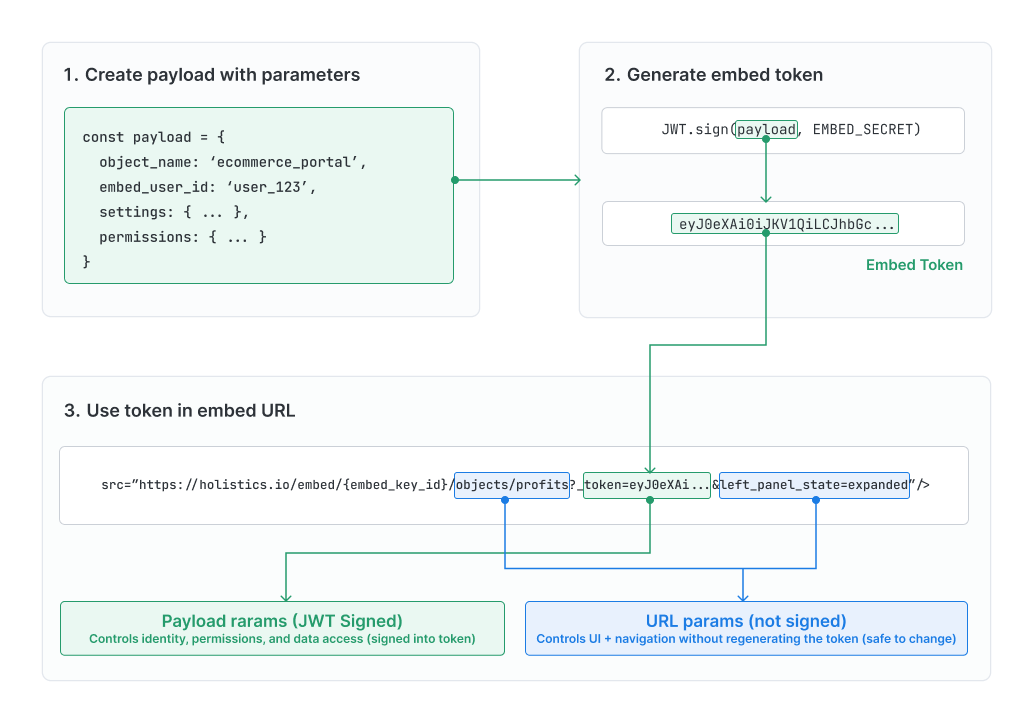
Embed Portal supports two types of parameters:
| Payload parameters | URL parameters | |
|---|---|---|
| Location | Signed JWT token | Appended to embed URL |
| Purpose | Security, permissions, data access (e.g., enable/disable raw data export, set row-level data permissions) | UI, navigation, display preferences (e.g., expand/collapse navigation panel, deep-link to specific dashboard) |
| User modifiable | No | Yes |
Payload parameters (JWT-signed)
Payload parameters let you create personalized, secure analytics experiences for each user. These parameters are included in your JWT token and control security-sensitive aspects like identity, permissions, and data access.
Since these are cryptographically signed, users can't modify them (making them perfect for security-critical settings like data access and permissions).
Basic configuration
Every embed session needs these parameters to identify which portal to load and ensure tokens expire for security.
| Parameter | Type | Description | Required |
|---|---|---|---|
object_name | string | Name of your EmbedPortal as defined in .embed.aml | Yes |
object_type | string | Must be 'EmbedPortal' | Yes |
exp | number | Token expiration time as Unix timestamp (e.g., 1769502969). Token becomes invalid after this time. | Recommended |
Example:
const payload = {
  object_name: "customer_analytics",
  object_type: "EmbedPortal",
  exp: Math.floor(Date.now() / 1000) + 3600, // Expires in 1 hour
};
User identity
These parameters identify who's viewing the portal and enable personalized features like saving dashboards, email subscriptions, and organization workspaces.
| Parameter | Type | Description | Required |
|---|---|---|---|
embed_user_id | string | Unique identifier for the user in your system. See Identity & Workspace Settings. | For SSBI features |
embed_org_id | string | Unique identifier for the user's organization. See Identity & Workspace Settings. | For org workspaces |
embed_user_email | string | User's email address for email subscriptions | Required for email subscriptions |
Example:
const payload = {
// ... basic configuration
embed_user_id: "user_123",
embed_org_id: "org_456",
};
Data access
Control which data each user can see by passing attributes that filter queries at the row level. This ensures users only access data they're authorized to view.
| Parameter | Type | Description | Required |
|---|---|---|---|
user_attributes | object | Key-value pairs to control data access via row-level permissions. Values must be arrays (e.g., region: ['US']). Also serves as Ask AI context for Embeddable Ask AI. | If using row-level permissions or Ask AI |
Example:
const payload = {
  // ... basic configuration and user identity
  user_attributes: {
    region: ["US", "EU"],
    company_id: [123],
    department: ["Sales", "Marketing"],
  },
};
Settings
Configure feature availability and default behaviors for the embedded portal. These settings control what users can do with the data and how it's displayed.
| Parameter | Type | Description | Default |
|---|---|---|---|
settings.ai.enabled | boolean | Enable Ask AI feature | false |
settings.allow_dashboard_export | boolean | Allow users to export dashboards | false |
settings.allow_raw_data_export | boolean | Allow raw data export (CSV, Excel) | false |
settings.allow_data_subscribe | boolean | Enable email subscriptions | false |
settings.default_timezone | string | Timezone for data display (e.g., "UTC", "America/New_York") | Workspace default |
settings.allow_dashboard_timezone_change | boolean | Allow users to change the current dashboard's timezone | true |
settings.dashboard_autorun_on_changes | boolean | Re-run the dashboard automatically whenever filters or controls change, without clicking the Apply button. Overrides the dashboard's internal auto-run on changes setting. | false |
Example:
const payload = {
  // ... basic configuration and user identity
  settings: {
    default_timezone: "America/New_York",
    ai: { enabled: true },
    allow_dashboard_export: true,
    allow_raw_data_export: false,
    allow_data_subscribe: true,
    allow_dashboard_timezone_change: true,
    dashboard_autorun_on_changes: true,
  },
};
Permissions
Define what users can create and modify within workspaces. These permissions determine whether users can save their own dashboards or collaborate with their team.
| Parameter | Type | Description | Default |
|---|---|---|---|
permissions.enable_personal_workspace | boolean | Allow user to save dashboards to personal workspace | false |
permissions.org_workspace_role | string | User's role in organization workspace: 'no_access', 'viewer', 'editor' | 'no_access' |
Example:
const payload = {
  // ... basic configuration and user identity
  permissions: {
    enable_personal_workspace: true,
    org_workspace_role: "editor", // Options: 'no_access', 'viewer', 'editor'
  },
};
Full payload example
Here's a complete example combining all parameter types together:
const embed_payload = {
// Required: Portal identification
object_name: "customer_analytics",
object_type: "EmbedPortal",
// User identity
embed_user_id: "user_123",
embed_org_id: "org_456",
// Row-level permissions
user_attributes: {
region: ["US", "EU"],
company_id: [123],
},
// Settings
settings: {
default_timezone: "America/New_York",
ai: { enabled: true },
allow_dashboard_export: true,
allow_raw_data_export: false,
allow_data_subscribe: true,
dashboard_autorun_on_changes: true,
},
// Workspace permissions
permissions: {
enable_personal_workspace: true,
org_workspace_role: "editor",
},
// Token expiration (Unix timestamp)
exp: Math.floor(Date.now() / 1000) + 3600, // Expires in 1 hour
};
// Generate JWT token
const embed_secret = "YOUR_EMBED_SECRET"; // Replace with your actual secret from Holistics
const token = jwt.sign(embed_payload, embed_secret, { algorithm: "HS256" });
Production checklist
The payload structure is standard, but some values must match how your embed portal and customer identity model are set up. Check these before signing the token and constructing the embed URL:
object_namemust match the EmbedPortal name in your.embed.amlfile.user_attributeskeys must match the attributes used by your row-level permission rules. You can manage user attributes programmatically with the User Attributes API and User Attribute Entries API.embed_user_idandembed_org_idshould use stable identifiers from your own application, based on your individual user or organization workspace model.- The embed URL must use the correct regional or custom domain and the right
embed_key_idfor your Holistics setup. - Feature flags such as AI, subscriptions, exports, and workspace permissions should match your product and security policy.
URL parameters (not signed)
URL parameters give you flexibility to customize the user interface without regenerating JWT tokens. Use them to control UI elements like navigation panel state, deep-link to specific dashboards, or adjust display preferences.
Since they don't affect security or data access, users can safely modify these parameters by changing the URL (perfect for features like bookmarking specific views or sharing links to particular dashboards).
URL structure
Understanding the URL structure helps you control where users land and how the portal behaves when it opens.
Your embed URL must use the same domain as your Holistics data center. Holistics has three regional app domains: APAC uses secure.holistics.io, US uses us.holistics.io, and EU uses eu.holistics.io. If you're not sure which one your account uses, see Data Centers.
App domain
https://secure.holistics.io/embed/{embed_key_id}/{initial_object}?_token={token}&{query_params}
                                  └──────┬─────┘ └──────┬───────┘        └──┬──┘ └─────┬─────┘
                                     Embed Key     Path (optional)        Token    Query params
https://us.holistics.io/embed/{embed_key_id}/{initial_object}?_token={token}&{query_params}
                              └──────┬─────┘ └──────┬───────┘        └──┬──┘ └─────┬─────┘
                                 Embed Key     Path (optional)        Token    Query params
https://eu.holistics.io/embed/{embed_key_id}/{initial_object}?_token={token}&{query_params}
                              └──────┬─────┘ └──────┬───────┘        └──┬──┘ └─────┬─────┘
                                 Embed Key     Path (optional)        Token    Query params
| Component | Description |
|---|---|
{initial_object} | Optional path to control which page opens first |
{query_params} | Optional query parameters for UI customization (see Query parameters) |
Initial object (URL path)
Deep-link users directly to the content they need (whether it's a specific dashboard, dataset, or the Ask AI page). This lets you create targeted links from emails, notifications, or your application's navigation.
Supported paths:
/objects/<object_name>– Open specific dashboard or dataset/ai– Open Ask AI page (requiressettings.ai.enabled: true)- (empty) – Use default (see resolution order below)
Examples:
- Dashboard:
https://{region_domain}.holistics.io/embed/abc123/objects/sales_dashboard?_token=... - Ask AI:
https://{region_domain}.holistics.io/embed/abc123/ai?_token=...
Replace {region_domain} with secure, us, or eu. If you use a custom domain, replace the full {region_domain}.holistics.io host with your custom domain.
Resolution order:
- URL path (if specified and accessible)
initial_objectin embed definition- First object in
objectslist
Query parameters
Fine-tune the portal's UI behavior with query parameters appended to your embed URL.
| Parameter | Values | Default | Description |
|---|---|---|---|
left_panel_state | expanded, collapsed | collapsed | Controls the left navigation panel's expand/collapse state |
{filter_block_uname} | Any valid filter value | — | Pre-fill a filter's initial value on the dashboard the URL opens to, using is/equal to/matches-style conditions. Best for setting the dashboard's initial filter state on load. See Passing Filter Parameters via URL for full syntax and Supported Operators. |
URL examples
Here are common scenarios showing how to combine URL paths and query parameters:
| Use case | URL |
|---|---|
| Basic embed | https://{region_domain}.holistics.io/embed/abc123?_token=... |
| Open specific dashboard | https://{region_domain}.holistics.io/embed/abc123/objects/sales_dashboard?_token=... |
| Open Ask AI page | https://{region_domain}.holistics.io/embed/abc123/ai?_token=... |
| Expanded navigation panel | https://{region_domain}.holistics.io/embed/abc123?_token=...&left_panel_state=expanded |
| Open dashboard pre-filtered | https://{region_domain}.holistics.io/embed/abc123/objects/sales_dashboard?_token=...®ion=US |
Related documentation
- Embed Portal - Overview and getting started guide
- Row-level Permission - Configure data access
- Identity & Workspace Settings - User and organization setup
- Ask AI - Enable AI features
- Email Subscriptions - Schedule email reports