Nested Aggregation: Looker vs Holistics
Introduction
Every Looker developer has hit this wall: you need a median of a sum, and suddenly you're creating yet another derived table. Your model grows by another view. Your field picker gets more cluttered. And your end users? They're back to filing tickets instead of exploring data themselves.
This post explains why nested aggregations are painful in Looker, examines the workarounds, and shows how Holistics handles them differently.
Looker handles nested aggregation by creating derived tables, which limits self-service capabilities and causes model bloat. Holistics allows you to define metrics with nested aggregation logic directly, and handles the nested SQL automatically.
| Feature | Looker (LookML) | Holistics (AQL) |
|---|---|---|
| Logic Placement | Spread across Views and Derived Tables | Encapsulated entirely within the Metric definition |
| Grain Control | Fixed at the View level (Hardcoded dimensions) | Dynamic: metric defines its own inner grain |
| Self-Service | Limited: new dimensions require new derived tables | High: dimensions can be changed freely in the UI |
| Code Bloat | High (Dozens of "Fact" views for different grains) | Low (One metric handles multiple dimensional contexts) |
The Problem: Median of Sum (Aggregate of Aggregate)
Here's a common business question that's surprisingly hard to answer in Looker:
For each country, give me median revenue per buyer
| Country | Median Revenue Per Buyer |
|---|---|
| United States | $1000 |
| Canada | $600 |
| Mexico | $300 |
In a standard Looker view, your code might look like this:
view: orders {
  dimension: country { type: string; sql: ${TABLE}.country ;; }
  dimension: user_id { type: string; sql: ${TABLE}.user_id ;; }

  measure: revenue {
    type: sum
    sql: ${TABLE}.revenue ;;
  }
}
The problem? You cannot create a measure of type: median that points to a measure of type: sum. Looker won't let you nest aggregations this way.
The SQL Solution
Because SUM and MEDIAN operate on different "grains" of data, SQL requires two distinct steps:
- Step 1 (inner sum): Group by User and Country to get the
SUM(revenue). - Step 2 (outer median): Take the
MEDIANof those results, grouped only by Country.
Standard SQL expresses this through subqueries/CTE:
-- For each country, display median revenue per user
WITH cte AS (
  SELECT
    country,
    user_id,
    SUM(revenue) AS revenue
  FROM orders
  GROUP BY 1,2
)
SELECT
  country,
  percentile_cont(0.5) WITHIN GROUP (ORDER BY revenue) AS median_revenue_per_user
FROM cte
GROUP BY 1;
Looker's Solution: Derived Table
Looker can generate subqueries. But it doesn't do it automatically for measure-on-measure calculations.
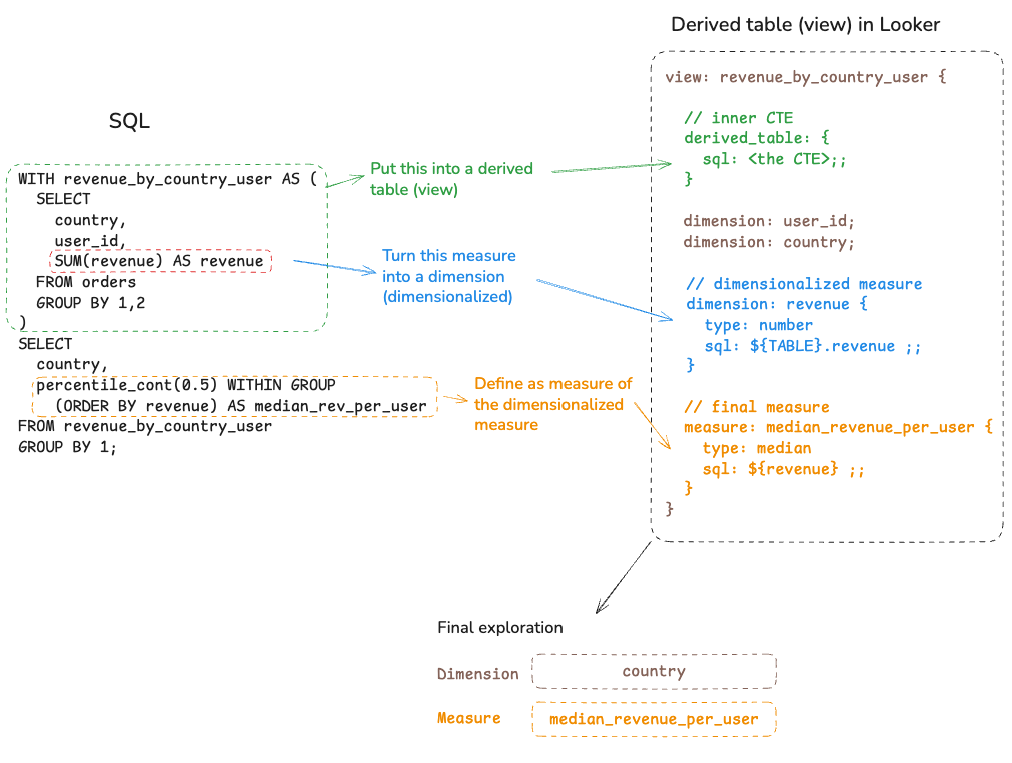
Looker's approach is to "dimensionalize" the inner measure. You first turn the sum into a dimension using a Native Derived Table (NDT) or Persistent Derived Table (PDT), then aggregate over that dimension. The pattern looks like this:
- Create a new view with a derived table containing the inner aggregation
- Turn the inner sum into a dimension
- Define a measure that calculates the median over that dimension
view: user_order_facts {
  derived_table: {
    sql:
      SELECT
        country,
        user_id,
        SUM(revenue) AS revenue
      FROM orders
      GROUP BY 1,2
    ;;
  }

  dimension: country { type: string }
  dimension: revenue {
    type: number
    sql: ${TABLE}.total_revenue ;;
  }

  measure: median_revenue_per_user {
    type: median
    sql: ${revenue} ;;
  }
}
The Tradeoff: Reduced Self-Service Flexibility
The downside of this approach is flexibility. Once the derived table is created, its dimensions are fixed:
- Hard-coded dimensions: The
countrydimension is baked into the derived table. If a user wants to slice the same median by "Marketing Source" or "Age Group," a developer must create a new derived table. - Model bloat: You end up with a "Fact View" for every nested grain. Dozens of nearly-identical views clutter the field picker.
- No dynamic filtering: Filters applied to the main explore don't automatically pass through to the derived table's inner SQL without complex
templated_filters.
Holistics' Approach: Encapsulate the Nested Logic in the Metric
If we look at the original SQL, notice that the "median revenue per user" logic is spread across the two nested queries (the inner CTE and the outer SELECT).
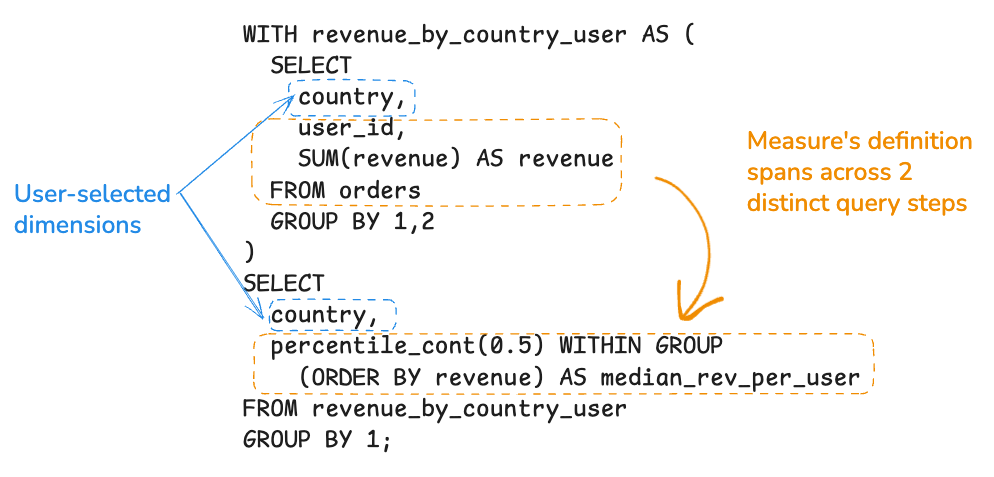
What if we could encapsulate the entire nested logic into the metric definition itself? What if there's a way to define the highlighted part of the SQL into a measure definition?
WITH cte AS (
  SELECT
    country,
    user_id,
    SUM(revenue) AS revenue
  FROM orders
  GROUP BY 1,2
)
SELECT
  country,
  percentile_cont(0.5) WITHIN GROUP (ORDER BY revenue) AS median_revenue_per_user
FROM cte
GROUP BY 1;
That's what AQL (Analytics Query Language) enables in Holistics. Instead of spreading logic across multiple Looker views (Holistics models), you define the metric once, including its inner grain:
Model orders {
  dimension user_id { .. }
  dimension country { .. }
  dimension created_at { .. }
  dimension revenue { ... }

  measure median_rev_per_user {
    label: 'Median Revenue per User'
    definition: @aql orders
      | group(orders.user_id) // Step 1: Inner grain
      | select(sum(orders.revenue)) // Step 2: Inner aggregation
      | median() ;; // Step 3: Outer aggregation
  }
}
How it works: AQL uses a pipe (|) syntax where each step transforms the data. The engine parses this logic tree, recognizes you're asking for an aggregate-of-aggregate, and automatically generates the necessary CTEs or subqueries.
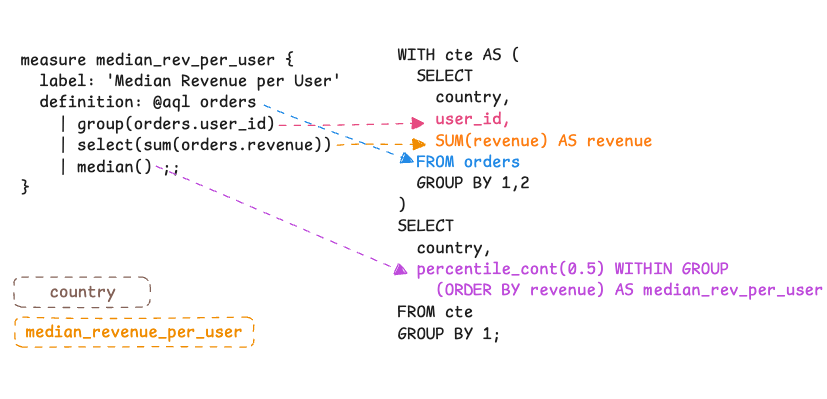
The AQL metric also "knows" its own inner grain. When a user picks any dimension (country, marketing source, age group), the engine injects that dimension throughout the nested subqueries automatically.
See it in action: The video below shows the "Median Revenue per User" metric working with any dimension, no additional configuration required.
Conclusion
We presented the challenges that Looker developers faced when working with nested aggregation in Looker, and also how Holistics solved this with AQL.
This issue highlights a generational shift in semantic modeling. Looker/LookML was built to be a direct abstraction of a single SQL query. It's powerful, but it's literal.
Modern engines like Holistics (AQL) treat metrics as semantic objects rather than just SQL snippets. By allowing metrics to define their own internal grain and reference one another, AQL overcomes the nested aggregation limit that Looker developers have faced for years.
For the end user, this means true self-service: the ability to slice complex, nested metrics by any dimension at any time.
Related Resources
- AQL Overview - Learn more about Analytics Query Language
- Nested Aggregation in AQL - Detailed guide on nested aggregations
- Metrics by Example - See more metric definition patterns