Database passthrough authentication
Database passthrough authentication is currently in open beta. Please contact us to get access to the beta program.
Introduction
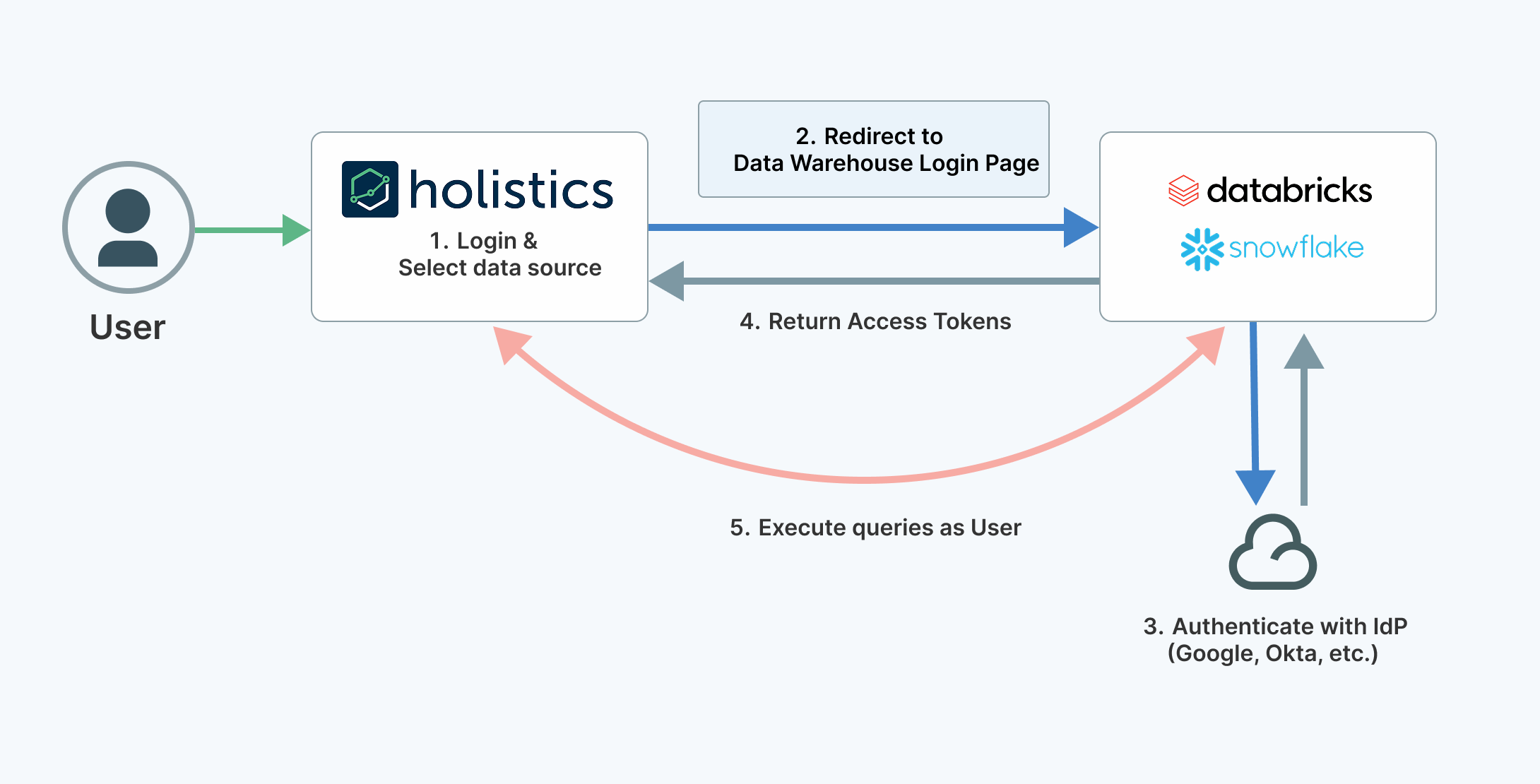
Database passthrough authentication enables organizations to enforce data security policies directly at the data warehouse level, rather than managing them within individual applications.
- Centralized security management: Apply consistent data security policies across all your applications and tools
- Granular access control: Leverage your existing role-based access controls (RBAC) directly from your data warehouse
- Reduced maintenance: Eliminate duplicate security configurations across multiple data tools
How it works
When users access data through Holistics, they authenticate using their individual data warehouse credentials. Each query is then executed under that user's identity at the warehouse, so permissions are enforced at the source.
Supported databases
Setup steps depend on which data warehouse you use. Follow the guide for your warehouse:
Impacted features
Once configured, passthrough authentication will be used for:
- Viewing dashboards
- Exploring dashboard data
- Exploring datasets and data models
- Running SQL queries in the query editor
- Viewing filter suggestion values
- Scheduled deliveries (Email, Slack, Google Sheets)
- Data alerts and webhooks
- Direct data exports (Excel, CSV)
The following features are not compatible with passthrough authentication:
Frequently asked questions
How does passthrough authentication affect data caching?
- Each user maintains their own private cache, ensuring data security and isolation.
Can I use both shared credentials and personal authentication simultaneously?
- No. When passthrough authentication is enabled, Holistics exclusively uses personal credentials to ensure consistent and secure data access.
How are user credentials secured within Holistics?
- All credentials are encrypted using AES-256 encryption and stored securely in the Holistics database.
What happens if a user's database access is revoked?
- The user will immediately lose the ability to execute new queries. However, they may still view previously cached data until the cache expires.