Query Holistics Dataset from External Tools
You’ve already done the hard part: defining trusted business metrics in Holistics (revenue logic, customer segments, sales velocity). Your team relies on them in dashboards and reports every day.
Now you can use those same metric definitions outside Holistics.
Holistics lets you query datasets programmatically, so you can pull governed metrics into notebooks, internal applications, and automated workflows, without rebuilding logic in every tool.
What You Can Build
With programmatic access to your Holistics datasets, you can:
- Enrich analysis: Pull metrics into notebook tools (like Jupyter) and combine them with external data sources
- Power applications: Serve trusted numbers to internal tools, customer portals, or operational systems
- Automate workflows: Trigger actions from metric thresholds (alerts, reorders, notifications)
- Extend reporting: Create custom visualizations or embed data where Holistics dashboards don’t reach
Your metric definitions stay centralized and governed in Holistics. External tools simply consume the results.
How It Works
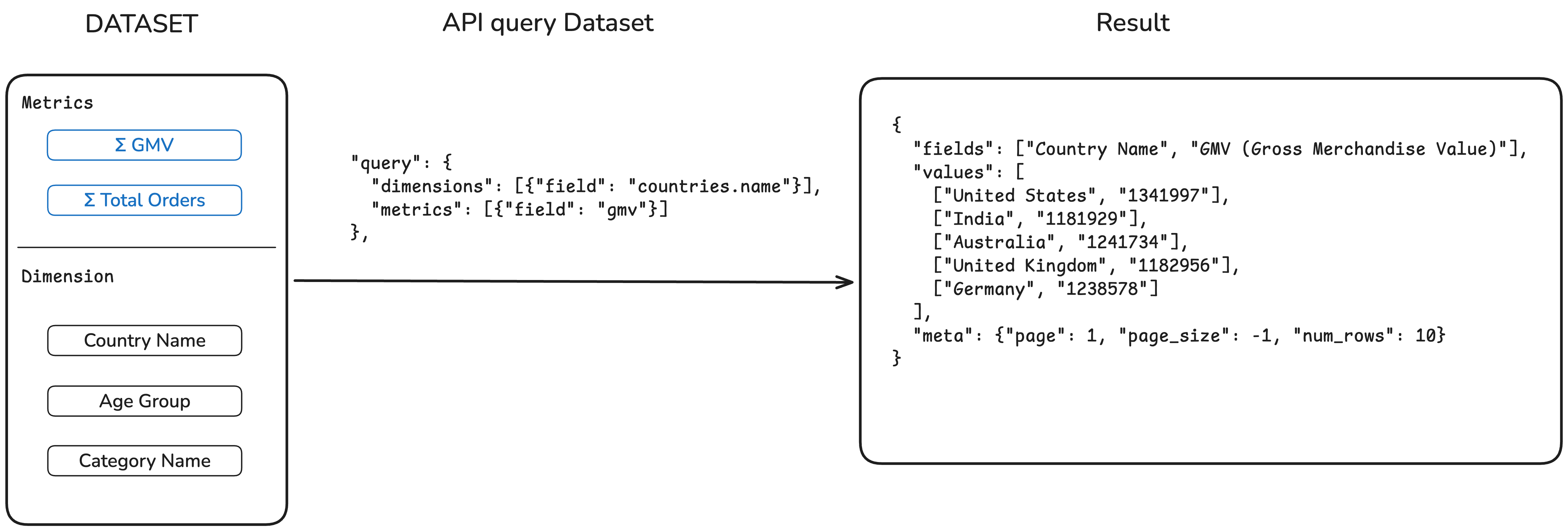
You query a Holistics dataset by specifying which dimensions and metrics you want. The API returns the aggregated results as JSON.
Quick Start
1. Get Your API Key
Go to User Settings in Holistics and generate an API key. You'll include this key in every API request using the X-Holistics-Key header.
2. Find Your Dataset ID
Option A: From the URL
Navigate to your dataset in Holistics. The ID is in the URL:
https://secure.holistics.io/data_sets/12345/explore
                                      ^^^^^
                                    Dataset ID
Option B: Via API
List all datasets you have access to:
GET /api/v2/data_sets
3. Build Your Query
To query a dataset, send a POST request to:
POST /api/v2/data_sets/{id}/submit_query
The request body specifies what data you want:
{
  "query": {
    "dimensions": [{"field": "model_name.field_name"}],
    "metrics": [{"field": "metric_name"}]
  }
}
- dimensions: Fields to group by (e.g.,
countries.name,products.category) - metrics: Aggregated measures defined in your dataset (e.g.,
gmv,order_count)
Example: curl
curl -X POST \
  -H "X-Holistics-Key: YOUR_API_KEY" \
  -H "Content-Type: application/json" \
  -d '{
    "query": {
      "dimensions": [{"field": "ecommerce_countries.name"}],
      "metrics": [{"field": "gmv"}]
    }
  }' \
  https://secure.holistics.io/api/v2/data_sets/12345/submit_query
Example: Python
import requests

response = requests.post(
    "https://secure.holistics.io/api/v2/data_sets/12345/submit_query",
    headers={
        "X-Holistics-Key": "YOUR_API_KEY",
        "Content-Type": "application/json"
    },
    json={
        "query": {
            "dimensions": [{"field": "ecommerce_countries.name"}],
            "metrics": [{"field": "gmv"}]
        }
    }
)
response.raise_for_status()  # Raises an HTTPError for bad responses (4xx or 5xx)

data = response.json()
4. Get Results
The API returns JSON with field names and row values:
{
  "fields": ["Country Name", "GMV (Gross Merchandise Value)"],
  "values": [
    ["United States", "1341997"],
    ["India", "1181929"],
    ["Australia", "1241734"],
    ["United Kingdom", "1182956"],
    ["Germany", "1238578"]
  ],
  "meta": {"page": 1, "page_size": -1, "num_rows": 10}
}
API Reference
Endpoints
| Endpoint | Method | Description |
|---|---|---|
/data_sets | GET | List available datasets |
/data_sets/{id} | GET | Get dataset structure (models, fields, metrics) |
/data_sets/{id}/submit_query | POST | Query the dataset |
Query Object
| Field | Type | Description |
|---|---|---|
dimensions | array | Fields to group by: [{"field": "model.field_name"}] |
metrics | array | Measures to calculate: [{"field": "metric_name"}] |
filters | array | Conditions to filter data |
limit | number | Maximum rows to return |
Regional Endpoints
| Region | Base URL |
|---|---|
| APAC | https://secure.holistics.io/api/v2 |
| US | https://us.holistics.io/api/v2 |
| EU | https://eu.holistics.io/api/v2 |
Check the URL when you log into Holistics (secure.holistics.io is APAC, us.holistics.io is US, eu.holistics.io is EU).
Authentication
Include your API key in the X-Holistics-Key header with every request. See the Quick Start examples above for curl and Python implementations.
Next Steps
- Full API reference: Explore all endpoints in the API documentation